
400 Bad Request Error: What It Means and How to Fix It

A 400 Bad Request error means the server received a request it cannot or will not process because something about the request itself looks wrong: a malformed address, a header or cookie that is too large or corrupted, or data in a format the server does not accept. The problem is on the client side of the conversation, which is why clearing cookies, fixing the URL or correcting the submitted data usually solves it.
This guide covers what the 400 status code means under the HTTP standard, the causes behind it, quick fixes for visitors, deeper fixes for site owners on common servers and platforms, and what a 400 does to your pages in Google and AI search. It is part of our HTTP status codes reference.
What the 400 status code means
RFC 9110, section 15.5.1 defines 400 Bad Request as a response showing that the server cannot or will not process the request due to something it perceives as a client error. The standard gives three examples: malformed request syntax, invalid request message framing and deceptive request routing.
In plain terms, the server is saying “I cannot make sense of what you sent.” It is not saying the page is missing (that is 404), that you lack permission (401 or 403) or that the server broke (500 or 503). Because 400 is the general code of the 4xx class, servers also use it when a more specific 4xx code would fit but they choose not to send one.
You may see it worded in different ways depending on the server and browser:
- 400 Bad Request
- HTTP Error 400. The request is badly formed.
- Bad Request: Your browser sent a request that this server could not understand.
- 400 Bad Request: Request Header Or Cookie Too Large
- HTTP Error 400. The size of the request headers is too long.
- The plain HTTP request was sent to HTTPS port
What causes a 400 Bad Request error
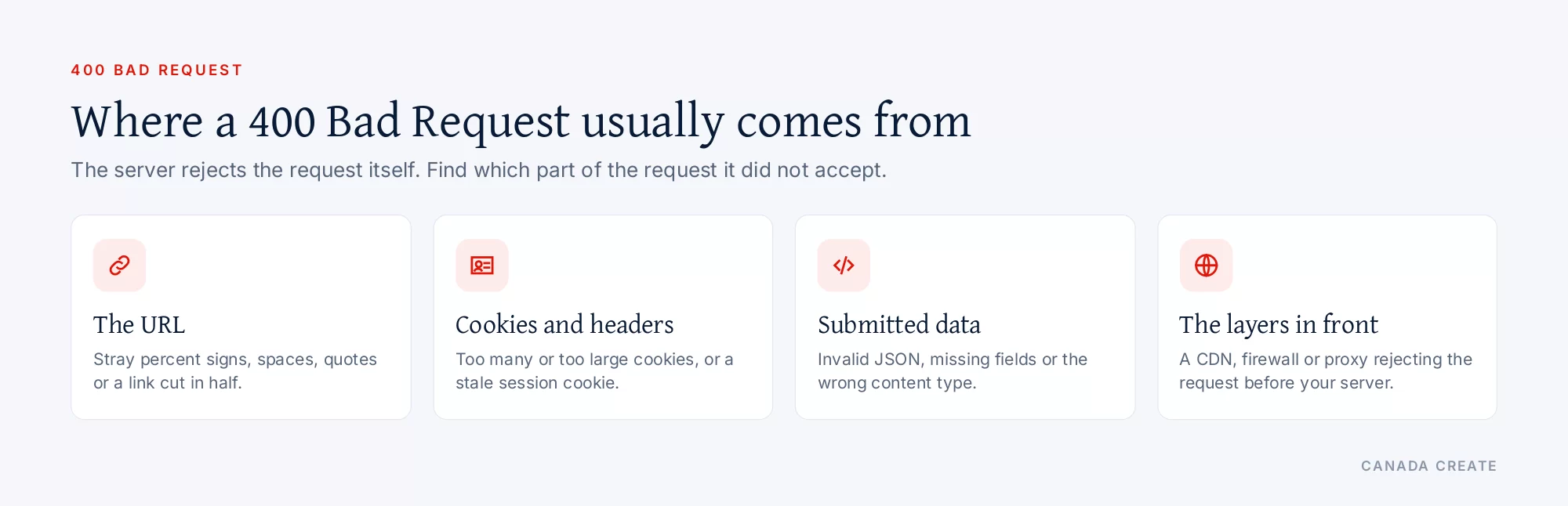
A malformed URL
URLs may only contain certain characters. A stray percent sign that is not followed by two hex digits, unencoded spaces or quotes, a backslash, or characters pasted from a word processor can make a server reject the request. A link copied with extra text attached, or a URL cut in half by an email client, does the same.
Cookies or headers that are too large
Every request carries the site’s cookies in its headers. When a site sets many cookies (analytics, consent, A/B tests, chat widgets, logins), the header can grow beyond the server’s limit. Nginx then shows “Request Header Or Cookie Too Large”, Apache reports that a header field exceeds the server limit, and Microsoft IIS shows “Request Too Long”. Large single sign-on tokens are a common cause on business systems.
Corrupted or stale cookies
A cookie left over from an old version of the site, a session that expired mid-request, or a cookie with an invalid value can make an application reject every request from that browser while the site works fine for everyone else.
Invalid data sent to a form or API
Many applications return 400 when submitted data fails basic checks: invalid JSON, a missing required field, the wrong content type, or a value in the wrong format. Some APIs use 422 Unprocessable Content when the syntax is correct but the values are invalid, and 400 for everything else.
Problems with the Host header or routing
A request that names the wrong host, arrives at a server that does not recognize the domain, or sends plain HTTP to a port that expects HTTPS can return 400. These often appear after DNS, certificate or CDN changes.
A proxy, CDN or firewall in the middle
Content delivery networks and web application firewalls can reject requests they consider malformed or suspicious before they reach your server. If the error page has the CDN’s branding, or response headers show the CDN answered, start there.
Upload limits
The correct code for a request body that is too large is 413 Content Too Large, but some applications and plugins return a 400 when an uploaded file exceeds their own limit.
Is a 400 error temporary?
It depends on the cause. A 400 caused by a corrupt cookie disappears as soon as the cookie is cleared. A 400 caused by a malformed link happens every time that link is used, until the link is fixed. A 400 from a server limit (headers too large) keeps happening for every visitor whose cookies cross the limit. The status code itself does not say whether the problem will repeat; the cause does.
How to fix a 400 error as a visitor
Try these in order. Most cases are solved by the first three.
- Check the address. Look for typos, stray symbols, spaces or a percent sign in the URL. Retype it, or go to the home page and navigate to the page.
- Clear the cookies for that one site. In Chrome, click the icon left of the address bar, open the site settings and delete its data; Edge, Firefox and Safari have similar options. Clearing one site’s cookies keeps you signed in everywhere else.
- Open the page in a private window. If it loads there, the problem is a cookie, cached file or extension in your normal profile.
- Disable browser extensions one at a time, especially ones that change headers, block content or rewrite links.
- Clear the browser cache if a stale redirect or file is involved.
- Reduce the file size if the error appeared while uploading.
- Flush your DNS cache only if the error started right after the site moved to a new server; it is a rare cause.
- Contact the site owner if nothing helps, and include the exact URL and the time it happened.
How to fix a 400 error on your own website
Start with the logs
Your web server’s access log records every 400 with the requested URL, the time and the user agent; the error log often records why. A CDN or firewall dashboard shows requests it rejected before they reached the server. Look for a pattern: one URL, one browser, one country, one integration.
Reproduce it
Request the URL with curl and compare it with a normal page:
$ curl -i "https://example.com/sale-50%off/"
HTTP/1.1 400 Bad Request
In this example the bare percent sign in “50%off” is the problem, because a percent sign in a URL path must be followed by two hex digits; the encoded form 50%25off is valid. If the error only happens in a browser, copy the request as cURL from the Network tab in developer tools, which includes its cookies and headers, and remove headers one by one until it succeeds.
Fix malformed links at the source
If a crawler or your logs show 400s on internal URLs, find the page that links to them and correct the link: encode spaces and special characters, remove broken tracking parameters, and fix template code that builds URLs from unescaped text. Search Console’s Page indexing report lists these under “Blocked due to other 4xx issue”.
Trim cookies and raise header limits with care
The lasting fix for oversized headers is to set fewer and smaller cookies: remove scripts you no longer use, shorten cookie lifetimes, and keep consent and analytics cookies to what you need. If the headers are legitimately large (for example, single sign-on), raise the server limit:
- Nginx: increase
large_client_header_buffers(for examplelarge_client_header_buffers 4 16k;) in the http or server block, then reload. - Apache: adjust
LimitRequestFieldSizeandLimitRequestLinein the server configuration. - IIS: Microsoft documents registry settings (
MaxFieldLengthandMaxRequestBytes) for the “Request Too Long” error. - Managed hosting and CDNs: limits may be fixed by the provider; ask support before assuming it can be changed.
Validate forms and APIs clearly
If your application returns 400 for invalid input, include a clear message in the response saying which field failed and why. For API clients, a structured error body (many APIs use the “problem details” JSON format from RFC 9457) saves hours of guessing. Test forms with the content types your front end actually sends.
Check the layers in front of the server
Review recent CDN, firewall or load balancer changes. A new rule that inspects headers or query strings, a certificate change or a port mismatch can start returning 400 to visitors or crawlers without any change on the site itself.
Platform notes
- WordPress: 400s often come from plugins that set very large cookies, security plugins rejecting certain query strings, or admin-ajax requests with invalid data. Deactivate recently added plugins on a staging copy to find the culprit, and clear any page cache after fixing.
- Shopify: store owners cannot change server limits; 400s usually trace to an app’s script or a malformed link in a theme or menu. Test with apps’ scripts turned off in a duplicate theme.
- Apache and LiteSpeed: check the error log for “request header field exceeds server limit” or invalid URI messages, and look for rewrite rules that build bad URLs.
- Nginx: check for “client sent invalid request” or “request header too large” entries, and confirm HTTPS server blocks listen with
sslso plain HTTP is redirected instead of rejected.
400 errors in forms, APIs and integrations
On business websites, many 400s never reach a browser window. They happen between systems: a contact form posting to a CRM, a payment page talking to a processor, a booking widget calling its server, or a webhook sending order data to an accounting tool. Because nobody sees an error page, these 400s often show up only as missing leads or orders.
- Form submissions that fail quietly: a form plugin may show a success message while its connection to the CRM returns 400 because a field was renamed or a required value is missing. Check the integration’s log after any change to form fields.
- Webhooks: when an app changes its expected format, every webhook it receives can start returning 400. Most platforms keep a delivery log with the response code for each attempt.
- Expired or malformed tokens: some APIs return 400 instead of 401 when an access token is badly formatted. If an integration stops working after a password or key change, check the token first.
- Character encoding: names with accents, apostrophes or non-Latin characters can break requests that are not encoded properly. That matters in Canada, where French names and addresses are common.
- Size limits: attachments in forms, long messages and large product feeds can exceed an API’s limit and return 400 or 413.
A simple safeguard is a weekly test submission through every form and integration that brings in business, with someone checking that it arrived where it should.
How a 400 affects SEO and AI search
Google’s documentation says all 4xx codes except 429 are treated the same way: the content is treated as not existing, a URL that was indexed is removed from the index, a newly found URL is not processed, and the URL is crawled less often over time. A 4xx does not slow crawling of the rest of the site.
That means one stray 400 on a malformed URL is harmless, but a 400 on a real page is as serious as deleting it. The cases that matter most:
- A page that returns 400 to Googlebot but not to people, often because a firewall or CDN rule dislikes the crawler’s headers. Use URL Inspection’s live test to see what Google receives.
- A template that builds broken URLs for filters, search or pagination, producing thousands of 400s that waste crawling.
- An integration feeding bad links into the sitemap, such as unencoded characters in product URLs.
AI search systems work from pages they can fetch. Google requires a page to be indexed and eligible for a snippet before it can appear as a link in AI Overviews or AI Mode, and other AI crawlers that receive 400 simply cannot read the page. If an important page returns 400 to any crawler, it is invisible to that system.
400 compared with similar codes
| Code | What it tells you | Typical fix |
|---|---|---|
| 400 Bad Request | The request itself is malformed or invalid. | Fix the URL, cookies, headers or submitted data. |
| 401 Unauthorized | Valid credentials are needed. | Sign in or send the right token. |
| 403 Forbidden | The server understood and refuses. | Check permissions, firewall and bot rules. |
| 404 Not Found | No page exists at that address. | Fix the link, restore or redirect the page. |
| 413 Content Too Large | The request body exceeds the limit. | Send a smaller file or raise the limit. |
| 422 Unprocessable Content | Syntax is fine, the values are not. | Correct the submitted values. |
| 500 Internal Server Error | The server failed on a valid request. | Fix the server or application error. |
Our SEO team plans, fixes and reports on the work in this guide every month for Canadian businesses.
How to prevent 400 errors
- Crawl the site monthly and fix any internal link that returns a 4xx.
- Audit the cookies your site sets once a quarter and remove the ones from tools you no longer use.
- Encode URLs in templates and feeds instead of inserting raw text.
- Return clear error messages for invalid form and API input.
- Test after every CDN, firewall, certificate or server change, from a normal browser and with a crawler user agent.
- Watch the Page indexing report in Search Console for new “other 4xx” entries.
Persistent 400s on a business site are usually a configuration problem, not a visitor problem. Our website maintenance and security team handles server and plugin issues like these, and technical SEO reviews in our Toronto SEO services check that crawlers get clean responses. For the other codes you are likely to meet, see the HTTP status codes hub, the 302 status code guide and the 404 error guide.
Frequently asked questions
What causes a 400 Bad Request error?
The server cannot understand or will not accept the request. Common causes are a malformed URL with stray characters, cookies or headers that are too large or corrupted, invalid data sent by a form or app, and a CDN or firewall rejecting the request.
How do I fix a 400 Bad Request?
Check the URL for typos and stray symbols, clear the cookies for that one site, try a private window, and disable extensions one at a time. If you own the site, read the server logs for the failing URL and fix the link, cookie size or validation behind it.
Is a 400 error temporary?
It depends on the cause. A corrupt cookie stops causing it as soon as it is cleared, but a malformed link or a header limit keeps returning 400 until it is fixed. The status code itself does not say whether it will repeat.
What does Request Header Or Cookie Too Large mean?
It is a 400 error from servers such as Nginx when the request headers, usually the cookies, exceed the size the server allows. Clearing the site's cookies fixes it for one visitor; the lasting fix is to set fewer cookies or raise the header buffer limit.
Is a 400 error my fault or the website's?
The code says the server sees a problem with the request, so a visitor's cookies, URL or extensions can be the cause. When many visitors see it on the same page, the site's links, cookies or settings are usually to blame.
What is the difference between a 400 and a 404 error?
A 400 means the server could not process the request because something in it is malformed. A 404 means the request was understood but there is no page at that address.
Does a 400 error affect SEO?
Google treats a 400 like other 4xx codes except 429: the URL is not indexed, an indexed URL is removed over time and it is crawled less often. A stray 400 on a broken URL is harmless, but a real page returning 400 drops out of search.
How can I trigger a 400 error to test my site?
Request a URL with an invalid percent sign, for example a path ending in 50%off, using curl -i. Many servers answer 400 because a percent sign must be followed by two hex digits. Test on a staging copy where possible.
Why do I get a 400 error on only one website?
The problem is usually that site's cookies or cached data in your browser. Clear the cookies for that site only, or open it in a private window. If it still fails, the site itself may have a configuration problem.
What is the difference between 400 and 422?
Both are client errors. A 400 is used when the request itself is malformed, while 422 Unprocessable Content means the request is well formed but the values in it are invalid, such as a date in the wrong format.
Can a firewall or CDN cause a 400 error?
Yes. CDNs and web application firewalls can reject requests they consider malformed or suspicious before they reach your server. If the error page carries the CDN's branding, review its recent rules first.