
HTTP Status Codes: Complete List, Meanings and SEO Impact

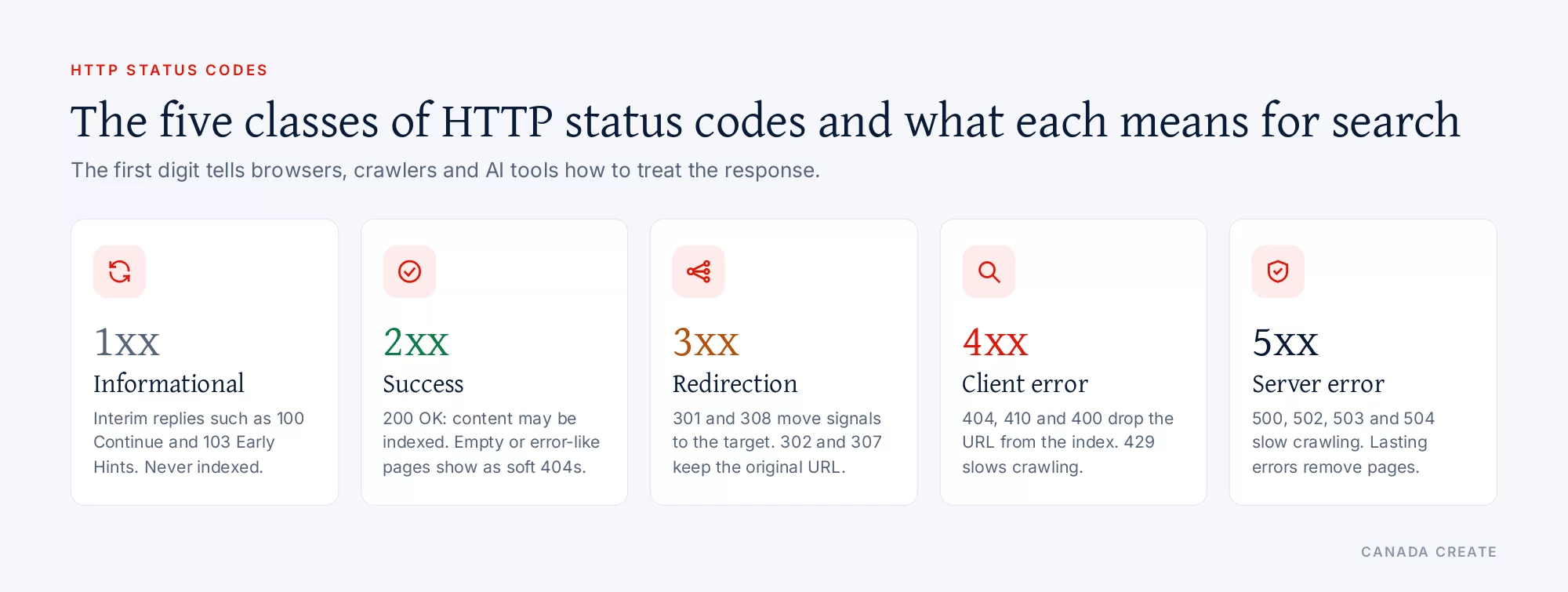
An HTTP status code is the three-digit number a web server sends back with every response to tell the browser, app or crawler what happened to its request. The first digit sets the class: 1xx informational, 2xx success, 3xx redirection, 4xx client error and 5xx server error. For a business website, these numbers decide whether visitors see your page, whether Google can index it and whether AI search tools can read and quote it.
This reference covers every class, the codes you will meet on real websites, what each one means under the HTTP standard (RFC 9110, section 15), and how Google’s crawlers treat each one. Where a code needs more than a paragraph, it links to a full guide: the 302 status code, the 400 Bad Request error, the 404 error and 503 Service Unavailable.
How a status code works
Every time a browser loads a page, it sends a request (for example, GET /services/ over HTTPS). The server answers with a status line, a set of headers and usually some content. The status line carries the code and a short reason phrase, such as HTTP/1.1 200 OK or HTTP/2 404. HTTP/2 and HTTP/3 drop the reason phrase and send only the number, which is why the same page can show “404 Not Found” in one tool and just “404” in another.
The code is what machines act on. The text on the page is what people read. The two should agree. A page that says “Sorry, this page does not exist” while the server sends 200 OK confuses search engines, and a page that shows a normal article while the server sends 500 tells every crawler the page is broken even though a person sees nothing wrong.
You can see the code for any URL in a few seconds:
- In a browser: open the developer tools (F12 in Chrome, Edge and Firefox, or Option + Command + I in Safari once the Develop menu is on), choose the Network tab, reload the page and read the Status column for the first document request.
- From a terminal: run
curl -I https://example.com/page/to see the status line and headers. Add-Lto follow redirects and see every hop. - In Google Search Console: the URL Inspection tool shows the status Google received, the Page indexing report groups URLs by error type, and the Crawl stats report (under Settings) breaks Googlebot’s requests down by response code.
$ curl -I https://example.com/old-page/
HTTP/2 301
location: https://example.com/new-page/
cache-control: max-age=3600
The five classes of status codes
RFC 9110 defines status codes as integers from 100 to 599. Only the first digit has meaning as a category; the last two digits identify the specific code. A client that does not recognize a code is told to treat it like the x00 code of its class, so an unknown 4xx is handled as a 400 and an unknown 5xx as a 500. That rule is why custom or unusual codes still behave predictably.
1xx informational
The server has received the request and the client should keep going. These are interim responses that arrive before the final one. You will rarely see them in a browser. 100 Continue lets a client check that the server will accept a large upload before sending it; 101 Switching Protocols is used when a connection upgrades, for example to WebSocket; 103 Early Hints (defined in RFC 8297) lets a server tell the browser which stylesheets and fonts to start loading while the page is still being generated.
For search: crawlers do not index interim responses. 103 Early Hints can make pages feel faster for visitors on servers and CDNs that support it, but it does not change how a page is indexed.
2xx success
The request was received, understood and accepted. 200 OK is the code every working page should return. 201 Created confirms a new resource was made (common in APIs and form submissions), 204 No Content means success with nothing to send back, and 206 Partial Content is used when a client asks for part of a file, such as a video streaming in pieces.
For search: Google’s documentation on status codes says content returned with a 2xx code may be considered for indexing, but a 200 does not mean the page will be indexed. If the content looks like an error page or is empty, Search Console reports it as a soft 404. A 204 gives Google nothing to process.
3xx redirection
The client must take another step to complete the request, usually by following the Location header to a different URL. 301 Moved Permanently and 308 Permanent Redirect say the move is permanent. 302 Found and 307 Temporary Redirect say the resource is somewhere else for now. 303 See Other is used after a form submission to send the browser to a results page, and 304 Not Modified tells a client that its cached copy is still current.
For search: Google follows up to 10 redirect hops for normal web crawling. It treats 301 and 308 as a strong signal that the target URL should be the one shown in results, and 302 and 307 as a weak signal, so the original URL usually stays in results. Content on the redirecting URL itself is ignored. A 304 tells Google the page has not changed since the last crawl. The full comparison of temporary and permanent redirects is in our guide to the 302 status code, and the choice between redirecting and removing a page is covered in 301 redirect vs 404.
4xx client error
The request has a problem the client is expected to fix: a mistyped or removed URL, missing credentials, a malformed request or too many requests in a short time. 400 Bad Request, 401 Unauthorized, 403 Forbidden, 404 Not Found, 410 Gone and 429 Too Many Requests are the ones website owners see most.
For search: Google does not index URLs that return a 4xx code, and an indexed URL that starts returning one is removed from the index over time. All 4xx codes except 429 are treated the same way: the content is treated as not existing and the URL is crawled less often. 429 is the exception; Google treats it as a sign the server is overloaded, like a 5xx. Google also warns not to use 401 or 403 to slow crawling, because those codes do not change crawl rate.
5xx server error
The server knows it failed to complete a valid request. 500 Internal Server Error is the general failure, 502 Bad Gateway and 504 Gateway Timeout point to a problem between a proxy or CDN and the server behind it, and 503 Service Unavailable signals a temporary overload or planned maintenance.
For search: 5xx codes (and 429) make Google’s crawlers slow down. Pages already in the index are kept for a while, but URLs that keep returning server errors are eventually dropped. Once the server returns 2xx again, Google gradually increases its crawl rate. Planned downtime should use 503 for no more than a day or two, as explained in our guide to 503 Service Unavailable.
HTTP status code reference table
The table lists the codes defined in RFC 9110 plus the widely used codes from related standards (102 and 207 from WebDAV, 103 from RFC 8297, 429 from RFC 6585 and 451 from RFC 7725). The search column summarises Google’s published handling; codes Google does not document are marked as such.
| Code and name | What it means | What it means for search |
|---|---|---|
| 100 Continue | The server accepted the request headers; the client can send the body. | Interim response, not indexed. |
| 101 Switching Protocols | The connection is switching protocols, for example to WebSocket. | No effect on pages. |
| 102 Processing | WebDAV: the server is still working on a long request. | Not documented by Google. |
| 103 Early Hints | Hints about resources to preload while the final response is prepared. | Speed benefit for visitors; no indexing effect. |
| 200 OK | The request succeeded and the content is in the response. | Content may be indexed; indexing is not automatic. |
| 201 Created | A new resource was created. | Google waits briefly, then processes what it received. |
| 202 Accepted | The request was accepted but not yet completed. | Same as 201. |
| 203 Non-Authoritative Information | A proxy changed the content returned by the origin server. | Treated as success. |
| 204 No Content | Success, with no content to send. | Google receives no content, so there is nothing to index. |
| 206 Partial Content | Only the requested range of a file is sent. | Used for media and downloads, not pages. |
| 207 Multi-Status | WebDAV: several results in one response. | Not documented by Google. |
| 300 Multiple Choices | More than one representation is available. | Rare; avoid for pages you want indexed. |
| 301 Moved Permanently | The resource has a new permanent URL. | Strong signal that the target should be shown in results. |
| 302 Found | The resource is temporarily at another URL. | Weak signal; the original URL usually stays in results. |
| 303 See Other | Go to another URL for the result, usually after a form post. | Followed like a temporary redirect. |
| 304 Not Modified | The cached copy is still current. | Google treats the content as unchanged since the last crawl. |
| 307 Temporary Redirect | Temporary move; the method must not change. | Equivalent to 302. |
| 308 Permanent Redirect | Permanent move; the method must not change. | Equivalent to 301. |
| 400 Bad Request | The server cannot process a malformed or invalid request. | Treated like other 4xx codes: not indexed. |
| 401 Unauthorized | Valid authentication is required. | Not indexed; never use it to slow crawling. |
| 402 Payment Required | Reserved for future use. | Treated like other 4xx codes. |
| 403 Forbidden | The server understood the request and refuses it. | Not indexed; a firewall blocking crawlers shows up here. |
| 404 Not Found | No current representation exists, or the server will not say. | Not indexed; indexed URLs drop out over time. |
| 405 Method Not Allowed | The method (for example POST) is not supported for this URL. | Treated like other 4xx codes. |
| 406 Not Acceptable | No representation matches the client’s Accept headers. | Treated like other 4xx codes. |
| 407 Proxy Authentication Required | The client must authenticate with a proxy. | Treated like other 4xx codes. |
| 408 Request Timeout | The server stopped waiting for the request. | Treated like other 4xx codes. |
| 409 Conflict | The request conflicts with the current state of the resource. | Mostly APIs. |
| 410 Gone | The resource was removed on purpose and will not return. | Not indexed; handled like 404 by Google. |
| 411 Length Required | A Content-Length header is required. | Treated like other 4xx codes. |
| 412 Precondition Failed | A condition in the request headers was false. | Mostly APIs and caching. |
| 413 Content Too Large | The request body is larger than the server allows. | Common with large uploads. |
| 414 URI Too Long | The URL is longer than the server will accept. | Watch for endless query strings. |
| 415 Unsupported Media Type | The request content is in a format the server does not accept. | Mostly APIs. |
| 416 Range Not Satisfiable | The requested byte range is not available. | Media and downloads. |
| 417 Expectation Failed | The server cannot meet the Expect header. | Rare. |
| 418 (Unused) | Reserved; began as an April Fools’ joke (“I’m a teapot”). | Not covered by Google. |
| 421 Misdirected Request | The request reached a server that cannot answer for that host. | Can appear with CDN or certificate setups. |
| 422 Unprocessable Content | The request is well formed but its content is invalid. | Mostly forms and APIs. |
| 426 Upgrade Required | The client must switch to another protocol. | Rare. |
| 429 Too Many Requests | The client sent too many requests in a given time. | Treated as a server error; Google slows its crawl. |
| 451 Unavailable For Legal Reasons | Access is blocked for legal reasons. | Treated like other 4xx codes. |
| 500 Internal Server Error | A general failure on the server. | Crawl rate drops; persistent errors are removed from the index. |
| 501 Not Implemented | The server does not support the requested function. | Handled as a server error. |
| 502 Bad Gateway | A proxy or gateway got an invalid response upstream. | Same as 500. |
| 503 Service Unavailable | Temporary overload or maintenance. | Same as 500; right choice for short planned downtime. |
| 504 Gateway Timeout | A proxy or gateway did not get a timely response upstream. | Handled as a server error. |
| 505 HTTP Version Not Supported | The server does not support the HTTP version used. | Rare. |
Our SEO team plans, fixes and reports on the work in this guide every month for Canadian businesses.
Some providers add their own codes outside the standard, for example 444 and 499 in Nginx logs or the 520 to 527 range at Cloudflare. These are not part of RFC 9110; a client treats them by class, so a 52x code is a server error for any crawler that sees it.
The codes that matter most for SEO
A typical business website only needs to get about a dozen codes right. These are the ones that change what appears in Google and what visitors experience.
200 for every page you want found
Every live page in your sitemap, menu and internal links should return 200 with its real content in the HTML. If a page needs JavaScript to show its main text, test it with URL Inspection to confirm Google sees the rendered content and not an empty shell.
301 or 308 for permanent moves
When a URL changes for good (a new slug, a merged page, HTTP to HTTPS, a new domain), redirect the old URL straight to the new one with a permanent redirect. Google’s redirects guide recommends server-side permanent redirects wherever possible. Point each old URL at the closest matching page, not the home page, and update internal links so visitors never need the redirect.
302 or 307 for genuinely temporary moves
Use a temporary redirect when the original URL will come back, such as a seasonal page, a short promotion or a page under repair. If the move turns out to be permanent, change it to a 301. See 302 status code for the details and common mistakes.
404 or 410 for pages that are gone
If a page is removed and nothing on the site replaces it, return 404 or 410. Both remove the URL from Google’s index; RFC 9110 prefers 410 when you know the removal is permanent. A useful custom 404 page with navigation and search keeps visitors on the site. Our 404 error guide covers how to find and fix them.
503 for short, planned downtime
Google’s guidance on pausing a website says to return 503 for an urgent closure of one to two days and to keep robots.txt available. For longer closures, keep the site live with a 200 and limited features instead.
429 and 5xx as warning lights
A spike in 429, 500, 502, 503 or 504 responses in the Crawl stats report means crawlers are being turned away. Fix the cause (server load, a misbehaving plugin, a firewall rule, a CDN that cannot reach the origin) before it costs indexed pages.
Soft 404s: the error that returns 200
A soft 404 is a page that tells people it does not exist, or shows almost no content, while the server reports 200 OK. Google detects these from the content and lists them in the Page indexing report. Common causes include an empty internal search results page, an out-of-stock product with no information, a missing include file, a broken database connection and a page whose scripts or images fail to load for Googlebot.
Google’s crawl troubleshooting page gives three fixes depending on the situation: return 404 or 410 if the content is gone, 301 to the replacement if it moved, and fix the rendering or blocked resources if the content still exists but did not load. Redirecting large numbers of removed URLs to the home page is another common source of soft 404 reports, because the destination does not answer the original request.
Redirect chains and loops
A redirect chain is a series of redirects, for example http to https, then non-www to www, then an old slug to a new one. Google follows up to 10 hops for normal crawling, but every hop adds a request and a delay for visitors, and some tools stop sooner. Google’s URL Inspection tool does not follow redirects at all; it reports the redirect itself. Keep every redirect to one hop by pointing old URLs straight at the final address and updating earlier rules when a URL moves again. A loop (A to B and B back to A) never resolves and shows as a redirect error in Search Console.
What status your robots.txt returns
The status code of /robots.txt changes how Google crawls the whole site, as described in Google’s robots.txt specification:
- 2xx: the rules in the file are followed.
- 3xx: Google follows at least five hops, then treats the file as a 404.
- 4xx (except 429): Google assumes there are no crawl restrictions at all.
- 5xx or a network error: Google stops crawling the site for the first 12 hours while it retries, then uses the last good copy for up to 30 days. If the errors continue after that and the site has general availability problems, Google stops crawling it.
That last point is why a maintenance mode that returns 503 for robots.txt can stop all crawling. During downtime, keep robots.txt returning 200 with your normal rules.
Status codes and AI search
AI answers draw on pages their systems can fetch and read. Google says a page must be indexed and eligible to show with a snippet to appear as a supporting link in AI Overviews and AI Mode, so every rule above applies: a page that returns 4xx or persistent 5xx cannot be cited there. Other AI assistants with search features send their own crawlers and fetch pages over HTTP in the same way. A firewall or bot rule that answers them with 403 or 429 keeps your pages out of their answers, even when Googlebot gets a 200.
Three checks keep AI crawlers able to read a site:
- Look at server or CDN logs for the user agents of the AI crawlers you want to allow and confirm they receive 200 on important pages, not 403, 429 or a challenge page.
- Make sure redirects resolve in one hop and the final page carries its main text in the HTML, because many AI crawlers do not run JavaScript.
- Return real 404s for removed pages so old URLs stop being fetched and quoted with outdated information.
How AI search picks sources is covered in more depth on our AI search optimization page.
How to find status code problems on your site
- Page indexing report: in Search Console, open Indexing, then Pages, and read the reasons under “Why pages aren’t indexed”: Not found (404), Soft 404, Server error (5xx), Redirect error, Blocked due to access forbidden (403) and others. Click a reason to see example URLs.
- Crawl stats report: in Settings, open Crawl stats and look at “By response”. A rising share of 5xx or 429 responses points to server trouble; a high share of 404s often points to old links or a broken sitemap.
- URL Inspection: test a single URL live to see the status Google receives and the rendered HTML.
- A site crawler: desktop and cloud crawlers list every internal URL with its status code, redirect chains and the pages that link to broken URLs.
- Server and CDN logs: the most accurate record of what each visitor and crawler received, including codes that only appear for certain user agents or countries.
- Uptime monitoring: an external check every few minutes catches 5xx errors and outages while they happen instead of days later in Search Console.
Where status codes are set on common platforms
The code a visitor receives can be set in several layers: the application (WordPress, Shopify, a custom app), the web server (Apache, Nginx, LiteSpeed, IIS), and anything in front of it (a CDN, a firewall, a load balancer). When a code is wrong, find which layer produced it before changing anything. Response headers often help: a server header, a CDN header such as cf-ray, or a plugin’s own header tells you who answered.
- Apache and LiteSpeed: redirects and custom error pages usually live in the .htaccess file or the virtual host (
Redirect 301,RewriteRule ... [R=301,L],ErrorDocument 404 /404.html). LiteSpeed reads Apache-style .htaccess rules. - Nginx: use
return 301 https://example.com/new/;in a location block anderror_page 404 /404.html;for custom error pages. - WordPress: core sends 404 for missing posts and 301 when a slug changes and the old slug is known; redirect plugins and SEO plugins add rules on top. Caching plugins can store and replay an error, so clear the cache after a fix.
- Shopify: URL redirects are managed in the admin next to the navigation and menu settings, and Shopify can create one automatically when you change a product or page handle. Missing products, collections and pages return 404.
- Cloudflare and other CDNs: redirect rules, page rules, firewall rules and bot settings can all return codes before the request reaches your server. Codes in the 52x range point to a connection problem between the CDN and the origin.
A status code checklist for redesigns and site moves
- Export every indexed URL and every URL with backlinks before launch, and map each one to its new address.
- Use one-hop 301 redirects for every URL that changes; return 404 or 410 only for content you are retiring on purpose.
- Check that the new home page, key service pages and robots.txt return 200 on launch day, from more than one network.
- Update internal links, canonical tags and the XML sitemap so they list final 200 URLs only.
- Watch the Page indexing and Crawl stats reports daily for the first two weeks, and keep the redirects in place for at least a year, as Google’s site move guide recommends.
If you would rather have a specialist review your redirects, errors and crawl data, our Toronto SEO services include technical reviews of this kind, and our website maintenance and security team handles uptime and server errors for business sites.
Guides to individual status codes
- 302 status code: what 302 Found means and when to use it
- 400 Bad Request error: what it means and how to fix it
- 404 error: what 404 Not Found means and how to fix it
- 503 Service Unavailable: what it means and how to fix it
- 301 redirect vs 404: which should you use for SEO?
Frequently asked questions
What are HTTP status codes?
They are three-digit numbers a web server sends with every response to say what happened to a request. The first digit sets the class: 1xx informational, 2xx success, 3xx redirection, 4xx client error and 5xx server error. Browsers, search engine crawlers and AI tools all act on the code before they read the page.
What do HTTP response codes mean for SEO?
They decide what Google does with a URL. A 200 page may be indexed, a 301 or 308 moves signals to the new URL, a 302 or 307 keeps the original URL, 4xx codes remove the URL from the index, and 5xx codes slow crawling and eventually drop pages that keep failing.
What are the most common HTTP status codes?
On a typical website you will see 200 OK, 301 Moved Permanently, 302 Found, 304 Not Modified, 403 Forbidden, 404 Not Found, 410 Gone, 429 Too Many Requests, 500 Internal Server Error, 502 Bad Gateway, 503 Service Unavailable and 504 Gateway Timeout.
How do I check the status code of a page?
Open the browser's developer tools, go to the Network tab and reload the page; the Status column shows the code. From a terminal, curl -I followed by the URL prints the status line and headers. In Google Search Console, URL Inspection shows the status Google received.
Is a 404 or a 410 better when I delete a page?
Both remove the URL from Google's index, and Google handles them the same way. Use 410 when you know the removal is permanent and 404 when you are not sure. If the page has a real replacement, a 301 redirect to it is better than either. See our 404 error guide.
Does a 200 status code mean my page will be indexed?
No. A 200 tells Google the page loaded, so its content can be considered for indexing, but Google still decides whether to index it based on quality and duplication. Pages that look empty or show an error message while returning 200 are reported as soft 404s.
What is a soft 404?
It is a page that tells visitors it does not exist, or shows almost no content, while the server returns 200 OK. Google detects these and lists them in the Page indexing report. Fix them by returning a real 404 or 410, redirecting to a true replacement, or fixing the content so it loads.
How many redirects will Google follow?
Google's crawlers follow up to 10 redirect hops for normal web crawling, though some tools stop sooner and the URL Inspection tool does not follow redirects at all. Keep every redirect to a single hop so visitors and crawlers reach the final page straight away.
What happens if my robots.txt returns an error?
A 4xx on robots.txt makes Google assume there are no crawl rules. A 5xx makes Google stop crawling the site for the first 12 hours, then use its last good copy for up to 30 days. Keep robots.txt returning 200, even during maintenance.
Do status codes affect AI Overviews and AI search?
Yes. Google says a page must be indexed and eligible for a snippet to appear as a link in AI Overviews or AI Mode, so 4xx and persistent 5xx pages cannot be cited. Other AI assistants fetch pages over HTTP too, and a firewall that answers their crawlers with 403 or 429 keeps your pages out of their answers.
What is the difference between 4xx and 5xx errors?
A 4xx code says the request has a problem, such as a missing page, missing permission or malformed request. A 5xx code says the server failed to handle a valid request. Google drops 4xx URLs from its index, while 5xx errors first slow crawling and only remove pages if they continue.
Who can help me fix status code problems on my site?
Start with the Page indexing and Crawl stats reports in Search Console to see which URLs are affected. If you want a specialist to review redirects, errors and crawl data, our Toronto SEO services include technical reviews of this kind.