
Toronto · AI receptionist
AI receptionist in Toronto for calls and bookings
An AI receptionist in Toronto answers your business line, handles routine questions, books into your real calendar, takes messages and hands callers to your team when a person is needed.
An AI receptionist for Toronto and GTA businesses that answers routine questions, books appointments, takes messages and routes calls, connected to your phone, calendar and CRM, from North York to downtown.
- BBB A+ accredited
- 18 years in business
- Mon to Fri 9 to 6, Sat 10 to 2
Get a custom proposal for your AI receptionist
Tell us your hours, call volume and what callers usually ask. A strategist replies within one business day.
Please do not share passwords or other sensitive details here. We never sell your contact information and we comply with Canadian privacy law
(privacy policy).
What an AI receptionist changes
Fewer missed calls
Additional answering capacity for after-hours and busy periods, with coverage and overflow behaviour matched to your phone setup.
Bookings around the clock
Appointments booked, moved and cancelled against real calendar availability, with confirmations sent to the caller by text or email.
Clear, structured messages
Agreed intake details captured for follow-up, with missing information and failed record updates flagged for review.
Staff focused on people
Routine questions and booking calls handled by the AI answering service, so your team spends its time on customers who need a person.
What is included in an AI receptionist setup
Scope is agreed in writing after discovery. Running costs are itemized separately.
- Call review and discoveryWhen calls arrive, what callers ask, how bookings work and which requests need staff attention or a callback.
- Script and approved answersOur team reviews the greeting, knowledge, booking rules, intake questions and transfer rules, then presents them for your approval before launch. Live responses follow the approved configuration and escalation paths.
- Voice and toneA voice, pace and level of formality that fits your business, tested with your team before launch.
- Phone number and forwardingYour existing number kept, with forwarding for after-hours, overflow or full coverage, or a new number if you prefer.
- Calendar and CRM connectionCalendar and CRM actions configured and tested, with call records, summaries and notifications scoped to your workflow.
- Privacy and disclosure settingsAI disclosure, recording purpose and consent, messaging preferences, access and retention settings reviewed for the use case.
- Simulated and live testingRealistic test calls, including upset callers, noise, accents and emergencies, before any real caller reaches the receptionist.
- Monitoring and monthly reviewTranscripts reviewed, approved answers added, transfer rules refined and results reported to your team.
How an AI receptionist is quoted
We quote after discovery, with the setup fee and a monthly running-cost estimate based on your real call volume.
Consultation and call review
Quoted in writing
Owners who want to know whether an AI receptionist fits their calls before committing.
- Review of your call patterns
- Recommended scope and coverage hours
- Privacy and disclosure considerations
- Written proposal
AI receptionist setup
Quoted in writing
Businesses ready to launch. Cost depends on call types, integrations, languages and regulated rules.
- Script, knowledge and voice
- Phone forwarding and calendar connection
- CRM and team notifications
- Simulated testing and staged launch
Monthly service
Quoted in writing
Ongoing management so the receptionist stays accurate as your business changes.
- Transcript reviews
- Knowledge and rule updates
- Call reporting
Telephony and software usage
Quoted in writing
Phone number, call minutes, text messages and AI processing, which depend on how many calls are handled.
- Itemized separately
- Based on real call volume
- Reviewed with you monthly
Setup and monthly service are quoted in writing after the consultation. Telephony and software usage depend on your call volume and are shown separately.
Calls answered, bookings made
How we set up and manage AI receptionists
Give callers a useful next step when your team is busy or the office is closed. An AI receptionist in Toronto is a voice assistant that answers a business phone line, identifies itself as automated, answers routine questions, takes messages, books appointments into your real calendar and routes calls to the right person. Canada Create has built business systems since 2008, is a BBB Accredited Business with an A+ rating and works from 126 Willowdale Ave. in North York. We design the conversation around your services, connect the relevant phone, calendar and CRM systems, and test how the receptionist responds when a request or integration goes wrong.
An AI receptionist setup covers six areas of work:
- Call design: the call types it handles, the questions it asks and the wording it uses.
- Knowledge: hours, services, service areas and policies you have approved.
- Phone connection: your existing number, overflow or after-hours routing, and transfers.
- Calendar and CRM: real availability for bookings and records written to your CRM.
- Privacy and disclosure: consent, retention and an honest introduction on every call.
- Monitoring: transcript reviews, knowledge updates and fixes after launch.
For voice automation beyond the front desk, see our AI voice agents for business in Toronto.
This page explains what an AI receptionist does, where it works well, where a person should still take over, how setup works, what drives the cost and how to judge whether it is worth it for your business. It answers the questions owners ask us most, in plain language, so you can decide with the facts in front of you.
What does an AI receptionist do?
An AI receptionist is a voice assistant that picks up your line, greets the caller with your business name, tells them they are speaking with an automated assistant and then has a real conversation. It understands normal speech, including interruptions, changes of mind and callers who give details out of order. It asks one clear question at a time and confirms the important details back to the caller before it acts.
Day to day, a well configured receptionist handles five kinds of work:
- Answers questions about hours, location, parking, services, service areas, payment options, what to bring and any other information you have approved.
- Books appointments against real availability in your calendar, including new bookings, reschedules and cancellations, with a confirmation sent by text or email.
- Takes structured messages with the caller’s name, number, reason for calling, urgency and the details your team needs to call back prepared.
- Routes and transfers calls to the right person, department or on-call number, with a short summary so the caller does not have to repeat themselves.
- Records agreed call outcomes in your CRM, with summaries or transcripts where the integration, purpose and consent settings support them.
An AI receptionist can offer a conversational route alongside existing phone menus, voicemail and staff queues. The right mix depends on your callers and phone system. We test booking, message-taking and transfer flows, including the fallback when the requested action cannot be completed.
Can an AI receptionist really handle your calls?
Yes, for the calls it has been set up to handle, and that qualifier matters. Modern voice systems sound natural, respond quickly and cope well with accents, background noise and casual speech. They are very good at repeatable conversations: questions with known answers, bookings with clear rules and intake with a defined list of details. They are not a substitute for professional judgment, empathy in a crisis or negotiation.
Does it sound human?
A good AI receptionist sounds calm, polite and natural, with a voice and pace you choose. It should not pretend to be a person. We configure every receptionist to say it is an automated assistant near the start of the call, and in our experience callers care far more about getting a quick, correct answer than about who gives it.
Can it answer several callers at once?
Voice platforms can support concurrent calls, but capacity depends on the provider, plan, phone routing and connected systems. We estimate peak demand, test the expected load and agree overflow behaviour so the setup fits your busiest periods.
What happens with complex or unclear questions?
We define how the receptionist should handle missing or uncertain information: ask for clarification, offer a callback or attempt an approved transfer. Tests and call reviews look for unsupported answers as well as missed opportunities to help. Approved knowledge reduces errors; it does not make a generative system infallible.
Can it tell routine calls from urgent ones?
Urgent-language rules can prompt a transfer attempt or staff alert, using wording and destinations your team approves. Tests cover missed signals, false alarms and unavailable staff. The receptionist is not an emergency-response service; emergency instructions and fallback routes are agreed with the business before launch.
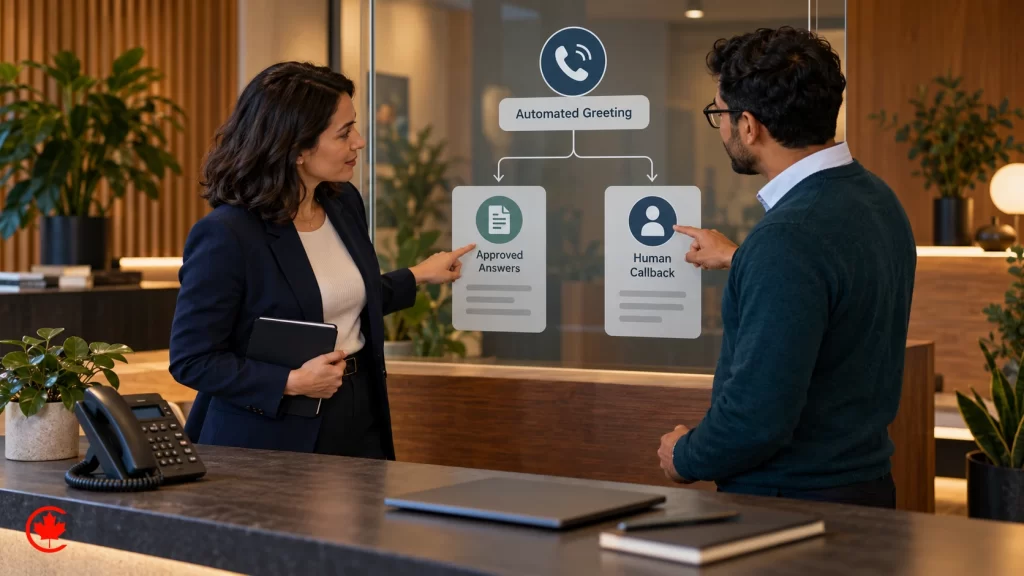
AI receptionist, answering service or voicemail
Most owners compare three options. Each has a place, and many businesses combine them.
| Question | Voicemail | Human answering service | AI receptionist |
|---|---|---|---|
| Who answers? | Nobody; the caller leaves a message or hangs up | A trained agent reading your script | A voice assistant following your approved script |
| Books appointments? | No | Sometimes, often by relaying details to you | Yes, directly into your calendar when connected |
| Several calls at once? | Each caller waits for a callback | Depends on staffing at that moment | Concurrent calls within the provider and phone setup’s capacity |
| Consistency | Depends on callback process | Depends on training and quality review | Configured rules, testing and ongoing quality review |
| Judgment and empathy | None | Strong | Handles defined conversations; transfer attempts and callback routes depend on the receiving team |
| Records and follow-up | Message and any connected transcription tools | Notes and integrations offered by the provider | Configured call records, summaries and CRM connections |
| Cost pattern | Lowest | Rises with minutes and call volume | Setup plus monthly service, with telephony and software usage separate |
In practice the AI receptionist usually takes after-hours calls, overflow when lines are busy and routine questions, while a person or an answering service keeps complex, sensitive or high-value conversations. During discovery we look at your real call patterns and tell you plainly if better call routing, a missed-call text or a human service would serve you better.
Can AI replace a receptionist?
For most small businesses, it should not, and it does not need to. A front desk person does far more than answer the phone: they greet people in the room, handle payments, calm an anxious client, notice problems and use judgment. What an AI receptionist removes is the part of the job that pulls them away from the people in front of them: the same five questions asked all day, the booking calls at lunch and the voicemails waiting every morning.
When owners ask whether AI receptionist jobs are replacing front desk jobs, our honest answer is that the role changes. Staff spend less time on repetitive calls and more on the conversations that need a person. For a business without a receptionist at all, such as a solo trade or a small practice, the AI receptionist gives callers a professional first response that the owner could not provide while working. For a busy office, it acts as the backup that answers when everyone is already on the phone.
Callers who want a human can always ask for one. The receptionist then transfers the call if someone is available or takes a message for a prompt callback, following the rules you set.
Virtual AI receptionist tasks we set up most
Every receptionist is configured for your business, but these are the jobs we build most often.
Virtual receptionist for bookings
New appointments, reschedules and cancellations checked against real calendar availability, with confirmations and reminders sent to the caller.
After-hours AI answering service
Evening, overnight, weekend and holiday calls answered, questions resolved and urgent matters sent to the on-call person.
Overflow AI phone answering
Overflow routing sends calls to the receptionist under the agreed rules, with capacity and fallback behaviour checked against your phone setup.
AI call intake and screening
Structured questions for new enquiries, so your team receives the job type, address, urgency and contact details before calling back.
Receptionist for FAQs
Approved information about hours, directions, parking, services, payment options and preparation, with uncertain answers routed for clarification.
Smart call routing
Callers sent to the right person or department with a short summary, instead of a phone menu with too many options.
Missed-call text follow-up
A polite text to callers who hang up, with a booking link or an offer to call back, sent with consent.
Call summaries in your CRM
Agreed call outcomes and permitted summaries sent to your CRM or CS+, the CRM we use with clients.
Call tracking and reporting come with every setup, so you can see what the receptionist handled and what it passed to your team.
Why an AI answering service suits small business
Small businesses feel missed calls the most. The owner is on a job site, the hygienist is with a patient, the front desk is checking someone out, and the phone rings out. Many callers who reach voicemail do not leave a message; they try the next business in the search results. An AI answering service for small business closes that gap without adding a shift.
Structured intake can make call follow-up easier: the CRM records the agreed details, completed bookings and unresolved requests. Your team can review that queue by service, location or urgency, with checks for missing information and incorrect records.
The receptionist is most useful when:
- you miss calls regularly, especially after hours, at lunch or when lines are busy;
- a large share of calls are routine questions or bookings;
- callers often phone outside business hours;
- you pay for ads and want every resulting call answered;
- staff are stretched between the phone and the people in front of them.
It is less useful when almost every call needs specialist judgment, when call volume is very low, or when the real problem is a website that does not answer basic questions. In those cases we will say so and suggest the simpler fix first.
How we set up your AI receptionist
Setup starts with your calls, not with software. We follow the same staged method on every project so you stay in control of what the receptionist says and does.
1. Discovery and call review
We look at when calls arrive, what callers ask, how bookings work, which calls must reach a person and what your team needs from each caller. Where you have them, we listen to sample calls or talk with the staff who answer the phone today.
2. Script, scope and knowledge
We write the greeting, the approved answers, the booking rules, the intake questions and the exact transfer rules in plain language. You review and approve every line before anything goes live. This is where you decide what the receptionist may and may not discuss.
3. Voice and tone
You choose the voice, the pace and how formal or friendly it sounds. A law office usually wants calm and professional; a family restaurant or a trades company may prefer warmer and more casual. We test a few options with your team.
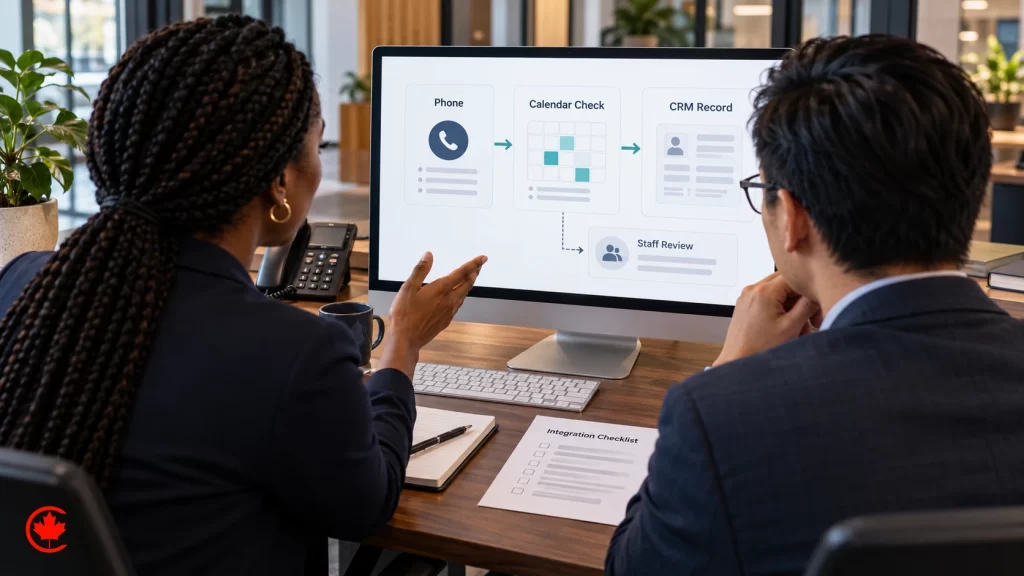
4. Connect your phone, calendar and CRM
We configure forwarding or a new number, connect the supported booking and CRM functions, and test confirmations, notifications and failed updates.
5. Simulated calls and your own testing
Before launch we test realistic calls, including unclear speech, noise, unusual requests, upset callers and escalation scenarios. Your team reviews the results against agreed acceptance criteria. We correct issues found, then monitor the limited release for failures the test set did not expose.
6. Staged launch
Most businesses start with after-hours calls only, review the first transcripts with us and then extend to overflow or full coverage. A staged launch shows how your callers respond before the receptionist handles more.
7. Monitoring and improvement
After launch we review permitted call records, investigate unsupported answers or failed actions, update the knowledge and refine routing. Changes are tested before release, and results are compared with the baseline to see whether the service is improving.
Your number, phone system and business tools
You keep your existing phone number. The most common setups forward calls to the receptionist after hours, when lines are busy, after a set number of rings or all the time. Some businesses prefer a dedicated number for a campaign or a new location. Cloud phone systems and many office PBX systems support these forwarding rules, and we check your setup during discovery.
The receptionist connects to the tools that make calls useful:
- Calendar and booking software so it offers only real availability and books, moves or cancels appointments.
- Your CRM for the agreed contact updates and call outcomes. We can use your current platform or CS+, the CRM Canada Create runs for clients, with recording and summary settings defined for the workflow.
- Text and email so callers receive confirmations, directions or a form link, and your team receives urgent alerts.
- Team notifications so the right person sees a callback request as soon as it is taken.
Many businesses also want the receptionist to answer text messages. The same approved knowledge can reply to texts and to missed-call follow-ups, so callers who prefer to type get the same answers as those who call.
How the receptionist learns your business
We build the receptionist’s knowledge from your services, policies, hours, directions, payment information and other approved material. Connected systems can supply current availability or status. We test whether answers use the right source and define what happens when information is missing, conflicting or outside the permitted scope.
When something changes, such as holiday hours, a new service or a staff change, your team sends us a short message and we update the knowledge and test the change before it goes live. You never have to learn a new platform to keep the receptionist accurate.
You decide which calls it handles
Control is set in writing before launch. You decide which hours it covers, which call types it handles, which callers go straight to a person, which questions it must never answer and what counts as urgent. Existing clients can be routed differently from new callers. Coverage can be paused or adjusted through the agreed controls. Expanded call types, hours or integrations may need additional testing and a scope change.
We agree which situations need a person and how those calls are routed: professional advice, disputes, urgent concerns and requests beyond the receptionist’s authority. The design includes a fallback when nobody answers and clear emergency guidance where relevant. Routine administrative work can continue within its approved scope.
Privacy, disclosure and consent
The greeting identifies the business and the automated assistant. If calls are recorded or transcribed, the design documents the purpose, notices and consent process, who receives the data and how it is retained. Access and collection are limited to what the approved workflow needs, with applicable privacy requirements reviewed before launch.
Confirmation and reminder texts are sent only with the caller’s consent. If a caller does not want to talk to an automated assistant, they can ask for a person or leave a message. We document these choices with you at the start of each project, so you can answer your own customers’ questions with confidence.
AI receptionist for medical office, dental and law practices
Regulated professions need stricter limits, and we build them into the approved script from day one.
Medical office and clinic receptionist
A clinic receptionist can handle bookings and approved administrative information such as hours, location, forms and preparation. Clinical questions are directed to the care team under the agreed workflow. Emergency wording and fallback routes are set with the clinic; callers should use emergency services when urgent help is needed rather than rely on the receptionist.
Dental offices
Dental practices use the receptionist for new-patient and existing-patient booking, recall appointments, hours, directions and insurance paperwork questions from approved information, with dental emergencies transferred or flagged for immediate callback. See our dental marketing page for how calls fit into new-patient growth.
Law firms
For lawyers, the receptionist handles after-hours intake: matter type, urgency, contact details and the information needed for a conflict check, then books consultations into the right lawyer’s calendar. It is configured for administrative intake, with legal advice and case assessment routed to qualified staff. See our law firm marketing page.
Where an AI receptionist fits
Call patterns differ by type of business, so each receptionist is scripted around how its callers behave.
Home services and trades
Night and weekend emergency calls answered, addresses and job details captured, urgent jobs transferred to the on-call technician and estimate requests queued for the office. See our HVAC marketing and plumber marketing pages.
Real estate
Listing enquiries answered quickly, showings booked into agents’ calendars and buyers separated from sellers from the first question. See our real estate SEO page.
Salons, spas and wellness
Service questions, bookings and reschedules handled while the team is with clients, with cancellation policies explained the same way every time.
Restaurants and hospitality
Hours, reservations, directions, parking and event enquiries answered during the dinner rush, when nobody can reach the phone.
Professional offices
Accountants, consultants and agencies use the receptionist to screen new enquiries, book discovery calls and route existing clients to the right person.
How many calls are you missing?Tell us your hours, roughly how many calls you get and what callers usually ask. Request your custom proposal showing how an AI receptionist would handle them and what should stay with your team.
What an AI receptionist costs in Toronto and what changes the quote
Setup and monthly service are both quoted in writing after we understand your calls. We do not publish a flat price because two businesses with the same number of calls can need very different work. What changes the quote:
- Scope of calls: answering questions only is simpler than booking, intake screening, routing to several people and urgent escalation.
- Integrations: connecting a calendar and CRM with ready connections is quicker than practice management software or a custom system.
- Hours of coverage: after hours only, overflow, or every call around the clock.
- Languages and voices: each language is scripted and tested separately.
- Regulated rules: clinics and law firms need tighter scripts, extra testing and more review.
- Review and reporting: how often we review transcripts, update knowledge and meet with your team.
The quote separates three parts so you can see what you pay for. Setup covers discovery, scripting, knowledge, integrations, testing and launch. Monthly service covers monitoring, knowledge updates, transcript reviews, improvements and reporting. Telephony and software usage, such as the phone number, call minutes, text messages and AI processing, depend on how many calls the receptionist handles and are itemized separately.
Free and do-it-yourself AI receptionist tools
You will see free trials, free plans and AI receptionist builders that let you set up a basic assistant yourself. They can be a good way to test the idea. The work that decides whether it succeeds is the same either way: writing the script, building accurate knowledge, connecting your calendar and CRM, setting transfer rules, testing hard scenarios and reviewing calls every month. A managed service, where an AI receptionist agency does that work with you, suits owners who would rather run their business than tune an assistant.
Are AI receptionists worth it?
An AI receptionist is worth it when the calls it saves are worth more than it costs to run. The honest way to judge that is with your own numbers, not someone else’s averages. We help you set a baseline before launch:
- How many calls arrive, and how many are missed, by hour and day of the week.
- What share of those calls are new customers rather than existing ones.
- How many new callers typically become paying customers.
- The expected contribution from an additional customer over a defined period, after the relevant cost to serve.
Those figures provide an initial value estimate. After launch, we compare actual call outcomes, customer feedback and staff handling time with the baseline, alongside setup, management and usage costs. A captured call is not automatically a new paying customer, so revenue assumptions are checked against your records.
Beyond revenue, owners tell us the value shows up in quieter ways: a calmer front desk, fewer callbacks forgotten, and a consistent first impression on every call.

Tracking calls and measuring results
Reporting uses the call and system events agreed for the service: answered calls, completed bookings, messages, transfer attempts, failures and abandonment. Recordings or transcripts are retained only where the purpose, consent and access settings support them. Your team can review those records to assess quality.
Where your booking and CRM systems support it, reporting follows kept appointments and completed callbacks. Call-source information is included when tracking can establish it; missing or uncertain attribution stays visible. Those results help decide whether to change coverage, routing or the booking flow.
In the first weeks we review transcripts often; after that, on a monthly rhythm. Scripts, knowledge and rules are updated, and each change is tested before it goes live.
How to compare AI receptionist companies in Toronto
There are many AI phone products, from self-serve apps to fully managed services. These questions separate them quickly:
- Does the assistant identify itself, and what transfer or callback options are offered when a caller requests a person?
- Can it book into your actual calendar and write to your CRM, or does it only take messages?
- How are personal information, consent and retention handled under Canadian privacy law?
- Who writes the transfer rules, and how are emergencies tested before launch?
- Who reviews transcripts and fixes problems after launch, and how often?
- Do you keep your phone number and your data?
- How are usage costs shown when your call volume grows?
Our answers are set out in writing before any work starts. Your phone numbers stay yours, your data stays yours, the receptionist identifies itself honestly, escalation rules are agreed and tested, a named person on our team reviews performance. Check real reviews on any provider’s own Google Business Profile before you decide.
Part of a wider AI and marketing system
An AI receptionist is most useful when it is connected to how you win and follow up customers. Calls from Google Ads, from your Google Business Profile and from SEO traffic are answered even when the office is closed, tagged with their source and followed up if the caller does not book. Website visitors can reach the same approved knowledge through an AI chatbot on your site, and more involved inbound call flows can be handled by AI voice agents. Follow-up for enquiries that do not book right away can run through sales follow-up automation.
The receptionist is one part of the work we do as an AI automation agency. Because one team plans the phone, chat, follow-up and marketing together, the answers, business details and reporting stay consistent across every channel, and you avoid paying for overlapping tools.
Related guides: AI tools vs hiring more staff, business phone plans for Canadian small businesses, VoIP and business phone systems, and speed to lead.
Why businesses choose Canada Create
Canada Create has helped businesses in Canada with websites, marketing and business systems since 2008, more than 18 years. We are BBB Accredited with an A+ rating. Our team works from our Toronto office and serves clients across Canada. Call (416) 273-9030, Monday to Friday, 9 am to 6 pm, and Saturday, 10 am to 2 pm. After hours, our 24/7 AI agent answers the toll-free line, +1 (800) 808-9235, and we’ll follow up the next business morning.
With us, your AI receptionist is designed around your calls, approved by you, connected to your systems and reviewed after launch by people who know your business. You get clear rules for when a person takes over, honest disclosure to callers and a quote that shows setup, monthly service and usage separately.
Ready to see how it would work for your calls? Share your hours and the questions callers ask most, and get a proposal.
For owners who answer the phone between jobs, see how an AI receptionist fits into a complete AI system for small business, with one lead inbox and automatic follow-up.
Talk to a strategist
Ready when you are?
Request a custom proposal
Tell us your goals, budget and timeline. You get a custom proposal and a named strategist, so your next stage of growth starts now.
How an AI receptionist goes live
A straightforward setup may take a few weeks. Integration access, call types, languages and review requirements determine the schedule confirmed in the proposal. The stages below are illustrative.
- Free consultation Week 1
We review your call patterns and agree what the receptionist should handle.
- Script and approval Week 1
Greeting, answers, booking and transfer rules written in plain language for your approval.
- Connect Week 2
Phone line, calendar and CRM connected; notifications set up for your team.
- Test Weeks 2 to 3
Run representative calls and failure cases, review the results and address issues against agreed acceptance criteria.
- Launch after hours Weeks 3 to 4
Go live on after-hours calls first and review the first transcripts together.
- Expand and improve Monthly
Extend to overflow or full coverage, add approved answers and report results.
Related AI services
The receptionist works alongside the rest of our AI automation services.
Why businesses choose Canada Create for their AI receptionist
Designed, not just installed
A script built around your calls, approved by you, not a generic template.
Connected to your systems
Calendar, CRM and notifications set up so calls turn into bookings and records.
Human handoff
Transfer rules, staff alerts and callback fallbacks designed and tested with your team.
Privacy built in
Disclosure, consent, retention rules and documented providers.
AI receptionist Toronto: questions owners ask
What is a virtual AI receptionist?
A virtual AI receptionist is a voice assistant that answers your business line, greets callers with your business name and tells them they are speaking with an automated assistant. It holds a real conversation, answers approved questions, books appointments against your calendar, takes structured messages and routes calls. When a caller needs a person, it hands over by the routes you set.
How much does a virtual AI receptionist cost each month?
Setup cost depends on your call types, integrations, languages and any regulated rules. Monthly service covers transcript reviews, knowledge updates and call reporting. Telephony and software usage, meaning the phone number, call minutes, texts and AI processing, depends on how many calls are handled and is itemized separately. You get a setup fee and a monthly estimate based on your real call volume in writing after a free consultation.
Will an AI receptionist replace the receptionist at a medical office?
In most offices it takes on routine calls rather than the person at the front desk. Questions about hours, directions and booking can be handled by the AI, so staff spend their time with patients who need a person. Clinical questions and urgent calls are routed to the care team, and privacy, disclosure and consent settings are reviewed for the use case.
How do I choose an AI receptionist provider?
Ask who configures and tests the receptionist, whether you keep your existing number, and how callers are told they are speaking with AI. Check that failed bookings and transfers have a tested fallback, that transcripts are reviewed after launch, and that the phone and software accounts are registered to your business where possible. An office address you can look up and live Google reviews show you the business behind the service.
How is an AI receptionist used in customer service?
An AI receptionist covers after-hours calls, overflow when your lines are busy, call intake and screening, frequent questions, and routing to the right person. Missed calls can trigger a text follow-up, and every call can leave a summary in your CRM. Your team handles the conversations that need judgement or care.
Can I make an AI receptionist for free?
Do-it-yourself tools can produce a talking demo, but a working receptionist still needs a phone number, call minutes, text messages and AI processing, which are billed by usage. It also needs approved answers, a calendar connection, disclosure, and testing with upset callers, noise and emergencies before real callers reach it. Those parts are what make the receptionist safe to put on your business line.
Can an AI receptionist work with my existing number and VoIP system?
Yes. Your existing number is kept, with forwarding for after-hours, overflow or full coverage, or you can take a new number if you prefer. Calendar and CRM actions are configured and tested, and team notifications are scoped to your workflow. Coverage and overflow behaviour are matched to your phone setup.
Does an AI receptionist suit a dental office?
It suits the routine side of a dental front desk: answering questions about hours, location and payment options, and booking or moving appointments against real availability with confirmations by text or email. Clinical questions and dental emergencies go straight to your team by the routes you approve. Privacy, disclosure and retention settings are reviewed for a health practice before launch.
How does an AI receptionist work on a live call?
It picks up, names your business and tells the caller they are speaking with an automated assistant. It understands normal speech, including interruptions and details given out of order, asks one clear question at a time and confirms important details back before it acts. If it cannot help, it takes a structured message or transfers the call by the rules you approved.


Get a custom proposal for your next project
Review the offer, budget and enquiry process before committing your marketing spend.