
404 Error: What 404 Not Found Means and How to Fix It

A 404 error, or “404 Not Found”, means the server is working but found nothing at the address that was requested. The page may have been deleted, moved without a redirect, or never existed because a link or the typed URL is wrong. For visitors it is a dead end; for search engines it is a signal to drop that URL from the index. A handful of 404s is normal on any website. The ones worth fixing are the 404s on pages people and links still point to.
This guide explains what 404 means under the HTTP standard, what causes it, whether it hurts SEO, how to find the 404s that matter, how to fix them on common platforms, and how to build a 404 page that helps visitors. It is part of our HTTP status codes reference.
What the 404 status code means
RFC 9110, section 15.5.5 says a 404 indicates the origin server did not find a current representation for the target resource or is not willing to disclose that one exists. It does not say whether the absence is temporary or permanent. When the server knows the removal is permanent, the standard prefers 410 Gone.
Two details in that definition matter in practice. First, a 404 comes from a server that is up and answering, so it is different from a site being down (a timeout, a DNS failure or a 503). Second, servers may use 404 to hide a page that exists but that the visitor is not allowed to see, which is why private areas of some sites answer 404 instead of 403.
The message varies by site and browser: “404 Not Found”, “Error 404”, “HTTP 404”, “Page not found”, “The requested URL was not found on this server”, or a branded page with a search box. What makes it a real 404 is the status code the server sends, not the words on the page.
404 vs 410, and the soft 404
- 404 Not Found: nothing is here, with no promise about the future. Use it for mistyped URLs and pages you removed without a replacement.
- 410 Gone: the page was removed on purpose and will not return. RFC 9110 describes it as a tool for web maintenance that asks for remote links to be removed. Google’s crawlers treat 404 and 410 the same way: both remove the URL from the index.
- Soft 404: a page that looks like an error (or is nearly empty) but returns 200 OK. Google detects these from the content and reports them in Search Console. They are worse than real 404s because the server says “all good” while the page says “nothing here”. The fix is to return a real 404 or 410, redirect to a true replacement, or fix the page so its content loads.
What causes 404 errors
- A page was deleted and nothing replaced it.
- A page moved (new slug, new folder, new domain, a redesign) and no 301 redirect was added from the old URL.
- Broken internal links in menus, footers, old blog posts, buttons or the sitemap still point at the old address.
- Broken links from other sites that linked to a page that has since changed, or that typed the URL wrong.
- Typos in a URL someone typed, copied or printed on a flyer.
- Case and slash differences. On many servers /About/ and /about/ are different URLs, and some setups treat /page and /page/ differently.
- Missing files such as images, PDFs, stylesheets or scripts that were renamed or removed. These do not show as a page error but can break layouts and cause soft 404s.
- Platform changes: a changed permalink structure in WordPress, a deleted product or changed handle in Shopify, or a plugin that registered URLs and was then removed.
- Deliberate probes: bots that request /wp-login.php, /.env or old exploit paths. These 404s are expected and need no fix.
Does a 404 error hurt SEO?
Not by itself. Google has long said that 404s on URLs that should not exist are a normal part of the web and do not harm how the rest of a site is indexed or ranked. Its status code documentation explains what does happen: content from a 404 URL is ignored, a URL that was indexed is removed over time, a new 404 URL is not processed, and Google crawls that URL less often. 4xx codes other than 429 do not slow down crawling of the rest of the site.
A 404 costs you when it lands on something valuable:
- A page that ranked or brought enquiries now returns 404, so it drops out of results.
- Backlinks point at a 404, so the value of those links stops reaching your site. A 301 to the closest matching page puts them back to work.
- Internal links point at 404s, which sends visitors to dead ends and makes crawlers spend time on URLs that lead nowhere.
- Soft 404s, where removed pages return 200 or every missing URL redirects to the home page, which confuses search engines about what is real.
What a 404 means for AI search
Google says a page must be indexed and eligible for a snippet to appear as a link in AI Overviews and AI Mode, so a page that returns 404 cannot be cited there once it drops out. AI assistants that fetch pages directly will also get nothing from a 404 URL. If an old guide or service page was being quoted by AI tools, restoring it or redirecting it to its updated version keeps that visibility, while a 404 ends it.
How to find the 404s that matter
Google Search Console
Open Indexing, then Pages, and look for “Not found (404)” under the reasons pages are not indexed. Click it to see example URLs, then use URL Inspection on any URL to see where Google found it (the referring page or sitemap). Also check “Soft 404” in the same report. The Crawl stats report under Settings shows how many of Googlebot’s requests ended in 404.
A site crawl
A crawler finds every internal link that leads to a 404 and lists the page that contains it. Fixing those links is the highest-value 404 work on most sites, because it is fully in your control.
Backlink reports
Backlink tools and Search Console’s Links report show which external pages link to URLs on your site. Filter the targets that now return 404 and redirect each one to its closest live match.
Analytics
Track visits to your 404 page by page title or a custom event, with the requested URL. The URLs real people keep hitting are the ones to redirect first.
Server logs
Access logs list every 404 with its referrer and user agent. They show 404s that never appear in other tools, such as missing images, broken links in emails and requests from old apps.
How to fix a 404 error
Decide what should happen to each URL. Our guide on whether to use a 301 redirect or a 404 goes deeper; the short version:
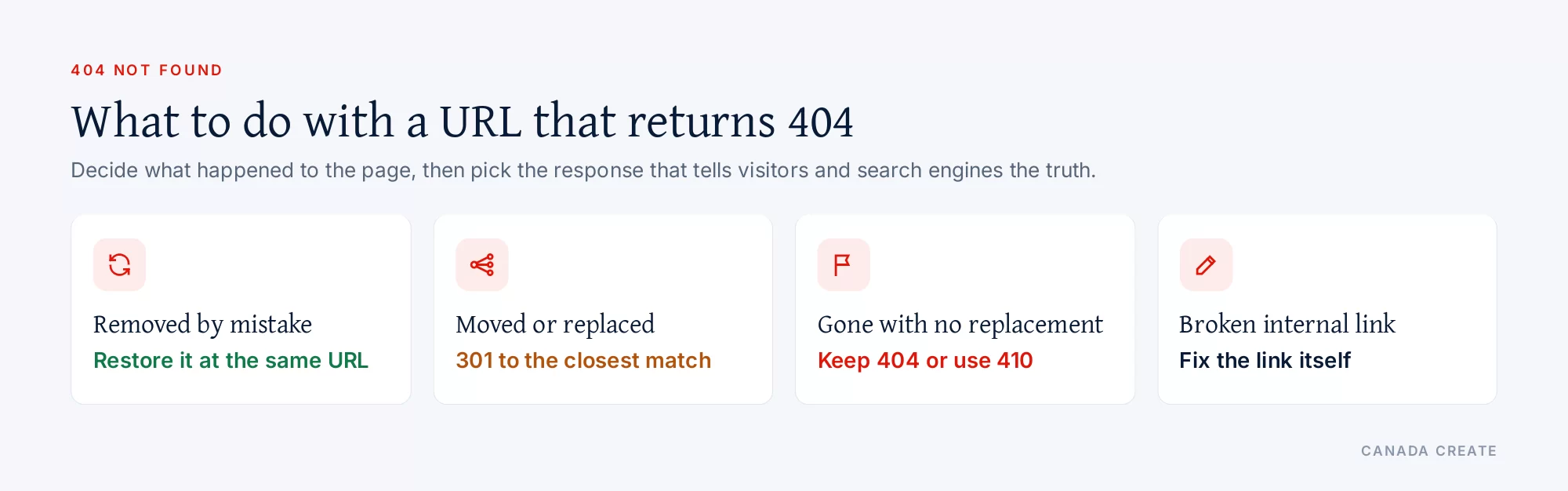
- The page was removed by mistake: restore it at the same URL.
- The content moved or has a close replacement: add a permanent 301 redirect from the old URL to the new one, in one hop. Google’s redirects guide recommends server-side permanent redirects for this.
- The content is gone and nothing replaces it: leave the 404, or use 410 if you want to be explicit. Do not redirect it to the home page; Google tends to treat that as a soft 404.
- The URL never existed (typo or bot probe): leave the 404. If many people make the same typo, a redirect is fine.
- An internal link is wrong: correct the link itself, even if a redirect exists, so visitors and crawlers reach the page directly.
After fixing, use URL Inspection to confirm the response, and use “Validate fix” in the Page indexing report so Google rechecks the URLs.
Platform notes
- WordPress: if every post suddenly returns 404, open Settings, then Permalinks, and save without changes to rebuild the rewrite rules. When you change a slug, WordPress usually adds a 301 from the old one automatically; redirect plugins or SEO plugins handle other cases. The theme’s 404.php template controls the error page.
- Shopify: when you change a product, collection or page handle, tick the option to create a redirect from the old URL. Deleting a product makes its URL a 404, so redirect it to the collection or replacement product if it had traffic or links. The 404 page is a theme template you can edit.
- Apache and LiteSpeed: set a custom page with
ErrorDocument 404 /404.htmlin .htaccess and add redirects withRedirect 301 /old/ https://example.com/new/. Use a local path in ErrorDocument; a full URL makes Apache send a redirect instead of a 404 status. - Nginx: use
error_page 404 /404.html;andreturn 301 https://example.com/new/;inside a location block for redirects. - Cloudflare and other CDNs: a CDN can cache a 404 for a short time, so purge the URL after restoring a page. Redirect rules at the CDN work for large lists of moved URLs.
- JavaScript sites: single-page apps often show a “not found” view while the server returns 200. Make the server return 404 for unknown routes, or add a noindex robots meta tag to the error view so it is not indexed as a soft 404.
404s after a redesign or site migration
The largest wave of 404s most businesses ever see comes the week a new website launches. URLs change, old pages are left out, and the redirects that should connect them are missing or incomplete. The fix is a URL map built before launch, not after.
Our SEO team plans, fixes and reports on the work in this guide every month for Canadian businesses.
- Collect every old URL: export the current sitemap, the pages with impressions or clicks from Search Console’s Performance report, the top landing pages from analytics and the pages with backlinks.
- Map each one: for every old URL, write the new URL that serves the same purpose, or mark it as retired. Avoid sending large groups of old pages to one general page.
- Load the redirects before launch: add one-hop 301s for every mapped URL and test a sample on the staging site.
- Test on launch day: crawl the list of old URLs and confirm each returns a 301 to a 200 page or an intentional 404.
- Watch for two weeks: check the Not found (404) list and your 404 page’s analytics every day and add redirects for anything missed.
Our 301 vs 404 guide has a decision table for the URLs that are hard to place.
Tracking 404s in analytics
Search Console shows the 404s Google finds; analytics shows the ones people hit. Most analytics tools can record a 404 when the error page loads, using its page title or a custom event that stores the requested URL and the referring page. Review that list monthly. A URL that real visitors keep reaching from the same referrer is usually an old link on another site, a printed address or an email campaign, and it is worth a redirect.
How to design a helpful 404 page
Google’s crawl troubleshooting guidance gives the basics: tell visitors clearly that the page cannot be found, use friendly language, keep the same look and navigation as the rest of the site, link to popular pages and the home page, and consider a way to report the broken link. Most important, the server must still return a 404 status so the error page is never indexed.
Practical additions that keep visitors on the site:
- A search box near the top.
- Links to your main services, contact page and most visited guides.
- A short line with your phone number or contact option for people who were trying to reach you.
- No automatic redirect after a few seconds; let visitors choose.
- Fast, light code, since bots request many missing URLs.
Is a 404 error my fault?
For visitors, usually not. A 404 means the address you used does not lead to a page on that server. Check the URL for typos, try the site’s home page or search, or search the page title in Google. A 404 does not mean you were blocked; access problems show as 403 Forbidden or 429 Too Many Requests instead. If you own the site, a 404 on an important page is something to fix, and a 404 on a random or mistyped URL is normal.
A 404 maintenance routine
- Monthly: check the “Not found (404)” and “Soft 404” lists in Search Console and crawl the site for broken internal links.
- Before any redesign, migration or URL change: export every URL with traffic or backlinks and map each to its new address.
- After launch: test the old URLs and watch the reports daily for two weeks.
- Quarterly: review external links that point at 404 URLs and redirect the valuable ones.
- Keep redirects in place; Google’s site move guide suggests at least a year, and longer is better.
If you would like help finding and fixing the broken URLs that cost traffic, technical clean-ups are part of our Toronto SEO services. For the rest of the codes, see the HTTP status codes hub, the 302 status code guide for temporary redirects and the 400 Bad Request guide.
Frequently asked questions
What does the 404 HTTP error code mean?
It means 404 Not Found: the server is working but has no page at the address requested. The page may have been deleted, moved without a redirect or never existed because the link or typed URL is wrong.
Does a 404 error mean I was blocked?
No. A 404 only says nothing was found at that address. Access problems use other codes, such as 403 Forbidden or 429 Too Many Requests.
Is a 404 error my fault?
Usually not. It means the link or address you used does not lead to a page on that site. Check the URL for typos, or go to the home page and use the site's search or menu.
How do I get rid of a 404 error on my website?
Restore the page if it was removed by mistake, add a 301 redirect to the closest replacement if it moved, or leave the 404 if the content is gone. Then fix any internal links that still point at the old URL and use Validate fix in Search Console.
How do I fix 404 errors reported in Google Search Console?
Open the Page indexing report, click Not found (404) and review the example URLs. Redirect the ones that have a replacement or backlinks, fix the internal links Google found them on, and leave genuine removals alone. Then click Validate fix.
Do 404 errors hurt SEO?
Not by themselves. Google says 404s on URLs that should not exist do not harm the rest of a site. They cost you when a page that ranked, brought enquiries or has backlinks returns 404, or when internal links point at dead URLs.
What is the difference between 404 and 410?
A 404 says nothing is at the address, without saying whether that will change. A 410 says the page was removed on purpose and will not return. Google removes both from its index in the same way.
Should I redirect all 404 pages to the home page?
No. A home page redirect does not answer what the visitor wanted, and Google often reports it as a soft 404. Redirect only to a page that serves the same need, and let the rest return 404.
What is a soft 404 error?
It is a page that shows a not found message, or almost no content, while the server returns 200 OK. Google reports these in Search Console. Make the server return 404 or 410, or redirect to a real replacement.
What should a good 404 page include?
A clear message, your normal header and menu, a search box, links to your main pages and a way to contact you. The server must still return a 404 status so the error page is never indexed.
Why does every page on my WordPress site show 404?
The rewrite rules are usually out of date after a plugin, theme or permalink change. Go to Settings, then Permalinks, and click Save without changing anything to rebuild them, then clear any cache.
How long does Google take to remove a 404 page?
There is no set time. Google removes indexed URLs that return 404 over time as it recrawls them, and URLs that were rarely crawled can take longer. Requesting a recrawl in URL Inspection can speed up an important one.