
Apple Business Connect Guide: How to Add Your Business to Apple Maps
Apple Business Connect was Apple’s portal for claiming and managing how a business appears in Apple Maps. In 2026 Apple folded it into a single service called Apple Business, together with Apple Business Manager and Apple Business Essentials. People still search for “Apple Business Connect”, and the old name still appears on many help pages, but the place to start today is business.apple.com. This guide walks a Toronto business through the whole process: signing up, verifying, adding or claiming your location, setting up a strong place card, and keeping it accurate.
Everything below comes from Apple’s own Apple Business User Guide for Canada, checked on November 3, 2026. Apple changes its screens and rules from time to time, so if a menu name differs when you sign in, follow the current wording in the portal.
Why Apple Maps matters for a Toronto business
Every iPhone, iPad and Mac comes with Apple Maps, and Apple describes your business’s place card as appearing across Maps, Siri, Calendar, Messages, Spotlight search and Apple Wallet. When someone asks Siri for “a pharmacy open now near me” or taps a restaurant name in a text message, the details they see come from that place card.
If you never claim it, Apple still builds a place card from other data, and that card may carry old hours, an old phone number or a pin on the wrong building. Claiming it lets you control your name, category, hours, photos and links, add offers, and see how people find you. It takes an afternoon to set up and a few minutes a month to maintain.
Apple Business Connect is now Apple Business
Apple’s help site now carries this notice on the old Apple Business Connect guide: Apple Business combines the capabilities previously found in Apple Business Manager, Apple Business Essentials and Apple Business Connect into one offering. For a business that only wants its Maps listing, the practical changes are small:
- The sign-in address is business.apple.com, and the location tools live under Brands > Locations.
- If you already had an Apple Business Connect account, signing in to Apple Business for the first time moves your organization to the new service, and you can no longer sign in to the old portal.
- If you used a personal Apple Account for Apple Business Connect, you can keep it, but Apple says you can then use only the brand and location management features. Creating an “Apple Account for Work” (a Managed Apple Account) unlocks the full feature set.
- Several old organizations under one login become organizational units under one account.
In Canada, Apple lists these Apple Business features as available: Brand and Location Management, Branded Mail, built-in device management, Get Apps, Get Books, Managed Apple Accounts, Tap to Pay on iPhone and zero-touch deployment. Business email, calendar and extra iCloud storage are listed for the United States only.
What your Apple Maps place card shows
Before you start, it helps to know what you are building. A place card is the panel people see when they tap your business in Maps.
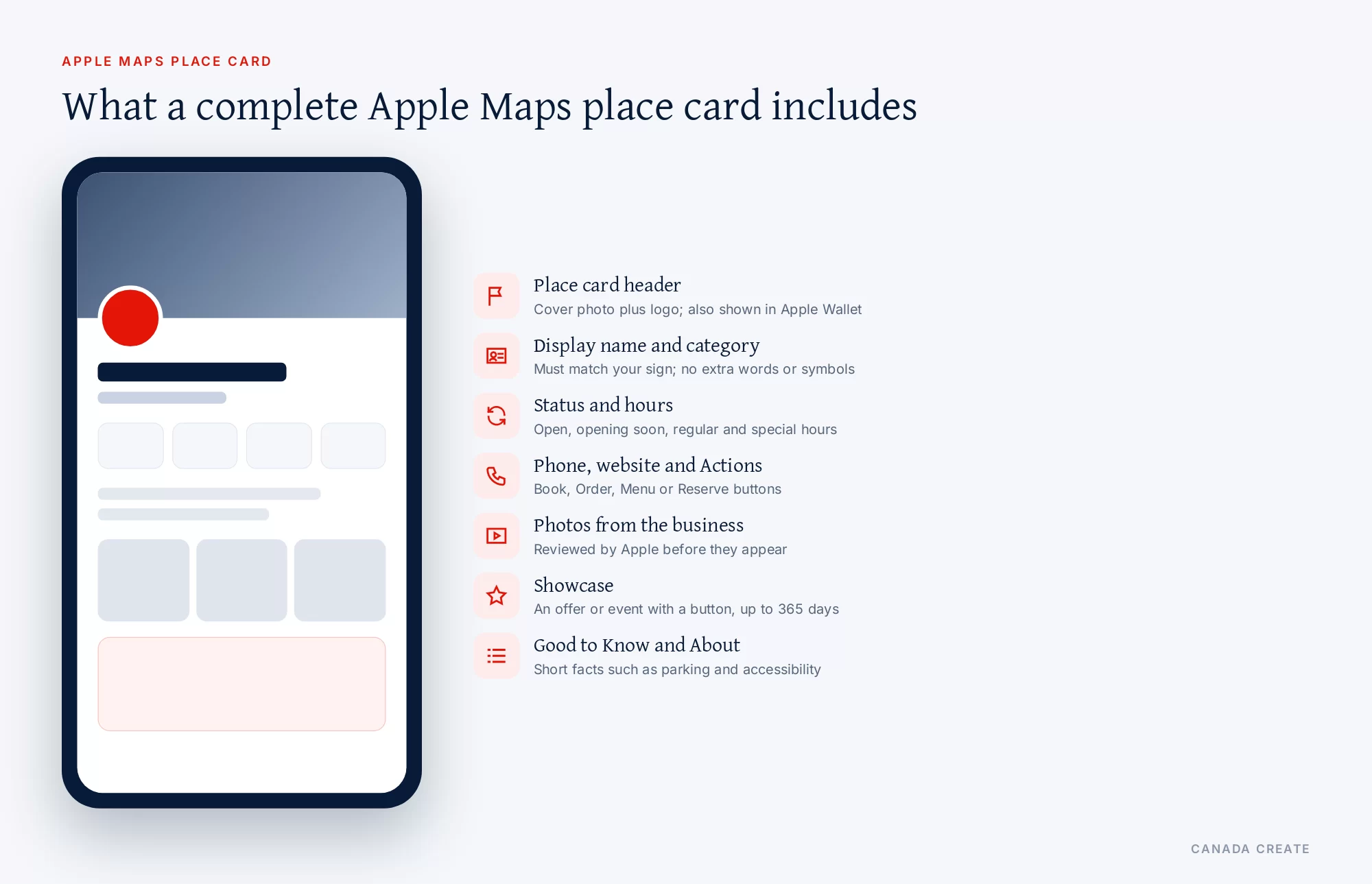
- Place card header: your cover photo and logo together. This is the first thing people see in Maps, and the same header appears in Apple Wallet after an Apple Pay purchase.
- Display name and category: the name customers search for and the primary category Apple uses to match you to searches such as “dentist” or “bakery”.
- Status, hours and special hours: open, opening soon or closed, plus holiday and event hours.
- Contact and links: phone number, website (Apple also accepts a Facebook, Instagram or TikTok page) and your Actions, such as Book, Order or Menu.
- Photos: an album called “From the Business” with photos you upload and Apple approves.
- Showcase: a promotional module for an offer, event or new item, with a button.
- Good to Know and About: short facts about the location and a description of the business.
What you need before you sign up
Gather these first and the sign-up takes much less time.
- A real person as the first administrator. Apple requires a legal first and last name. Role names such as “IT Coordinator” are sent back for correction.
- A work email that is not already an Apple Account. The email for the first administrator must not be in use for another Apple service, such as an App Store or iCloud account. A public email provider is allowed if you do not have your own domain.
- A work phone number that can receive a code by text or call.
- Your website address. It is optional, but Apple says providing it can speed up verification.
- Two ways to prove the business is yours. See the verification table below. A D-U-N-S Number, a DNS record on your domain, or official documents such as a business licence or utility bill are the usual choices for a Canadian business.
- A supported browser: recent Safari, Chrome, Edge or Firefox on a Mac, Windows PC, iPhone or iPad.
- Your logo and photos in the sizes listed further down, so you can finish the place card the same day.
How to add your business to Apple Maps
These are the stages in the order Apple’s guide presents them. If your business already shows on Maps, follow the same path; Apple will match you to the existing place.
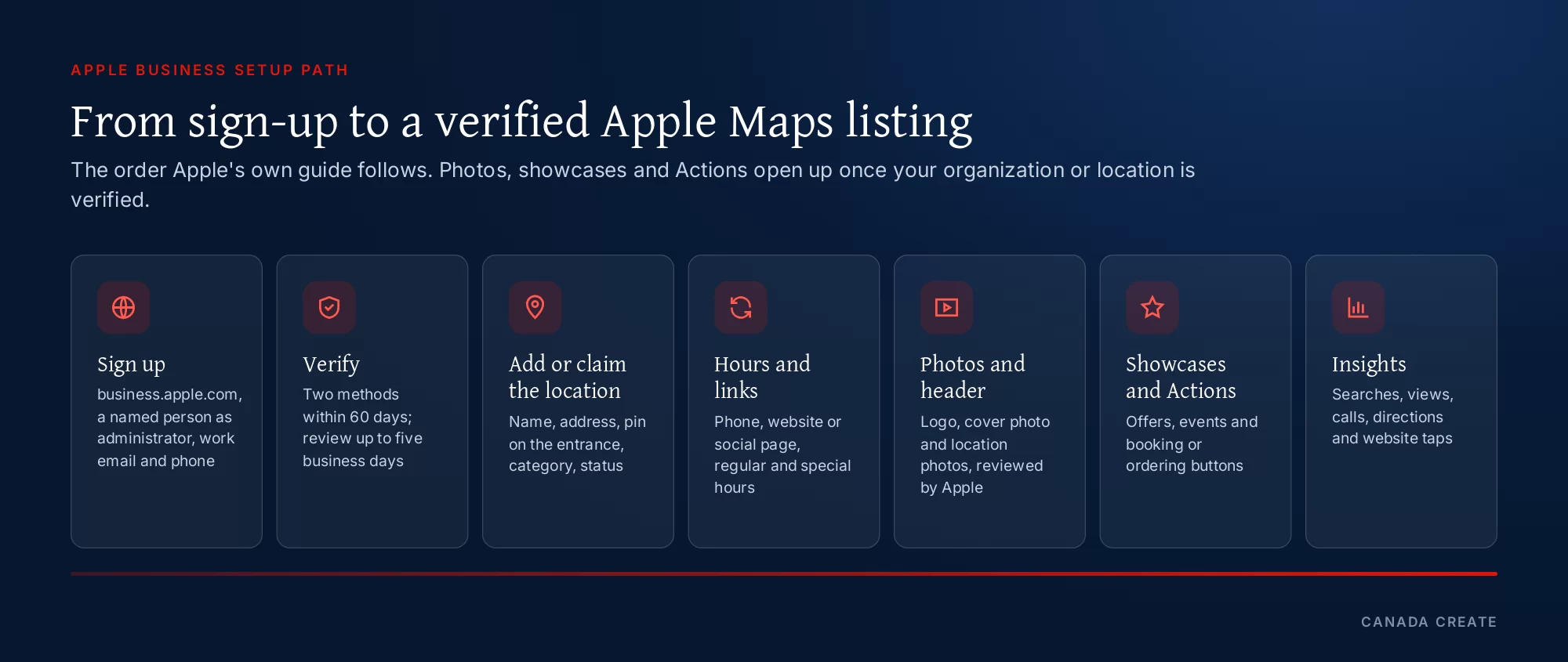
Sign up at business.apple.com
Go to business.apple.com and choose Sign up now. Enter your organization’s name, choose whether you want Apple’s business emails, add your website, and enter the location and address of the organization. Leave the agency checkbox empty unless you are an agency signing up as a third-party partner; Apple says it is only for partners who manage brands for other organizations. Then enter the administrator’s name, country, password and phone number, confirm the codes Apple sends to your email and phone, and accept the Apple Business terms. Apple then asks which features interest you and how many employees you have, and you can skip that step.
Verify your organization within 60 days
Apple gives a new organization 60 days to verify. Verification needs two methods, and Apple says the review can take up to five business days, longer when volumes are high. Start it from Settings > Organization > Verify Now.
| Method | What Apple asks for | Good to know |
|---|---|---|
| Business ID | A D-U-N-S Number or an Employer Identification Number | Apple publishes the accepted ID types; an EIN is a US tax number, so a Canadian business without one can use a D-U-N-S Number or another method |
| Domain validation | A TXT record added to your domain’s DNS | Fast if you or your web team control the domain |
| App Store Connect | The app associated with your organization | Only for businesses with an app; not for agencies |
| Official document | Business licence, sales tax permit, food, health or alcohol permit, lease or property agreement, utility bill or other | Use a document that shows the same legal name and address |
We manage Google Business Profiles, citations and reviews so local customers find and call you.
Use the legal or registered name that appears on your documents. If your storefront name is different, you can set the display name for Maps separately (see below).
Add your location and place the pin on your entrance
In the portal, choose Brands > Locations, select Add, and type the location’s name. If Apple already has a place by that name, select it; if not, add a new location. Enter the address, then drag the map so the marker sits over the correct building. Apple suggests switching to Hybrid or Satellite view to see your entrance. This matters in Toronto, where a plaza, a condo podium or an office tower can have several doors on different streets, and a pin on the wrong side sends drivers to the wrong lot.
Choose your display name and categories
Your display name is what people search for, and Apple has firm rules for it:
- It must match the name on your storefront or website.
- No descriptions, slogans or extra words (not “Smith Plumbing, Best Emergency Plumber Toronto”).
- No symbols such as ®, © or ™, and no semicolons, brackets or similar characters. Ordinary punctuation that is part of the real name, such as an apostrophe or ampersand, is fine.
- A city name is allowed only when it is part of the real brand name. Adding a city just to tell locations apart is not allowed.
Pick the primary category that best describes the location. Apple updates its category list regularly, so check back later for a closer match, and add more categories once the location is set up. You can also add an alternate name in another language, which is useful for a bilingual business in Toronto or a location in Quebec.
Set your hours, phone and website
Set the status to Open, or to Opening Soon with an opening date no more than six months away. Add the phone number with the country code, your website (or a Facebook, Instagram or TikTok page if you have no site), and your regular hours. After setup, add special hours for statutory holidays, events and seasonal changes; stale holiday hours are one of the easiest ways to frustrate a customer who drove across the city.
Claim an existing place or request a transfer
If the place already exists on Maps, Apple may let you verify it with a phone call to the number it has on record. You choose Location Verification, take the call and enter the four-digit code. If you do not recognize the number Apple has, contact Apple Business support.
If you see “This location is already managed”, another organization (perhaps a former agency, a landlord or a franchisor) controls it. You can still add the location and then request a transfer: find it under Brands > Locations, select Request Transfer, explain why, and attach supporting documents such as a business licence or utility bill. Apple says the review can take up to five business days. Make sure your email filters allow mail from all apple.com domains so you do not miss the result.
Add photos, a logo and a cover photo
Photos are reviewed by Apple before they appear. Uploads show as “In Review” until approved, and approved location photos appear in your “From the Business” album. Apple accepts HEIF, JPEG and PNG files (logos may also be SVG).
| Image | Minimum size | Shape and rules |
|---|---|---|
| Location photos | 720 x 960 px (maximum 4864 x 4864) | Specific to one location: exterior, entrance, services, products, atmosphere |
| Cover photo | 1600 x 1040 px (maximum 4864 x 4864) | Centre crop 2.5:1 in Maps, 1.5:1 in Wallet; one unedited photo, no text, watermarks or clip art |
| Brand logo | 1024 x 1024 px (maximum 4864 x 4864) | Square 1:1; HEIF, JPEG, PNG or SVG |
| Showcase photo | 492 x 492 px (maximum 4864 x 4864) | Square 1:1; must match the showcase headline and text |
A few practical points, based on Apple’s guidance:
- The cover photo should be one real photo, with no edits, promotional text, watermarks or clip art. Apple crops it to a wide 2.5:1 frame in Maps and 1.5:1 in Apple Wallet, so keep the subject in the centre.
- Give each location its own cover photo if you have several, using the same logo. Apple says a location’s own cover photo takes priority over the brand’s.
- Show what a first-time visitor needs: the storefront from the street, the entrance from the parking lot, the reception area, and the work you do.
- Write a caption and alt text for each photo. Apple allows up to 100 characters each; alt text helps customers who cannot see the image.
- Name files clearly, especially for several locations, so the right photo goes to the right branch.
Showcases: promote an offer or event on your place card
A showcase is a module on your place card for something new: a seasonal menu, a sale, an open house or an event, with a button that takes the customer to act. Apple’s rules:
- Header up to 38 characters, body up to 100 characters, one square photo (minimum 492 by 492 pixels) and an Action.
- A showcase runs up to 365 days; the default is 90 days.
- Apple reviews each showcase, which can take up to three calendar days, so submit at least three days before you want it live.
- If you add several languages and one is rejected, the whole showcase is rejected.
Plan one showcase a month or a season so the card always has something current.
Actions: let customers book, order or reserve from Maps
Actions are buttons on your place card that link to your own booking, ordering or ticketing page. The available types depend on your category; a restaurant, for example, can have Menu, Reserve, Waitlist, Pickup and Delivery. Your first Action becomes the Primary Action, shown next to the website button. Apple approves each Action, which can take up to three business days, and customers need iOS or iPadOS 17.4 or later to use them. Each Action’s URL must be unique to one action type.
If you take appointments online, an Action that opens your booking page directly saves a customer several taps, and it gives you a clean way to count bookings that started in Maps.
Insights: see how people find you on Apple Maps
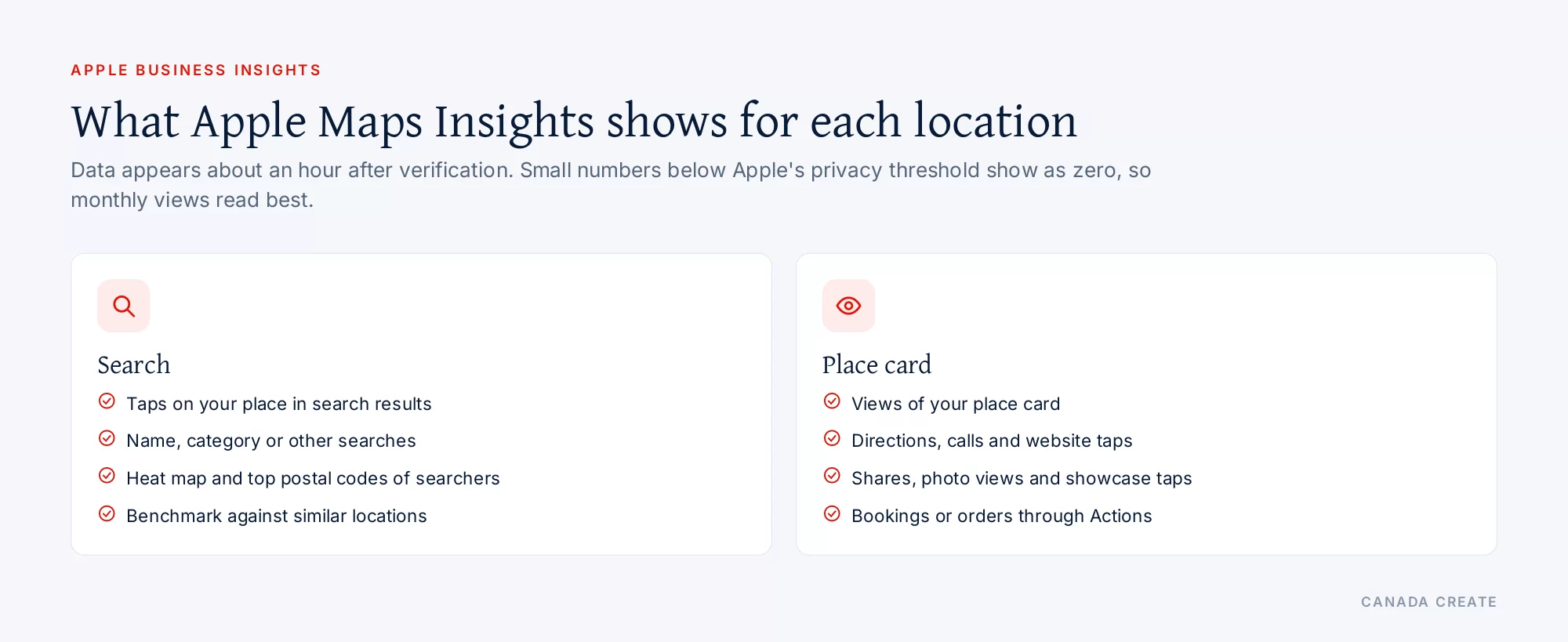
Once a location is verified, Apple Business shows insights about it, usually within about an hour of verification. Apple groups them into two sections:
- Search: how many times people tapped your location in search results, and whether they searched for your name, for a category such as “physiotherapist”, or for something else such as an address. A heat map and a list show the postal codes where searchers were when they tapped you (up to 10), and a “similar locations” benchmark compares your taps with comparable businesses nearby.
- Place card: how many people viewed your card and what they did next: asked for directions, tapped your website or phone number, shared the card, browsed photos, opened your showcase or used an Action. A heat map shows where people requesting directions came from.
Apple hides small numbers below a privacy threshold and shows them as zero, so a quiet location will see more useful figures over monthly periods. You can also get a monthly recap by email.
Keep your Apple Maps information accurate
Customers can report a problem, such as a closed location, directly from your place card. Apple reviews those reports and may edit your location name, status or hours, then emails your administrators. You can accept the change (“Looks Good”) or contest it by entering the correct details; a contested name change is reviewed again, which can take up to five business days.
To avoid surprises:
- Update regular and special hours before every long weekend and seasonal change.
- Keep the name identical to your sign and website.
- Use the Good to Know field for useful facts, such as wheelchair access or parking.
- When you close or hand over a location, remove it in the portal and choose the reason. Apple offers two: someone else manages it, or it is permanently closed, in which case Apple marks it permanently closed on Maps.
Why your business is not showing on Apple Maps
If customers cannot find you, work through these causes in order.
- Not verified yet. New organizations must complete two verification methods within 60 days, and Apple only lets you add photos, showcases and Actions once the organization or location is verified.
- Already managed by someone else. Request a transfer with your documents.
- Display name rejected or changed. Names with extra keywords, symbols or a city added for distinction break Apple’s rules and may be changed.
- Wrong pin. A marker on the wrong building or across the street makes a place hard to find in search and in directions.
- Category too broad or wrong. Choose the closest primary category and add secondary ones.
- Emails filtered. Apple’s verification and review messages come from apple.com domains; a spam filter can hide them.
- A service-area or online-only business. Apple says Apple Business can also serve businesses without a physical location, and its site invites online stores and mobile businesses to register as a virtual business. Follow that path rather than listing a home address you do not want shown.
Apple Maps, Siri and your website
Apple Maps relies on your place card, but Siri, Spotlight and Safari also read the web through Apple’s crawler. Apple’s Applebot page explains the controls:
- Applebot crawls the web to power search features in Spotlight, Siri and Safari. Allowing it lets your site appear in those results.
- Apple may use Applebot data to train its foundation models. You can opt out of that use by disallowing Applebot-Extended in robots.txt, while still allowing Applebot.
- Applebot data can also give context for AI-generated answers in Siri and Search, which may include links to sources. You can keep specific content out of those answers with a nosnippet meta tag.
- If your robots.txt does not mention Applebot but does mention Googlebot, Applebot follows the Googlebot rules.
So a business that blocks unfamiliar bots by default may be invisible in Siri’s web answers without knowing it. The same crawler questions apply to ChatGPT, Gemini and the other assistants; our guide to AI search optimization in Toronto covers them together, and ChatGPT SEO in Toronto explains OpenAI’s crawlers in detail.
Ads on Apple Maps in Canada
Apple Business also runs ads on Apple Maps. Apple says they are available in the United States and Canada, for advertisers with business locations and an organization address in those countries. To start, open Ads in Apple Business, accept the advertising terms, and add your organization details. Apple warns that the currency and time zone cannot be changed later. An ad uses up to three of your approved assets, optional promotional text, the locations you choose and a monthly budget maximum you can pause at any time. Apple also mentions a one-time USD 150 sign-up credit for eligible organizations, with conditions. Ads are optional; a complete, verified place card comes first.
Apple Maps and Google Business Profile: keep them in step
Apple Maps and Google Maps are separate systems with separate listings, and many customers use both. The facts on both must match your website exactly: name, address, phone, hours, categories and services. When they disagree, customers lose trust and AI assistants, which compare sources, may repeat the wrong version.
- Set up your Google Business Profile and your Apple place card from the same master list of facts.
- Change hours on both on the same day.
- Use the same photos where they meet both platforms’ rules, and refresh them together.
- Track calls and directions from each platform separately so you know where customers come from.
Accurate listings across Apple, Google, Bing and the main directories are the core of local SEO in Toronto. Our guide to local citations covers the other directories.
Several locations, franchises and agencies
Apple Business supports organizations with many locations and brands. Each location can carry an internal location code (for example Store-02) that customers never see, a default language, and its own photos, hours and Actions. Insights reports can cover several locations at once.
If an agency manages your listings, Apple has a third-party partner program: the agency registers as a partner and you share access with it, rather than handing over your login. Keep your own administrator account, and remove a partner’s access when the work ends. That way your listings never get stuck under someone else’s account, a frequent reason owners see “This location is already managed”.
Branded Mail and Tap to Pay
Two other Apple Business features are worth knowing about, even if Maps is your focus. Branded Mail shows your logo on emails you send to customers, once you verify your domain and email domain. Tap to Pay on iPhone lets you accept contactless payments on an iPhone, and Apple can show your brand during the payment. Both use the same brand details you set up for your place card, which is another reason to get the name and logo right the first time.
If you would rather have your Apple Maps, Google and other listings set up and kept current for you, our local SEO team in Toronto does exactly that.
Frequently asked questions
How does a business get added to Apple Maps?
Sign up for Apple Business at business.apple.com, verify your organization with two methods, then add your location under Brands > Locations with the correct name, address, pin, category, phone and hours. If your business already appears on Maps, you select the existing place and claim it, by phone verification or by verifying your organization.
How do I list my business on Apple Maps?
Create an Apple Business account, verify the organization, and add a location. Apple asks for the display name, address, primary category, status, phone number, optional website and hours, then links the location to a brand. Once verified, you can add photos, a cover photo, showcases and Actions to complete the place card.
What is Apple Business Connect?
Apple Business Connect was Apple's portal for claiming and managing how a business appears in Apple Maps, Siri, Wallet and other Apple apps. Apple has since combined it with Apple Business Manager and Apple Business Essentials into one service called Apple Business, at business.apple.com.
What happened to Apple Business Connect?
Apple merged it into Apple Business. The old guide now opens with the notice that Apple Business Connect is now Apple Business. Existing users sign in at business.apple.com; the first sign-in moves the organization to Apple Business, after which the old portal is no longer available to that account.
Does it cost money to be listed on Apple Maps?
Apple's business site lists paid options such as extra iCloud storage, AppleCare+ for Business and ads on Apple Maps. Signing up and managing your place card are not listed with a fee on Apple's pages, checked November 3, 2026. Check the current terms when you sign up, since Apple can change them.
How do I get my business on Apple Maps for free?
Use Apple Business directly at business.apple.com rather than a paid listing service. Sign up, verify the organization, and add or claim your location. Paid extras such as Maps ads are optional; a complete, verified place card is the part every business needs.
Can I list my business on Apple Maps without a website?
Yes. The website field is optional, and Apple also accepts a Facebook, Instagram or TikTok page in its place. Providing a website does help in one way: Apple says it can speed up verification of your organization.
Can I add a home-based or service-area business to Apple Maps?
Apple says Apple Business also serves businesses without a physical location, such as service providers and online stores, and its site invites them to register as a virtual business. Use that route rather than listing a home address you do not want shown on a public map.
How long does Apple Maps verification take?
Apple says organization verification can take up to five business days, and longer when volumes are high. A transfer request for a location someone else manages can also take up to five business days. Allow mail from all apple.com domains so the results reach you.
What documents does Apple accept to verify a business?
Apple accepts a business licence, sales tax permit, food, health or alcohol permit, lease or property agreement, utility bill or another official document. You need two verification methods in total; the others are a Business ID such as a D-U-N-S Number, a DNS TXT record on your domain, or App Store Connect if you have an app.
Can I verify my business on Apple Maps by phone?
For a place that already exists on Maps, yes. Apple can call the phone number it has on record for that location, and you enter the four-digit code it gives you. If you do not recognize the number Apple has on file, contact Apple Business support instead of guessing.
Do I need a D-U-N-S Number for Apple Business?
It is one option, not the only one. Apple needs two verification methods, and a Business ID such as a D-U-N-S Number is one of them. You can also use domain validation through a DNS record, App Store Connect, or official documents such as a business licence or utility bill.
How long do I have to verify my organization?
Apple gives you 60 days after sign-up to verify your organization. Start soon after signing up, because the review itself can take up to five business days and you may need time to gather documents or add a DNS record.
Why does my location say it is already managed?
Another organization already controls that place, often a former agency, a landlord, a franchisor or an old account. Apple lets you add the location anyway and then request a transfer, explaining why and attaching supporting documents such as a business licence or utility bill. The review can take up to five business days.
Can I sign up with a Gmail or other public email address?
Yes for the first administrator, if you do not have your own domain. Apple's requirement is that the email is not already used as an Apple Account for another Apple service, such as an App Store or iCloud account, and is not on a domain another Apple Business organization has verified.
How do I change my business hours on Apple Maps?
Sign in to Apple Business, choose Brands > Locations, select the location and edit Regular hours. Use Special hours for holidays, events or extended hours, so customers see the right times on the day without changing your normal schedule.
How do I change my business address on Apple Maps?
Edit the location in Brands > Locations, then check the map and drag it, or enter coordinates, so the marker sits over the correct building and entrance. If you moved to a new location entirely, add the new location and remove the old one with the reason that applies.
How do I change my business name on Apple Maps?
Edit the display name for the location. Apple requires it to match your storefront or website, with no extra descriptions, symbols such as the trademark sign, or a city added only to tell locations apart. If Apple changed your name after a customer report, you can contest it and send supporting information for review.
Why did Apple change my business hours or status?
Customers can report problems, such as a closed location, from your place card. Apple reviews those reports and may update the location name, status or hours, then emails your administrators. You can accept the change or contest it by entering the correct details in Apple Business.
What size should my Apple Maps cover photo be?
At least 1600 by 1040 pixels and no more than 4864 by 4864, in HEIF, JPEG or PNG. Apple crops it to 2.5:1 in Maps and 1.5:1 in Apple Wallet, so keep the subject centred. It must be a single photo without edits, promotional text, watermarks or clip art.
How do I add photos to Apple Maps?
After verification, open the location in Brands > Locations, select Photos, then Add Photos. Upload HEIF, JPEG or PNG files at least 720 by 960 pixels, add a caption and alt text, and wait for Apple's review. Approved photos appear in the From the Business album on your place card.
What categories can I choose on Apple Maps?
You choose one primary category when you add a location and can add more later. Apple updates its category list regularly, so if nothing fits well today, pick the closest match and check back. Categories help Apple match your place to searches such as dentist, bakery or plumber.
Can my Apple Maps listing show French and English names?
Yes. Each location has a default language, and you can add an alternate display name in another language. Apple asks that the content in each language stay consistent, which suits bilingual businesses in Toronto and locations in Quebec.
What is an Apple Maps showcase?
A showcase is a module on your place card for something new, such as a seasonal menu, a sale or an event, with a call-to-action button. It has a headline of up to 38 characters, body text of up to 100 characters, a square photo and an Action. Apple reviews each one before it goes live.
How long does an Apple Maps showcase run?
Up to 365 days, with 90 days as the default. Because Apple reviews every showcase, and that can take up to three calendar days, submit it at least three days before you want it to appear, and plan new ones ahead so the card stays current.
What are Actions on Apple Maps?
Actions are buttons on your place card, such as Order, Reserve, Menu or Tickets, that link to your own booking or ordering page. The types available depend on your category. Your first Action becomes the Primary Action, Apple approves each one, and customers need iOS or iPadOS 17.4 or later to use them.
Can customers book appointments from Apple Maps?
Yes, if your category offers a booking-type Action and you link it to your online booking page. Approval can take up to three business days. A direct booking Action shortens the path for the customer and makes Maps bookings easier to count in your own system.
What does Apple Maps Insights show?
Insights show how people found your location, for example by searching your name, a category or an address, plus taps in search results, place card views and actions such as directions, website taps, calls, shares, photo views, showcase taps and Action use. Heat maps show where searchers and people asking for directions were.
Can I see how many people called my business from Apple Maps?
Yes. The place card section of Insights counts taps on your phone number, along with directions requests and website taps. Apple shows small numbers below a privacy threshold as zero, so monthly views give a clearer picture for quieter locations.
Can I advertise on Apple Maps in Canada?
Yes. Apple says ads on Apple Maps are available in the United States and Canada for advertisers with business locations and an organization address there. You set them up in the Ads section of Apple Business with up to three assets, chosen locations and a monthly budget maximum.
Is there a sign-up credit for Apple Maps ads?
Apple mentions that an organization may be eligible for a one-time USD 150 sign-up credit toward ad spending, with eligibility limits and terms. Check the current offer in the Ads section when you start, and note that the currency and time zone you choose cannot be changed later.
Does an Apple Maps listing help with Siri?
Yes. Apple says your place card appears across Apple apps, including Maps, Siri, Calendar, Messages and Spotlight. When someone asks Siri for a business like yours, the details shown come from that place card, so an accurate, complete card matters for voice searches too.
What is Applebot?
Applebot is Apple's web crawler. Apple says it powers search features in Spotlight, Siri and Safari, and allowing it in robots.txt lets your website appear in those results. If your robots.txt has no rules for Applebot but has rules for Googlebot, Applebot follows the Googlebot rules.
Should I block Applebot-Extended?
It depends on whether you want your content used to train Apple's foundation models. Disallowing Applebot-Extended opts out of that training use while still letting Applebot crawl for Spotlight, Siri and Safari results. It is a business decision about your content, not a requirement for appearing on Maps.
Does Apple Maps matter for local SEO?
Yes, because it is a separate place where customers find, compare and get directions to local businesses, and because AI assistants compare listings when they describe a business. A verified Apple place card with the same facts as your website and Google Business Profile is part of a complete local presence.
Is Apple Business the same as Google Business Profile?
No. They are separate systems run by different companies, with separate accounts, rules and reports. Most businesses need both. Set them up from the same master list of facts and update them together, so customers and AI assistants see one consistent version of your business.
Why is my business not listed on Apple Maps?
The common causes are an unverified organization, a location already managed by someone else, a display name that breaks Apple's rules, a pin on the wrong building, a poor category match or verification emails caught by a spam filter. Work through them in that order in Apple Business.
Can an agency manage my Apple Business account?
Yes, through Apple's third-party partner program. The agency registers as a partner and you share access with it from your own account. Keep your own administrator login and remove the partner's access when the work ends, so your locations never sit under someone else's account.
Can I manage several locations in one Apple Business account?
Yes. Each location has its own address, hours, photos, showcases and Actions, and can carry an internal location code that customers never see. Insights reports can cover several locations at once, and brands with several businesses can organize them as separate brands or organizational units.
How do I remove a closed or duplicate location from Apple Maps?
In Brands > Locations, select the location, then Preferences > Manage > Remove Location, and choose a reason. If you pick permanently closed, Apple marks it closed on Maps. If someone else manages it, it is removed from your account. Apple notes a removed location may still appear on Maps.
How can I contact Apple Business support?
Apple Business has its own support section, linked from the Apple Business User Guide and from the Support menu at business.apple.com. Use it for problems such as a phone number on record that you do not recognize, a stuck verification or a transfer request that needs more information.
What browsers does Apple Business support?
Apple lists recent versions of Safari and Chrome on iPhone and iPad, and Safari, Chrome, Edge and Firefox on Mac, plus Chrome, Edge and Firefox on Windows. If a page in the portal will not load, update the browser before contacting support.
What is Branded Mail in Apple Business?
Branded Mail shows your logo on emails you send to customers, so they recognize your brand in their inbox. It uses the brand you set up in Apple Business and requires you to verify your domain. Apple lists Branded Mail as available in Canada.