
302 Status Code: What 302 Found Means and When to Use It

A 302 status code, named “302 Found”, means the page you asked for is temporarily available at a different URL. The server sends the new address in a Location header and the browser loads it automatically. Because the move is temporary, browsers and search engines keep the original URL as the real address of the page, which is the key difference from a 301 permanent redirect.
This guide explains what the 302 code means under the HTTP standard, how Google treats it, when it is the right choice, when it quietly hurts a site, and how to set, check and fix 302 redirects on common platforms. It is part of our HTTP status codes reference.
What 302 Found means
RFC 9110, section 15.4.3 defines 302 Found this way: the target resource resides temporarily under a different URI, and because the redirection might change, the client ought to keep using the original URI for future requests. The server should include a Location header with the temporary address, and the response body usually holds a short note with a link to it.
A typical response looks like this:
HTTP/1.1 302 Found
Location: https://example.com/holiday-hours/
Content-Type: text/html; charset=UTF-8
Cache-Control: no-cache
Three practical points follow from the definition:
- It is a redirect, not an error. A 302 is a 3xx response. Tools sometimes list it under “errors” or “warnings”, but the code itself says the request is being handled correctly by sending the visitor elsewhere.
- The original URL stays the reference. Bookmarks, links and search engines are meant to keep pointing at the old address, because it will be used again.
- The method can change. For historical reasons, a browser may turn a POST into a GET when it follows a 302. If the method must be kept, the standard points to 307 instead.
A short history: why there are four redirect codes
HTTP/1.0 called 302 “Moved Temporarily” and meant it to keep the request method. Most browsers ignored that and switched POST requests to GET, so the code came to mean two things at once. HTTP/1.1 fixed the confusion by adding 303 See Other (go to another URL, always with GET) and 307 Temporary Redirect (temporary, keep the method). Later, 308 Permanent Redirect was added as the method-keeping version of 301. Today the four codes line up like this:
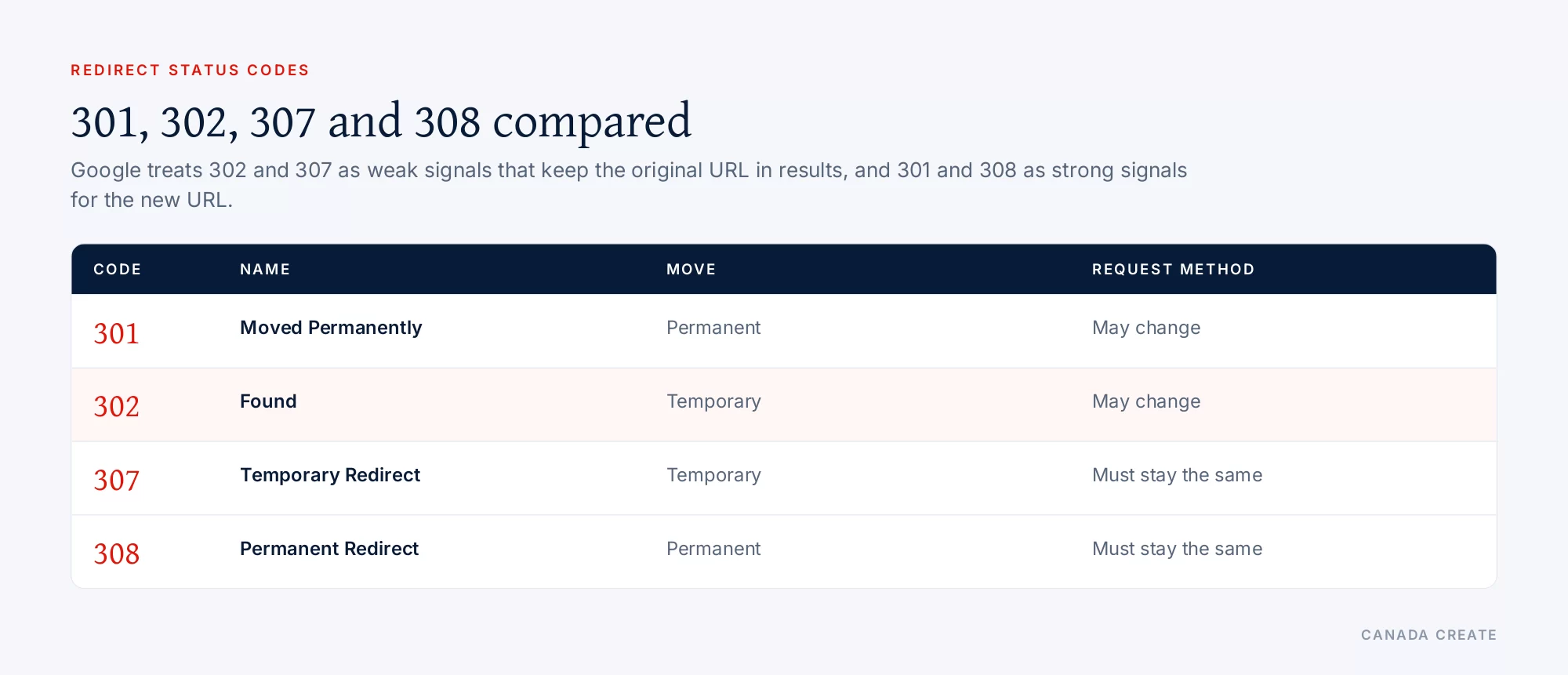
| Code | Permanent or temporary | Can the method change? |
|---|---|---|
| 301 Moved Permanently | Permanent | Yes, POST may become GET |
| 302 Found | Temporary | Yes, POST may become GET |
| 307 Temporary Redirect | Temporary | No, the method must stay the same |
| 308 Permanent Redirect | Permanent | No, the method must stay the same |
Our SEO team plans, fixes and reports on the work in this guide every month for Canadian businesses.
For ordinary page visits, which are GET requests, 302 and 307 behave the same way, and so do 301 and 308. The difference matters for forms and APIs that send data.
How Google treats a 302 redirect
Google’s status code documentation says its crawlers follow a 302 by default and use it as a weak signal that the redirect target should be processed. A 301 is a strong signal. Google treats 307 as equivalent to 302 and 308 as equivalent to 301, while still asking site owners to use the code that matches the real situation so other clients benefit.
Google’s redirects guide spells out what this means in search results:
- Permanent redirects tend to show the new target URL in search results.
- Temporary redirects tend to show the original source URL in search results. The target can still be indexed if other canonical signals point to it, such as internal links, sitemaps and rel=”canonical” tags.
Two more details are useful. Google ignores any content on the redirecting URL itself, so text on a 302 response is never indexed. And Google follows up to 10 redirect hops for normal crawling, so a 302 inside a long chain may still resolve, but every hop slows visitors and wastes crawl requests.
What about a 302 that stays in place for months? Google picks the URL to show from several signals, and the redirect type is only one of them. If a “temporary” redirect never changes and every other signal points to the target, Google may decide the target is the canonical page anyway. That is not a reason to rely on 302s for permanent moves; it means the outcome becomes harder to predict.
When a 302 is the right choice
Use a 302 (or 307) when the original URL is coming back and you want it to keep its place in search results.
- Seasonal or temporary pages. Sending /patio-furniture/ to a “back in spring” page for the winter, or a menu page to holiday hours for a week.
- A page under repair. Pointing visitors to a related page while one page is rebuilt, when you do not want the replacement to take over its ranking.
- Short promotions. Sending a campaign URL to the current offer while the campaign runs.
- A/B and split tests. Google’s guidance on website testing recommends a 302 rather than a 301 when a test redirects some visitors to a variant URL, plus a canonical tag on the variant pointing at the original.
- Login and session flows. Sending a visitor who is not signed in to the login page and back again afterward.
- After a form submission. Sending the browser from the form handler to a thank-you page. 303 is the most precise code here, but 302 is widely used and works.
- Testing a planned permanent redirect. Browsers may cache a 301 for a long time, while a 302 is not cached unless headers allow it. Some teams test with a 302, confirm the destination is right, then switch to a 301.
When a 302 hurts a site
Most 302 problems come from using a temporary code for a permanent change, often because it was the default of a plugin, a framework or a hosting panel.
A permanent move set up as a 302
Changing a page’s URL, merging two pages, moving from HTTP to HTTPS, adding or removing www, or moving to a new domain are all permanent. With a 302, Google keeps treating the old URL as the main one, so the new URL can take longer to appear and signals stay split between the two. Use a 301 or 308 for all of these.
Location and language redirects
Some sites send visitors to a country or language version based on their IP address. Googlebot crawls mostly from addresses in the United States, so an automatic redirect can stop it from ever seeing your Canadian or French pages. Google’s advice on locale-adaptive pages is to give each version its own URL, link them with hreflang and let people switch, instead of forcing a redirect.
Removed pages sent to the home page
Redirecting every deleted URL to the home page with a 302 tells search engines the old page is still the real address, while visitors land somewhere unrelated. Google often reports these as soft 404s. If there is a close replacement, use a 301 to it; if not, return a 404 or 410 (see our 404 error guide and 301 vs 404).
Chains and loops
A chain like http, then https, then www, then a new slug, mixing 302 and 301 hops, sends mixed signals and slows every visit. A loop, where a login page redirects to itself or two rules send a URL back and forth, never resolves and shows up as “Redirect error” in Search Console and “too many redirects” in the browser.
Redirects that depend on cookies or user agents
A 302 that only fires for certain browsers, devices or cookies can show crawlers something different from what visitors see. Keep redirects consistent for everyone, or use responsive design and hreflang instead.
How 302s interact with canonical tags, sitemaps and hreflang
A redirect is only one of the signals Google uses to choose which URL to show. The others should agree with it, or the result becomes unpredictable.
- Sitemaps: list only the URLs you want indexed. During a temporary redirect, that is usually the original URL, so keep it in the sitemap and leave the temporary target out unless it is a page you want found on its own.
- Canonical tags: if the temporary target is a near copy of the original (for example a test variant), give it a rel=”canonical” tag pointing at the original. If the canonical tag points one way and a permanent redirect points the other, Google has to guess.
- Internal links: keep linking to the original URL during a temporary move. Linking to the temporary target tells Google that URL matters more.
- hreflang: language and country versions should each return 200 at their own URL. A 302 between language versions hides one of them from crawlers and breaks the hreflang set.
Real examples from business websites
- A clinic’s booking page under repair: /book/ sends visitors to /contact/ with a 302 for two days while the booking tool is fixed. The booking page keeps its place in search, and the redirect comes off when the fix is live.
- A store’s seasonal collection: /patio-furniture/ points to a “back in spring” page from November to March. Because the URL returns in spring, a 302 keeps its ranking history attached to the original address.
- A rebrand done with 302s by mistake: a company moves to a new domain and its hosting panel adds 302s by default. Months later the old domain still shows in results. Switching every rule to a one-hop 301 lets the new domain take over.
- A login wall: a members area sends anyone not signed in to /login/ with a 302. That is correct, and those member pages should not be in the sitemap or indexed anyway.
302 vs 301: how to decide
Ask one question: will the original URL be used again? If yes, use a temporary redirect (302 or 307). If no, use a permanent redirect (301 or 308).
- New URL for the same content, forever: 301.
- HTTP to HTTPS, or a domain change: 301.
- Two pages merged into one: 301 from the retired page to the survivor.
- Page temporarily replaced while it is fixed or out of season: 302.
- Split test variant: 302, with a canonical tag on the variant.
- Form posted, show a result page: 303 (302 works).
- API endpoint temporarily moved and the method must be kept: 307.
If you set up a 302 and later learn the move is permanent, switch it to a 301 and update internal links to point straight at the new URL.
How to check whether a URL returns a 302
In the browser
Open developer tools (F12), go to the Network tab, tick “Preserve log” so redirects are kept, and load the URL. The first request shows the status (302) and, in its headers, the Location it pointed to. The next request shows where the browser went.
With curl
$ curl -sIL https://example.com/old/ | grep -iE "^HTTP|^location"
HTTP/2 302
location: https://example.com/temporary/
HTTP/2 200
The -L option follows every hop, so you see the whole chain and the final status.
In Google Search Console
URL Inspection reports “Page with redirect” for a URL that redirects; Google’s inspection tool does not follow the redirect, so inspect the target separately. In the Page indexing report, “Page with redirect” lists URLs that are not indexed because they redirect, which is expected for old URLs, and “Redirect error” lists chains that are too long, loops and redirects to empty or invalid URLs.
With a site crawler
A crawler lists every internal link that points at a redirect, the type of each redirect, and the chains. Fixing the internal links so they point at final URLs removes most redirect hops visitors ever experience.
How to set or change a 302 on common platforms
These are general patterns; check your platform’s documentation and test on one URL before changing many.
Apache and LiteSpeed (.htaccess)
# Temporary redirect for one page
Redirect 302 /patio-furniture/ https://example.com/back-in-spring/

# Same with mod_rewrite
RewriteEngine On
RewriteRule ^patio-furniture/?$ https://example.com/back-in-spring/ [R=302,L]

# A permanent move uses 301 instead
Redirect 301 /old-page/ https://example.com/new-page/
In mod_rewrite, a rule with [R] and no number sends a 302, which is a common reason permanent moves end up temporary.
Nginx
location = /patio-furniture/ {
    return 302 https://example.com/back-in-spring/;
}
# rewrite ... redirect;  sends 302
# rewrite ... permanent; sends 301
PHP
header('Location: https://example.com/back-in-spring/', true, 302);
exit;
A plain header('Location: ...') without a code also sends a 302, so permanent redirects in custom code need the 301 set explicitly.
WordPress
The WordPress function wp_redirect() sends a 302 unless a different code is passed, and many themes and plugins call it with the default. Redirect plugins and SEO plugins usually let you choose the type per rule; check each rule rather than assuming. WordPress core itself sends a 301 when you change a post’s slug and the old one is on record.
Shopify
Shopify’s URL redirect feature creates permanent (301) redirects, and it can add one for you when a product or page handle changes. Temporary redirects need an app or theme logic, so most Shopify stores rarely see 302s on their own pages; you will still see them in checkout and account flows, which is normal.
Cloudflare and other CDNs
Redirect rules at the CDN let you choose 301, 302, 307 or 308 for each rule. Set the code on purpose and check that a CDN rule is not stacking on top of a server rule and creating a chain.
A 302 checklist
- List every redirect on the site with its code (crawler export or server rules).
- Mark which 302s are truly temporary. Change the rest to 301.
- Make sure every redirect is one hop, from the old URL straight to the final URL.
- Point internal links, menus, canonical tags and the sitemap at final 200 URLs.
- Remove temporary redirects when the temporary period ends, so the original page is served again.
- Recheck the Page indexing report for redirect errors after any change.
Redirect clean-ups are part of most technical reviews we do in our Toronto SEO services. For the full picture of how every status code affects crawling, see the HTTP status codes hub, and for errors you may meet next, read 400 Bad Request and 503 Service Unavailable.
Frequently asked questions
What does error code 302 mean?
A 302 is not an error. It is a redirect status called 302 Found, meaning the page is temporarily at another URL. The server sends that URL in a Location header and the browser follows it automatically, while the original URL stays the official address.
What is a 302 redirect used for?
It is used when the original URL will be used again: a seasonal or out-of-stock page, a page under repair, a short promotion, a split test variant, a login step or a thank-you page after a form. For permanent moves, use a 301.
What is the difference between status code 301 and 302?
A 301 says the page has moved permanently, and Google treats it as a strong signal to show the new URL. A 302 says the move is temporary, and Google treats it as a weak signal, so the original URL usually stays in search results.
When should I use a 301 instead of a 302?
Use a 301 for any change that will not be reversed: a new slug, merged pages, HTTP to HTTPS, a www change or a new domain. Use a 302 only when you plan to bring the original URL back.
Does 302 mean redirect?
Yes. Every 3xx status code is a redirection code, and 302 Found tells the client to load a different URL for now. Browsers follow it without the visitor doing anything.
Why would a server send a 302 instead of a 200?
A 200 means the content is at the URL requested. A 302 means it is temporarily somewhere else, so the server points the browser there instead of serving the page. Login checks, location rules and maintenance setups often send 302s for this reason.
Is a 302 redirect bad for SEO?
Not when the move really is temporary. Problems start when a permanent move is set up as a 302, because Google keeps the old URL as the main one and signals stay split. Check plugins and server rules, since several send 302 by default.
What is the difference between 302 and 307?
Both are temporary redirects and Google treats them the same way. The difference is how the request method is handled. With a 302 a browser may turn a POST into a GET, while a 307 requires the same method, which matters for forms and APIs.
How long can a 302 redirect stay in place?
There is no fixed limit, but a temporary redirect should end when the temporary reason ends. If a 302 stays for months and every other signal points to the target, Google may treat the target as the main URL anyway, so switch it to a 301 if the move became permanent.
How do I check if a page uses a 302 redirect?
Run curl -sIL with the URL to see each hop and its status, or open the Network tab in your browser's developer tools with Preserve log on. In Search Console, URL Inspection reports a page with redirect.
Do 302 redirects pass link value?
Google uses every redirect as a signal for choosing the canonical URL, and link signals are consolidated on the URL it picks. With a 302, that is usually the original URL. If you want the new URL to collect the signals, use a 301.