
503 Service Unavailable: What It Means and How to Fix It

A 503 Service Unavailable error means the server is reachable but cannot handle the request right now, usually because it is overloaded or down for maintenance. The condition is meant to be temporary, and the server can say when to try again with a Retry-After header. For a visitor, waiting a few minutes and reloading often works. For a site owner, a 503 that lasts more than a short maintenance window is a warning that real visitors and search engines are being turned away.
This guide explains what 503 means under the HTTP standard, its common causes, how to fix it as a visitor and as a site owner on common platforms, how to use a 503 correctly for planned maintenance, and how Google and AI search systems react to it. It is part of our HTTP status codes reference.
What the 503 status code means
RFC 9110, section 15.6.4 defines 503 Service Unavailable as a sign that the server is currently unable to handle the request due to a temporary overload or scheduled maintenance, which will likely be fixed after some delay. The server may send a Retry-After header to suggest how long the client should wait. The standard also notes that servers are not required to use 503 when overloaded; some simply refuse connections.
The Retry-After header (section 10.2.3) takes either a date or a number of seconds:
HTTP/1.1 503 Service Unavailable
Retry-After: 3600
Content-Type: text/html; charset=UTF-8
The wording on the screen depends on the server and platform:
- 503 Service Unavailable
- HTTP Error 503. The service is unavailable.
- Service Temporarily Unavailable
- Briefly unavailable for scheduled maintenance. Check back in a minute.
- 503 Backend fetch failed, or backend is unhealthy
- No server is available to handle this request.
503 compared with other server errors
| Code | What it usually means | Where to look first |
|---|---|---|
| 500 Internal Server Error | The application crashed or hit an error. | Application and PHP error logs. |
| 502 Bad Gateway | A proxy got an invalid reply from the server behind it. | The upstream service (PHP-FPM, app server). |
| 503 Service Unavailable | The server is overloaded, out of workers or in maintenance. | Resource use, maintenance mode, upstream health. |
| 504 Gateway Timeout | A proxy waited too long for the server behind it. | Slow queries, slow scripts, timeouts. |
| 429 Too Many Requests | One client sent too many requests. | Rate limits, firewall and bot rules. |
Our SEO team plans, fixes and reports on the work in this guide every month for Canadian businesses.
What causes a 503 error
Planned maintenance
Many systems return 503 on purpose during updates. WordPress, for example, puts a .maintenance file in the site root while it updates core, plugins or themes and shows “Briefly unavailable for scheduled maintenance” with a 503. If an update is interrupted, that file can stay behind and keep the site in maintenance mode.
Too much traffic for the server
A spike from a promotion, a news mention or an email campaign can use up the server’s capacity. On shared and managed hosting, accounts have limits on processes, memory or PHP workers; when every worker is busy, new requests get a 503 until one frees up.
Bots and floods
Aggressive crawlers, scrapers, brute-force login attempts and denial-of-service traffic consume the same resources as real visitors. Uncached URLs with query strings (search, filters, calendars) are especially expensive, because each one runs the full application.
A stopped or unhealthy service
If PHP-FPM, an application server or an IIS application pool stops, the web server in front of it can return 503. Load balancers and CDNs return 503 when their health checks mark every backend as down, which is where messages like “backend is unhealthy” and “no server is available” come from.
Slow code and database problems
A heavy plugin, a slow database query or a scheduled job running at a busy time can tie up workers long enough to trigger 503s for everyone else.
Rate limiting and firewalls
Some firewalls and CDNs return 503 (instead of 429) when they decide a visitor or crawler is sending too many requests. If only some visitors or only bots see the error, check these rules.
How to fix a 503 as a visitor
- Wait a minute and reload. Many 503s clear on their own as traffic drops or maintenance ends.
- Check whether the site or its host has a status page or social account reporting an outage.
- Try another network or device to rule out a local proxy or VPN.
- If the error lasts more than an hour on a site you rely on, contact the business by phone or email.
Clearing your cache rarely helps with a 503, because the problem is on the server side.
How to fix a 503 on your own website
Find out who is answering
Look at the error page and the response headers (curl -I https://example.com/). A CDN-branded page or CDN headers mean the CDN could not get a healthy response from your server. A plain server page means the web server itself returned the 503. A WordPress maintenance message points to an unfinished update.
Check maintenance mode
On WordPress, look for a .maintenance file in the site root and delete it if no update is running, then rerun the update that failed. Other platforms have a maintenance switch in their admin or configuration; make sure it was turned off.
Check resources
Your hosting panel or monitoring shows CPU, memory, process and worker use. If limits are being hit, find out why before raising them: a traffic spike, a bot, a slow page or a background job.
Read the logs
The web server error log, the PHP or application log and the access log for the time of the errors usually show the cause: workers exhausted, a fatal error in one plugin, a timeout to the database, or thousands of requests from one address.
Restart the stuck service
If a service has stopped, restarting PHP-FPM, the application server or the IIS application pool brings the site back. Then find out why it stopped, or it will happen again.
Reduce the load
- Turn on full-page caching for pages that are the same for every visitor, and make sure the cache covers common query strings.
- Block or rate-limit abusive bots at the firewall or CDN, without blocking the search and AI crawlers you want.
- Move heavy scheduled jobs to quiet hours, and run WordPress cron from a real server schedule instead of on page views if traffic is high.
- Deactivate a plugin or extension that the logs point to, on a staging copy first where possible.
- Upgrade the hosting plan or add capacity only once you know the load is legitimate.
Check the CDN and load balancer
Confirm the origin address, the health check path and the timeout settings. A health check pointed at a page that redirects or needs a login can mark a healthy server as down and turn the whole site into a 503.
Using a 503 correctly for planned maintenance
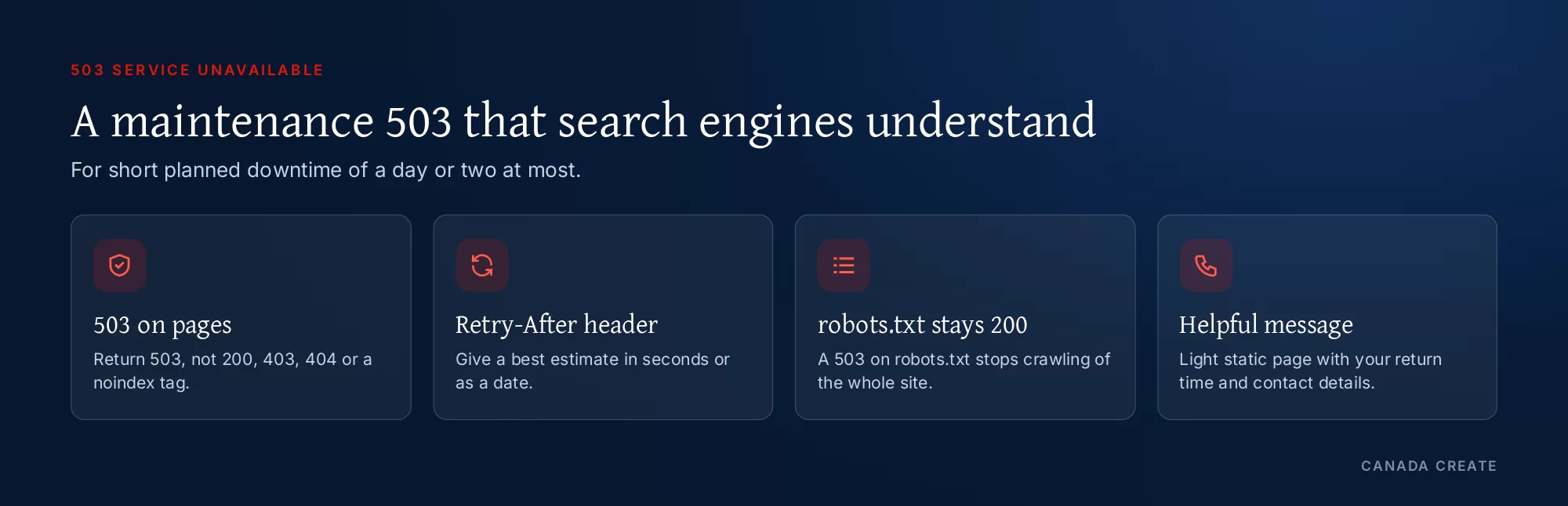
Google’s guidance on pausing an online business recommends limiting site features (for example, turning off the cart and showing a banner) instead of taking the site down. If you must take it down, return an informational page with a 503 for an urgent closure of one to two days, and for longer closures keep a home page live with a 200 so people can still find you. Google’s best practices for that 503 page:
- Keep robots.txt available with a 200. Never return 503 for robots.txt, because that blocks all crawling.
- Send a Retry-After header with your best estimate.
- Serve static HTML with inline styles and few outside files, so the page stays light under load.
- Tell visitors what is happening, when you expect to be back and how to reach you.
- Do not use 403, 404 or 410, a noindex tag, a robots.txt that disallows everything, or the Search Console removal tool to “pause” a site; those remove pages from Google.
Google also notes that it cannot refresh titles, descriptions or structured data while pages return 503, so schedule maintenance outside your busiest hours and keep it short.
Example: Apache or LiteSpeed (.htaccess)
RewriteEngine On
# Let your own IP and robots.txt through
RewriteCond %{REMOTE_ADDR} !^203\.0\.113\.10$
RewriteCond %{REQUEST_URI} !^/robots\.txt$
RewriteCond %{REQUEST_URI} !^/maintenance\.html$
RewriteRule ^ - [R=503,L]
ErrorDocument 503 /maintenance.html
Header always set Retry-After "3600"
Example: Nginx
location = /robots.txt { try_files $uri =404; }
location / {
    return 503;
}
error_page 503 /maintenance.html;
location = /maintenance.html {
    root /var/www/maintenance;
    add_header Retry-After 3600 always;
    internal;
}
Example: PHP
http_response_code(503);
header('Retry-After: 3600');
readfile(__DIR__ . '/maintenance.html');
exit;
Test the result with curl -I on the home page (expect 503 and Retry-After) and on /robots.txt (expect 200). Remove the rule as soon as maintenance ends.
Planning maintenance so it needs little or no downtime
Many updates that used to need a maintenance page can now be done without taking the site offline. Planning the work this way protects both customers and search visibility.
- Use a staging copy: test plugin, theme and platform updates on a copy of the site first, then apply them to the live site in a few minutes.
- Pick a quiet window: analytics shows the hours with the fewest visitors; for most Canadian businesses that is late evening or early morning Eastern time, but check your own data.
- Keep the maintenance page light: a static HTML file with inline styles keeps working even if the application is down.
- Let your team in: allow your own IP address past the maintenance rule so you can test before reopening.
- Take a backup first and know how to restore it, so a failed update does not turn a short 503 into a long one.
- Tell people in advance on social channels or by email if the site handles bookings or orders.
Maintenance plugins and coming soon pages
Maintenance and “coming soon” plugins are a common way to put a site offline, but they do not all send the same status code. Some return 503 with a Retry-After header, which is correct for short work. Others return 200 with a “coming soon” message, which can get the placeholder indexed in place of your real pages, or a 302 to a holding page. Before relying on one, switch it on and run curl -I on the home page and on /robots.txt to see exactly what crawlers receive. For a new site that is not ready yet, a 200 placeholder page with your business name and contact details is fine; for an existing site, keep closures short and use 503.
How a 503 affects SEO and AI search
Google’s status code documentation says 5xx errors (and 429) make its crawlers temporarily slow down. Pages already in the index are kept for a while but are eventually dropped if the errors continue, and the content of a 503 response is ignored. When the server returns 200 again, Google gradually raises its crawl rate.
- Short, planned 503s of an hour or two, or a day at most, are handled as intended.
- Repeated or random 503s under load make Google crawl less, so new and updated pages take longer to appear.
- 503s that last for days can start removing pages from the index, and it is uncertain how quickly they return.
- A 503 on robots.txt stops crawling of the whole site for the first 12 hours, then Google uses its last cached copy for up to 30 days, as described in Google’s robots.txt specification.
AI search follows the same path. A page must be indexed and eligible for a snippet to appear as a link in Google’s AI Overviews and AI Mode, and AI assistants that fetch pages on demand get nothing useful from a 503. A firewall that answers AI crawlers with 503 under load can keep your pages out of their answers even while people can browse the site.
How to spot 503s before customers do
- Uptime monitoring from outside your network, checking key pages every few minutes and alerting by text or email.
- Search Console Crawl stats (Settings, then Crawl stats): watch “By response” for server errors and the host status panel for availability problems.
- Page indexing report: “Server error (5xx)” lists URLs Google could not fetch.
- Server alerts for CPU, memory and worker limits, so you see the load building before the errors start.
- A log review after every campaign or launch, since those are the moments traffic spikes.
Recurring 503s on a business website usually point to hosting limits, caching gaps or bot traffic. Our managed web hosting in Toronto and website maintenance and security services cover monitoring and server fixes, and our Toronto SEO services check what crawlers receive. For related codes, see the HTTP status codes hub, the 404 error guide and the 400 Bad Request guide.
Frequently asked questions
What does 503 Service Unavailable mean?
The server is reachable but cannot handle the request right now, usually because it is overloaded or in maintenance. The condition is meant to be temporary, and the server may send a Retry-After header saying when to try again.
What is the root cause of a 503 error?
The most common causes are planned maintenance, a traffic spike that uses up the server's workers or account limits, bot floods, a stopped service such as PHP-FPM or an application pool, slow code or database queries, and CDN or load balancer health checks marking the server as down.
Is a 503 error temporary?
It is meant to be. A 503 during an update or a short spike usually clears within minutes. If it lasts hours or keeps coming back, something is wrong with the server's capacity or configuration and needs fixing.
How do I fix a 503 Service Unavailable error?
As a visitor, wait a minute and reload. As a site owner, check for maintenance mode, look at CPU, memory and worker use, read the error logs, restart any stopped service, add caching and block abusive bots, and review CDN health checks.
How do I fix a 503 error on WordPress?
Check the site root for a leftover .maintenance file from an interrupted update and remove it if no update is running. Then look at the PHP error log, deactivate the plugin it points to, and check your hosting resource limits.
Does a 503 error hurt SEO?
A short planned 503 does not. Google slows crawling while it sees 5xx errors and keeps indexed pages for a while, but pages that keep returning errors are eventually dropped. Keep planned 503s to a day or two at most.
Should I use a 503 for website maintenance?
Yes, for short planned downtime. Google recommends a 503 for urgent closures of one to two days, with a Retry-After header and robots.txt still returning 200. For longer closures, keep a page live with a 200 status instead.
What does backend is unhealthy mean?
It means a proxy, cache or load balancer in front of the website cannot reach a healthy server behind it, so it answers with a 503. Check that the web server is running and that the health check URL returns 200.
What is the difference between a 502 and a 503 error?
A 502 Bad Gateway means a proxy got an invalid reply from the server behind it. A 503 means the server, or the proxy for it, cannot handle the request right now because of overload or maintenance.
What is the Retry-After header?
It is a response header that tells clients how long to wait before trying again, as a number of seconds or as a date. Sending it with a maintenance 503 helps browsers, crawlers and monitoring tools know when to return.
Can a 503 on robots.txt stop Google crawling my site?
Yes. If robots.txt returns a server error, Google stops crawling the site for the first 12 hours and then relies on its last cached copy for up to 30 days. Keep robots.txt available during maintenance.