
Toronto · Gemini SEO
Gemini SEO in Toronto
Help Google's Gemini assistant describe and link your business correctly, from the Google-Extended setting to the pages and profile it relies on.
Google Gemini optimization for Toronto and GTA businesses, from North York to downtown.
- BBB A+ accredited
- 18 years in business
- Mon to Fri 9 to 6, Sat 10 to 2
Get your custom Gemini SEO proposal
Tell us what your Toronto customers ask Gemini, and we reply with a custom proposal.
Please do not share passwords or other sensitive details here. We never sell your contact information and we comply with Canadian privacy law
(privacy policy).
What Gemini SEO gives you
A deliberate Google-Extended choice
Training and grounding set on purpose, not by a plugin default.
Pages Gemini can quote
Clear, current passages that are easy to credit accurately.
Correct local answers
Business Profile and location pages aligned for near me prompts.
A record of what Gemini says
Tracked prompts, sources and accuracy, month by month.
What is included in Gemini SEO
Each engagement is scoped to your business and confirmed in a written custom proposal.
- Gemini visibility auditCustomer prompts, current answers, sources and errors.
- Google-Extended decisionThe trade-off explained and the setting applied on purpose.
- Index and crawl reviewThe pages you want Gemini to use are crawlable and indexed.
- Quotable service pagesKey passages written to be quoted accurately.
- Location pagesThe neighbourhoods and services you really cover, in text.
- Business Profile alignmentProfile details matched to your site for local prompts.
- Image and alt text reviewOriginal photos Gemini can show and credit.
- Monthly Gemini reportPrompts, sources, accuracy, referrals and enquiries.
Gemini SEO pricing in Toronto
Gemini work usually runs with your Google SEO and AI Overviews work, because they share Google's index.
Gemini within your Google program
Quoted in writing after a free consultation
Local and service businesses that rely on Google
- Gemini visibility audit
- Google-Extended decision
- Quotable service pages
- Business Profile alignment
- Monthly prompt tracking
Multi-location and B2B
Quoted in writing after a free consultation
Brands with several locations or business buyers
- Everything in the core scope
- Location-level prompts and pages
- Proposal and document clarity review
- Wider content work
One-time setup work, monthly management and any third-party costs are listed separately in your custom proposal.
Google Gemini optimization
Help Gemini describe your business the way your customers would
Gemini SEO is the work of helping Google’s Gemini assistant find, describe and link your business correctly when people ask it for help. Gemini lives at gemini.google.com, in the Gemini app on Android and iPhone, and inside Google Workspace. People use it to plan, compare and decide, often with their location switched on, and it can show the websites behind its answers. For a Toronto business, that means your website, your Google Business Profile and one robots.txt setting called Google-Extended all shape what Gemini can say about you.
Gemini is easy to confuse with Google’s AI features in Search. AI Overviews and AI Mode are part of Google Search and have their own page: Google AI Overviews and AI Mode optimization. This page covers the Gemini app itself. For every assistant together, see AI search optimization in Toronto.
Gemini Apps and Google Search are different products
The difference matters because each has different controls and different measurement.
| Gemini Apps | AI Overviews and AI Mode | |
|---|---|---|
| Where people use it | gemini.google.com, the Gemini mobile app and Google Workspace | Inside Google Search |
| Sources shown | A Sources button or in-line links when sources are available; not every response has them | Supporting links in the AI response |
| Robots.txt control for AI use | Google-Extended governs training and grounding in Gemini Apps | Googlebot rules; Google-Extended does not affect Search |
| Other controls | Google-Extended is the publisher control Google documents for Gemini Apps | Search Console’s Search generative AI setting and snippet rules |
| Site-owner reporting | No Gemini app report documented; measured with tracked prompts | Search Console’s Generative AI performance report |
In short: a setting that keeps you in AI Overviews does not decide what happens in Gemini, and the Google-Extended token, which matters a great deal for Gemini, does not affect Google Search.
How Gemini shows its sources
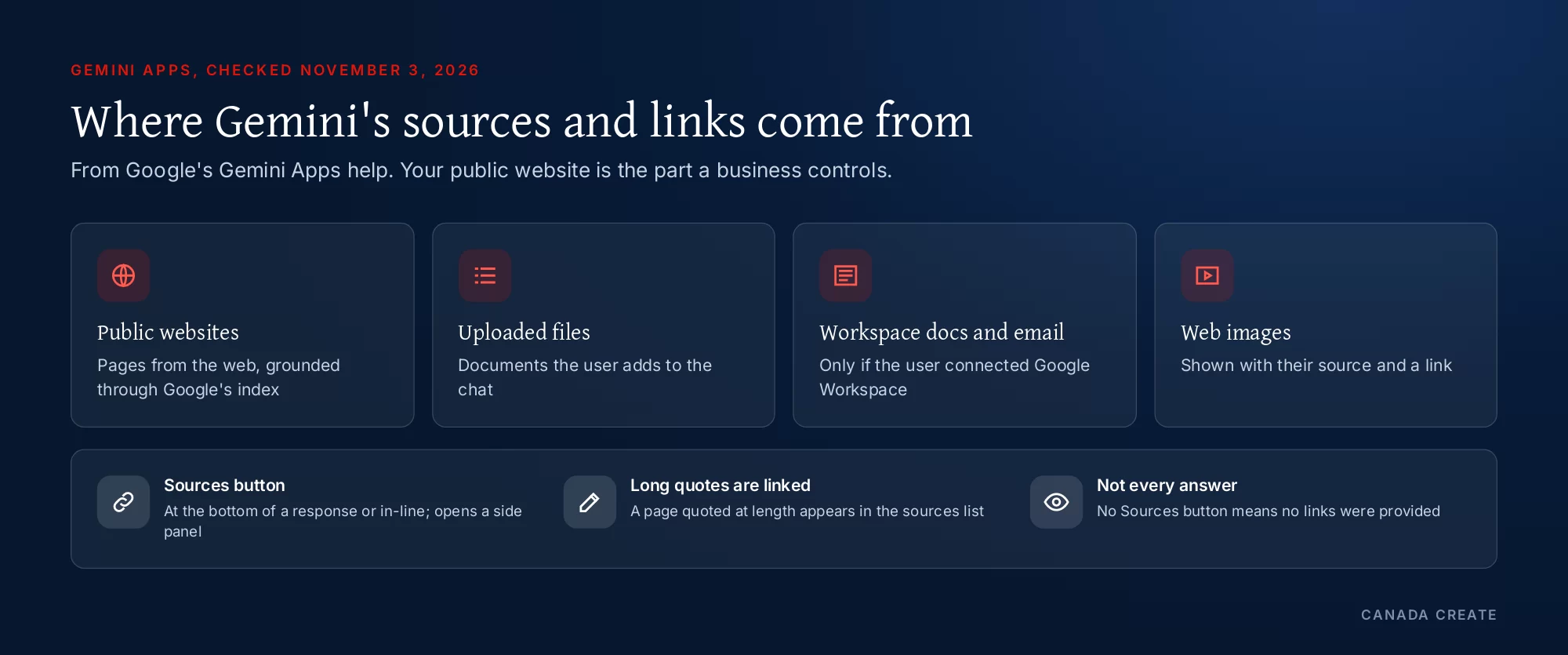
Google’s Gemini Apps help article on sources and related links explains what users see. Gemini may provide links to sources and related content so people can dig deeper. Those links can include public websites, files the user uploaded, and, if the user connected Google Workspace, their own documents and emails. When sources are available, a Sources button appears at the bottom of a response or in-line, and a side panel opens with the links.
Three details from that article matter for a business:
- Not every response has sources. Google says that if there is no Sources button, Gemini did not provide links for that response.
- Direct quotes are linked. If Gemini directly quotes a large amount of text from a webpage, that page appears in the sources list.
- Images carry their source. When a Gemini response includes an image from the web, it shows the source and links to it.
So the goal is twofold: be the page Gemini relies on when it does link sources, and make sure what it says is right when it does not.
Google-Extended: the setting that decides Gemini grounding
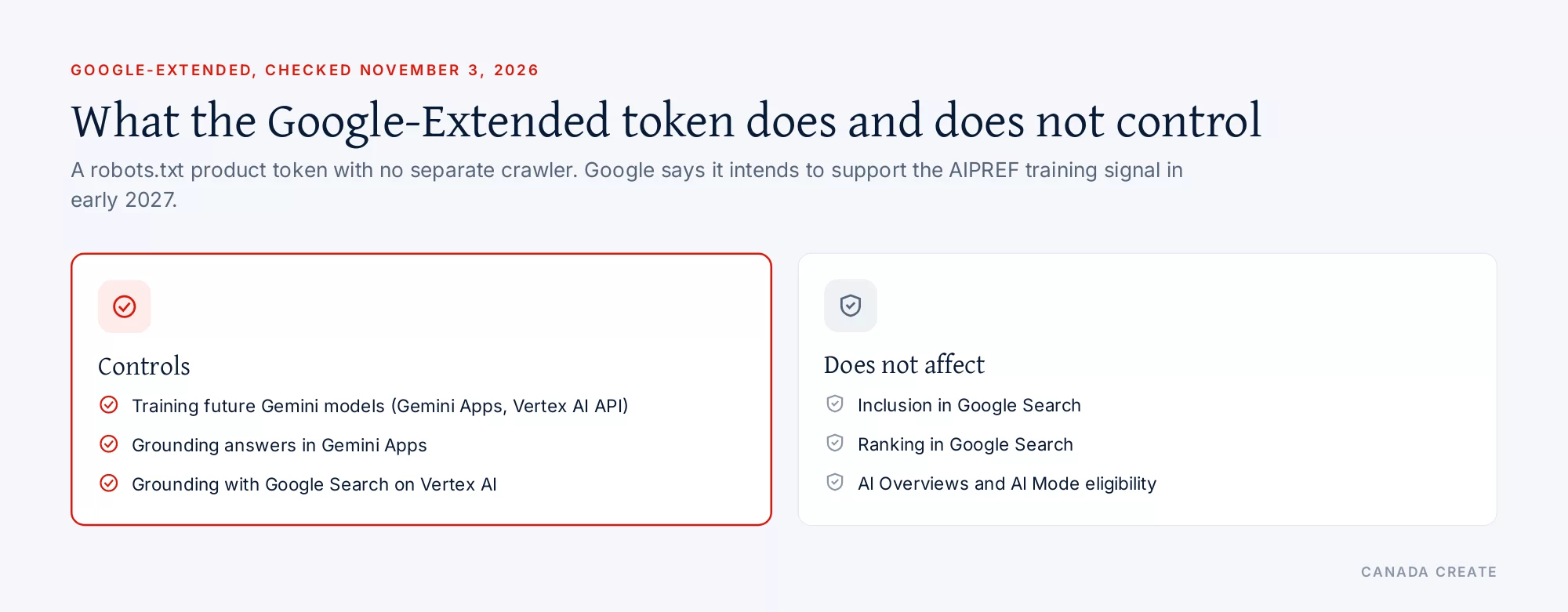
Google documents Google-Extended as a standalone robots.txt product token. As of November 3, 2026, Google says it lets publishers manage whether content Google crawls from their sites may be used for two things:
- Training future generations of Gemini models that power Gemini Apps and the Vertex AI API for Gemini.
- Grounding in Gemini Apps and in Grounding with Google Search on Vertex AI, which Google describes as providing content from the Google Search index to the model at prompt time to improve factuality and relevance.
Google adds that Google-Extended does not affect a site’s inclusion in Google Search and is not used as a ranking signal. It has no separate user-agent string: crawling is done by Google’s existing crawlers, and the token only expresses your preference. Google also says it intends to support a shared, machine-readable AI training preference signal, called AIPREF, in early 2027.
What blocking Google-Extended means for your business
Some sites block Google-Extended only because a plugin or a “block AI” setting added it, with no decision behind it. The trade-off is real:
- If you block Google-Extended, your content should not be used to train future Gemini models, and it should not be used to ground answers in Gemini Apps. That can mean fewer chances for Gemini to rely on and link your pages.
- If you allow it, your content may be used for training and for grounding. Your Google Search rankings are unaffected either way.
There is no right answer for every business. A publisher that sells its content may block it. A clinic, contractor or law firm that wants Gemini to describe it accurately and link its pages usually allows it. We set it with you as a deliberate choice, write it down and check it after every plugin, theme or hosting change.
Local questions in Gemini
People ask Gemini local questions all the time: “a pharmacy open late near me”, “a family dentist in Leaside that takes new patients”, “where can I get my winter tires changed this weekend”. Google’s Gemini Apps privacy information explains that, with permission, Gemini can process precise location from the device to answer prompts like finding the closest coffee shop, and that it can receive precise location from another Google service such as Google Maps to fulfil a request.
For a business, that points to Google’s own local data. When an answer depends on where the user is, the details that describe your location in Google’s systems matter:
- Your Google Business Profile: categories, services, hours, special hours, photos and the link to your site, kept current. We run this as part of Google Business Profile management in Toronto.
- Your location and service pages: the neighbourhoods and services you really cover, in text.
- Consistent details elsewhere: the same name, address and phone on every listing, so nothing contradicts the profile.
Strong local SEO in Toronto is the foundation for Gemini’s local answers.
Gemini in Google Workspace: your documents can become sources
Google’s help article notes that when a user has connected Google Workspace, Gemini’s sources can include their own documents and emails. That has a practical side for businesses that sell to other companies: a prospect who asks Gemini to compare the proposals in their inbox, or to summarize the vendors they have spoken to, may get an answer partly based on your emails, attachments and proposals.
You cannot optimize someone else’s inbox, but you can make what you send easy to understand. Clear subject lines, a short summary at the top of each proposal, plain-language descriptions of scope and next steps, and documents in readable text rather than scanned images all help a prospect, and any assistant they use, get your offer right.
What Gemini needs from your website
Google describes Gemini Apps grounding as providing content from the Google Search index, so the basics of being in Google’s index come first.
- Indexable, crawlable pages. If Googlebot cannot crawl a page or Google has not indexed it, there is nothing to ground from.
- Facts written out. What you sell, where, when you are open, what changes the price and which credentials you hold, as readable text rather than pictures or script-loaded widgets.
- One clear page per service and location, written for the people who buy it.
- Quotable passages. Google says Gemini links pages it quotes at length. Sections that state an answer clearly, then explain it, are easy to quote accurately.
- Original images with descriptive alt text, since Gemini shows and links web images with their source.
- Current information, with dates where facts change.
None of this requires special files or markup. It is the same groundwork that makes Google Search work for you, plus the Google-Extended decision.
Apps built on Google’s index: Vertex AI grounding
Google-Extended reaches beyond the Gemini app. Google says the same token controls whether your content may be used for Grounding with Google Search on Vertex AI, the Google Cloud service that lets other companies build their own AI assistants on top of Google Search results. A travel booking assistant, a bank’s help chat or an industry research tool built that way may draw on the same index when it answers a customer. Blocking Google-Extended keeps your content out of that grounding too. For most businesses that want to be found, that is another reason to make the setting a deliberate choice rather than a default.
Why Gemini might not mention your business
When a business is missing from Gemini’s answers, or described wrongly, the cause is usually one of these:
- Google-Extended is blocked, often by a plugin, so Gemini Apps cannot ground answers in your pages.
- The pages that should answer the prompt are not indexed, are disallowed in robots.txt or sit on a subdomain nobody checked.
- The Business Profile is incomplete or out of date: wrong categories, missing services, old hours or no website link.
- Details conflict across listings, so Google’s systems are unsure which version is right.
- No page answers the specific prompt, such as whether you take new patients, work weekends or serve a particular neighbourhood.
- Competitors are better described by their own pages, reviews and independent sites.
Each has a different fix, and the first two cost almost nothing to correct.
A Gemini checklist for Toronto owners
You can check these yourself before hiring anyone.
- Open yourdomain.com/robots.txt and look for Google-Extended. Decide whether you want it allowed, and remove any block you did not choose.
- Check the robots.txt on any subdomains, such as a blog, shop or booking system.
- Confirm in Search Console that your key service and location pages are indexed.
- Review your Google Business Profile: categories, services, hours, special hours, photos and the website link.
- Make sure your website, profile and other listings use the same name, address, phone and hours.
- Ask Gemini, with location on, three questions your customers ask. Note whether it names you, whether a Sources button appears and which sites are linked.
- Look at one important page and ask whether its first paragraph says, in plain words, what you do, for whom and where.
How we measure Gemini visibility
Google’s Search Console reports cover AI Overviews and AI Mode in Google Search; Google does not document a site-owner report for the Gemini app. So we measure Gemini directly:
- Tracked prompts your buyers ask, run in the Gemini app on a schedule, with the date, whether location was on and whether we were signed in recorded.
- Sources and mentions: whether a Sources button appears, which of your pages are linked, and which competitors and other sites are named.
- Accuracy: every fact Gemini states about your business, checked against the truth.
- Referral visits from gemini.google.com, when analytics can attribute them, followed through to calls and forms.
- Google-Extended status in your robots.txt, confirmed every month.
What our Gemini SEO service includes
Scope and fees come in a written custom proposal after a free consultation. Gemini work usually includes:
- Gemini visibility audit: your buyers’ prompts, what Gemini says about you, which sources it shows and every inaccurate fact.
- Google-Extended decision: the trade-off explained, the setting applied on purpose and documented, accidental blocks removed.
- Index and crawl review: the pages you want Gemini to rely on are crawlable and indexed.
- Quotable pages: service and location pages written so their key passages can be quoted accurately.
- Business Profile and local data: profile details aligned with your site for location-based prompts.
- Monthly reporting: tracked prompts, sources, accuracy, referrals and enquiries.
How Gemini fits with the other assistants
Gemini shares Google’s index with AI Overviews and AI Mode, so the work overlaps heavily with Google AI Overviews and AI Mode optimization. Outside Google, ChatGPT SEO and Perplexity SEO depend on their own crawlers. Our AI SEO program in Toronto handles them together, on top of SEO services in Toronto.
Before you start: questions owners ask
Should I block Google-Extended?
Only if you have a reason that outweighs being used as a source in Gemini. Google says the token controls training and grounding in Gemini Apps and does not affect Search. Most local and service businesses that want Gemini to describe them accurately leave it allowed. Publishers who license their content often decide otherwise.
Can anyone promise that Gemini will recommend my business?
No. Gemini decides what to say and whether to show sources for each prompt, and its answers vary with location and context. What can be done is to remove accidental blocks, keep your Google profile and pages accurate and clear, and track what Gemini says over time.
How quickly do changes show in Gemini?
Robots.txt changes take effect once Google next reads the file, and page changes once Google recrawls the page; Google says crawling can take anywhere from several days to several months. We recheck the tracked prompts monthly.
Call (416) 273-9030, Monday to Friday, 9 am to 6 pm, and Saturday, 10 am to 2 pm. After hours, our 24/7 AI agent answers the toll-free line, +1 (800) 808-9235, and we’ll follow up the next business morning.
Talk to a strategist
Ready when you are?
Request a custom proposal
Tell us your goals, budget and timeline. You get a custom proposal and a named strategist, so your next stage of growth starts now.
How Gemini SEO runs
Settings and accuracy first, then the pages and profile Gemini relies on.
- Audit and baseline Week 1 to 2
Customer prompts tested and today's answers recorded.
- Settings and indexing Week 2 to 3
Google-Extended decision, crawl and index checks.
- Pages and profile Month 1 to 3
Quotable pages, location pages and Business Profile updates.
- Images and details Ongoing
Original photos and consistent listings kept current.
- Track and adjust Monthly
The same prompts rerun and the changes reported.
Why Canada Create for Gemini SEO
18+ years in search
We have helped businesses get found online since 2008.
BBB Accredited, A+
An A+ rating with the Better Business Bureau.
Gemini within your wider SEO
Gemini work is run with your Google SEO, AI Overviews work and the other assistants in one scope.
Quoted in writing
Every fee is confirmed in writing before work starts. Request your custom proposal.
Site, search and ads under one roof
Web development, local SEO and Google Ads without vendor hand-offs.
Sales and support hours
Call (416) 273-9030, Monday to Friday, 9 am to 6 pm, and Saturday, 10 am to 2 pm. After hours, our 24/7 AI agent answers the toll-free line, +1 (800) 808-9235, and we'll follow up the next business morning.
Gemini SEO in Toronto: questions buyers ask
How Gemini works
What is Gemini SEO?
Gemini SEO is the work of helping Google's Gemini assistant find, describe and link your business correctly. It covers your Google-Extended decision, crawlable and indexed pages with clear facts, quotable passages, an accurate Google Business Profile for location-based prompts, and tracking what Gemini says about you.
What is Google Gemini, for a business owner?
Gemini is Google's AI assistant, available at gemini.google.com, in the Gemini mobile app and in Google Workspace. People use it to research, plan and compare. When it answers, it may show links to its sources, so being one of those sources, and being described accurately, is the goal.
How does Gemini find information about my business?
Google says Gemini Apps can be grounded with content from the Google Search index at prompt time, unless a site blocks that use through Google-Extended. For location-based prompts, Gemini can use the user's location and Google Maps. Your indexed pages and your Business Profile are the main inputs you control.
Is Google AI Mode the same as Gemini?
No. AI Mode is a mode of Google Search, so its controls and reports are the Search ones. Gemini Apps are a separate product whose documented publisher control is Google-Extended. Both can draw on Google's index, which is why much of the groundwork carries over.
Does Gemini show sources for its answers?
Often. Google's help article says Gemini may provide links to sources and related content, shown through a Sources button at the bottom of a response or in-line. Not every response includes sources; if there is no Sources button, Gemini did not provide links for that answer.
When does Gemini link to a website it quotes?
Google says that if Gemini directly quotes a large amount of text from a webpage, it shows a link to that page in the sources list. Pages with clear, quotable passages are therefore more likely to be credited when Gemini relies on them.
Does Gemini show images from websites?
Yes. Google says that when a Gemini response includes an image from the web, it shows the source and links to it. Your own photos of real work, premises and products, named and described properly, are what can bring your site that credit.
Can Gemini use my emails and documents as sources?
Only a user's own, if they connect Google Workspace. Google says sources can include documents or emails from a connected Workspace account. For a business, that means proposals and emails you send to prospects may inform their Gemini answers, so make them clear and readable.
Where can people use Gemini?
Google offers Gemini at gemini.google.com, in the Gemini mobile app for Android and iPhone, and inside Google Workspace for people who connect it. The same business can be asked about in all of them, so the facts Google holds about you need to be consistent.
Is Gemini better than ChatGPT for finding local businesses?
They are different products. Gemini sits inside Google's ecosystem and can use location from Google Maps with permission, while ChatGPT runs its own search crawler. For a local business, an accurate Google Business Profile matters more for Gemini; OpenAI's crawler settings matter more for ChatGPT.
Will Gemini replace Google Search for my customers?
Not soon for most businesses. Gemini is one more place customers ask for help, alongside Google Search with its AI Overviews and AI Mode. The same accurate pages and profile serve both, so there is no need to choose between them.
Google-Extended
What is Google-Extended?
Google-Extended is a robots.txt product token Google uses to let publishers manage whether content it crawls may be used to train future Gemini models and to ground answers in Gemini Apps and Vertex AI. It has no separate user-agent string; crawling is done by Google's existing crawlers.
Does blocking Google-Extended affect my Google rankings?
No. Google says Google-Extended does not affect a site's inclusion in Google Search and is not used as a ranking signal in Search. It only expresses your preference about Gemini training and grounding in Gemini Apps and Vertex AI.
Does blocking Google-Extended remove me from Gemini answers?
Google says the token controls whether your content may be used for grounding in Gemini Apps, so blocking it can reduce Gemini's ability to rely on and link your pages. Gemini may still mention your business from other sources. Decide based on whether being a Gemini source matters to you.
Should my business block Google-Extended?
Usually not, if you want Gemini to describe you accurately and link your pages. Blocking makes sense for publishers who license their content or do not want it used for training. Whatever you choose, make it a deliberate decision rather than a plugin default.
How do I check whether my site blocks Google-Extended?
Open your robots.txt file and look for a group that names Google-Extended. Also check for rules added by security or SEO plugins, and for robots.txt files on subdomains. A Disallow: / under Google-Extended blocks training and Gemini Apps grounding for that host.
Does Google-Extended affect AI Overviews?
No. AI Overviews and AI Mode belong to Google Search, and Google says Google-Extended has no effect on Search inclusion. Whether you can appear there depends on Googlebot's access, your snippet rules and the Search Console setting for generative AI features.
What is AIPREF?
Google says it intends to support AIPREF, a shared machine-readable signal for AI training preferences, in early 2027, using a robots.txt user-agent line for AI training. Until then, Google-Extended is the token Google documents for Gemini training and grounding.
Is there a Google-Extended crawler I can see in my logs?
No. Google says Google-Extended has no separate user-agent string in HTTP requests. Crawling is done with Google's existing user agents, and the token is used only in robots.txt to express a preference, so you will not see it as a visitor in your logs.
What is Grounding with Google Search on Vertex AI?
It is a Google Cloud feature that lets companies building their own AI apps ground answers in Google Search results. Google says Google-Extended also controls whether your content is used for that grounding, so blocking the token affects third-party apps built on it as well as Gemini Apps.
Does Google-Extended affect AI apps built by other companies?
It can. Google says the token also controls grounding through Grounding with Google Search on Vertex AI, which companies use to build their own AI assistants on Google Search results. Blocking it keeps your content out of that grounding as well as out of Gemini Apps.
Local and Workspace
How does Gemini answer near me questions?
Google says Gemini can process precise location from the device, with permission, for prompts such as finding the closest coffee shop, and may receive precise location from Google Maps. Local answers therefore lean on Google's own data about where businesses are and what they offer.
Does my Google Business Profile affect Gemini?
It is the most important local input you control. Gemini can use location from Google Maps, and your profile is how Google describes your business there. Keep categories, services, hours, special hours, photos and the website link accurate and current.
How do Toronto businesses appear in Gemini for local requests?
Start with a complete, current Google Business Profile, then add pages for the neighbourhoods and services you genuinely cover and bring every other listing into line. Test the prompts your customers use, with location turned on, and note which businesses Gemini names.
Does Gemini work in French for Quebec customers?
Gemini answers in the language a person writes in. If you serve French-speaking customers, publish proper French pages and a French description in your listings so Gemini has French sources to rely on.
How should I write proposals if clients use Gemini in Workspace?
Make them easy to summarize: a clear subject line, a short summary at the top, plain descriptions of scope, timing and next steps, and text rather than scanned images. If a client asks Gemini to compare vendors in their inbox, a clear proposal is more likely to be summarized correctly.
Does Gemini use Google reviews?
Google does not document exactly which profile fields Gemini uses in each answer. Reviews are part of how your business is described across Google's products, so collect them steadily within Google's rules and reply with useful detail; never buy or script them.
Content Gemini relies on
How do I rank in Google Gemini?
Gemini does not rank websites like a results page. Your aim is to be a source it relies on: allow Google-Extended if you want to be used for grounding, keep key pages crawlable and indexed, state facts clearly in text, and keep your Business Profile accurate. Then track the prompts your buyers use.
What content does Gemini quote?
Google says it links pages it quotes at length, so clear, self-contained passages work well: a direct answer at the start of a section, followed by the conditions and detail. Specific, current facts about services, areas and requirements are easier to quote than general marketing copy.
Do I need special markup or files for Gemini?
Google does not document any special markup or file for Gemini Apps. Accurate structured data that matches the page is still good practice for Google Search. The documented Gemini-specific control is the Google-Extended token in robots.txt.
Does Gemini use my website or only Google's index?
Google describes grounding in Gemini Apps as providing content from the Google Search index to the model at prompt time. In practice, your website reaches Gemini through Google's crawl and index, so pages Google has not indexed are unlikely to be used.
Why does Gemini describe my business incorrectly?
Common causes are an outdated Business Profile, conflicting details across listings, old pages that still rank, or Google-Extended blocked so Gemini relies on other sources. Correct the facts at the source, keep the corrected pages indexable and recheck the same prompts later.
Do original photos help with Gemini?
Yes, in two ways. Google says Gemini shows and links web images with their source, and clear photos with descriptive alt text help Google understand your pages. Stock images that appear on many other sites add little and are unlikely to be credited to you.
Why might Gemini leave my business out of an answer?
Common reasons are a blocked Google-Extended token, key pages that are not indexed, an incomplete Business Profile, conflicting details across listings, or no page that answers the specific prompt. Competitors with clearer pages and more reviews may also be preferred. Each cause has its own fix.
Measuring results
How can I see what Gemini says about my business?
Ask Gemini the questions your customers ask, in the app, with location on where it matters, and record the date, the answer, whether a Sources button appears and which sites are linked. Repeat the same prompts monthly to see the pattern.
Does Search Console show Gemini traffic?
Search Console's Generative AI performance report covers AI Overviews and AI Mode in Google Search; Google does not document a site-owner report for the Gemini app. In your analytics, clicks from gemini.google.com can show as referrals when the browser shares that detail.
Why do Gemini answers change between people?
Gemini's answers depend on the wording, the conversation so far, the user's location and settings and, for Workspace users, their own connected files. That is why we test fixed prompts under recorded conditions instead of relying on one person's screenshot.
How do you measure Gemini SEO results?
With tracked prompts, the sources Gemini shows, an accuracy check of every fact about you, your Google-Extended status, and referral visits and enquiries from gemini.google.com where analytics can identify them. Each is reported separately.
Working with us
What does Gemini SEO include at Canada Create?
A Gemini visibility audit, a documented Google-Extended decision, an index and crawl review of the pages you want Gemini to use, quotable service and location pages, Business Profile alignment for local prompts, and monthly reporting on prompts, sources, accuracy and enquiries.
How much does Gemini SEO cost in Toronto?
It depends on the number of services and locations in scope and the state of your pages and profile. We set the fee out in a custom proposal after a free consultation; third-party costs, if any, are shown on their own line.
How long does Gemini SEO take?
Robots.txt and page changes count once Google next crawls them, which Google says can take from several days to several months. Profile and content improvements then need to be used in Gemini's answers. We track the same prompts monthly.
Is Gemini SEO separate from Google SEO?
It sits on top of Google SEO. Being crawlable, indexed and clearly described in Google's systems comes first; Gemini adds the Google-Extended decision, quotable passages and prompt tracking in the app. Most of the work also helps your Google Search results.
Do I need Gemini SEO and AI Overviews optimization?
They share Google's index, so we usually run them together. AI Overviews and AI Mode have Search Console controls and reports; Gemini adds Google-Extended and app-based tracking. Doing both in one scope avoids paying twice for the same groundwork.
Can I do Gemini SEO myself?
You can cover the basics: check robots.txt for Google-Extended, keep your Business Profile complete, make sure key pages are indexed, and test your customers' prompts in Gemini monthly. Help is useful for larger sites, several locations or a crowded category.


What does Gemini say about your business?
Ask Gemini what your customers ask, with location on, and see who it names and which sources it shows. Then check your robots.txt for Google-Extended.