
Toronto · AI Overviews
Google AI Overviews and AI Mode Optimization in Toronto
Make your pages eligible, useful and measurable in Google's AI Overviews and AI Mode, from Search Console settings to the pages and profiles Google links.
AI Overviews and AI Mode optimization for Toronto and GTA businesses, from North York to downtown.
- BBB A+ accredited
- 18 years in business
- Mon to Fri 9 to 6, Sat 10 to 2
Get your custom AI Overviews proposal
Tell us which searches matter to your Toronto business, and we reply with a custom proposal.
Please do not share passwords or other sensitive details here. We never sell your contact information and we comply with Canadian privacy law
(privacy policy).
What AI Overviews optimization gives you
Eligible everywhere it counts
Indexing, snippets, crawling and the Search generative AI setting all confirmed.
Pages Google wants to link
Non-commodity content that answers the first question and the follow-ups.
Local and product details aligned
Business Profile and Merchant Center information that matches your pages.
Clear AI reporting
Generative AI impressions tied to clicks, calls and forms by page.
What is included in AI Overviews optimization
Each engagement is scoped to your site and confirmed in a written custom proposal.
- Eligibility auditIndexing, snippet rules, robots.txt, CDN access and structured data checks.
- Search Console AI settingsThe Search generative AI control checked on every property.
- AI Overview baselineWhich of your searches show AI Overviews and who is linked today.
- AI Mode conversationsTracked multi-step questions with the links shown at each step.
- Topic clustersCore service pages plus supporting pages for real follow-up questions.
- Non-commodity contentPages built from your team's experience, records and original photos.
- Profile and feed alignmentBusiness Profile and Merchant Center details matched to your site.
- AI performance reportingGenerative AI and Performance reports joined to enquiries.
AI Overviews optimization pricing in Toronto
AI Overviews work is part of your SEO scope, because Google uses the same systems for both.
AI Overviews within your SEO program
Quoted in writing after a free consultation
Local and service businesses that rely on Google search
- Eligibility and settings audit
- AI Overview and AI Mode tracking
- Topic clusters for buyer questions
- Business Profile alignment
- Monthly AI reporting
Large sites and online stores
Quoted in writing after a free consultation
Multi-location brands, publishers and retailers
- Everything in the core scope
- Merchant Center and product page work
- Location-level pages and profiles
- Wider content program
One-time setup work, monthly management and any third-party costs are listed separately in your custom proposal.
AI Overviews and AI Mode
Give Google better pages to link when it answers your buyers
Google AI Overviews and AI Mode optimization is the work of making your pages the ones Google links to when it answers a Toronto searcher with an AI-written summary. AI Overviews appear above the usual results for some searches; AI Mode is a separate, conversational way to search that handles longer questions and follow-ups. Both are built into Google Search, both draw on Google’s own index and ranking systems, and both show supporting links. Being one of those links puts your business in front of buyers before they have scrolled to a single organic result.
This page is about Google’s two AI features only: how they choose links, the Search Console controls and reports that apply to them, and what we change on your site. For the full program across ChatGPT, Gemini, Perplexity, Copilot, Claude and Grok, see AI search optimization in Toronto. If you want a do-it-yourself checklist instead, our CC Zone guide on improving your website for Google AI Overviews is a good starting point.
AI Overviews and AI Mode are not the same feature
Google’s own documentation, AI features and your website, treats the two as related but different, and the difference changes what you optimize.
| AI Overviews | AI Mode | |
|---|---|---|
| Where it appears | A summary above the regular results, on some searches | A separate conversational mode of Google Search |
| When it shows | Only when Google decides it adds to classic results; often does not trigger | When a person chooses it, usually for exploration, reasoning or comparisons |
| How answers are built | May use query fan-out across subtopics and data sources | May use query fan-out; may use different models and techniques |
| Links shown | Supporting links from indexed, snippet-eligible pages | Supporting links, often a wider set, and they change with follow-up questions |
| Where you measure it | Search Console Generative AI performance report and Performance report (Web) | The same two reports |
Two consequences follow. First, no search is certain to show an AI Overview: Google says they only appear when its systems decide they add something to classic results, and they often do not trigger. Tracking “the AI Overview for my keyword” only makes sense for searches where one actually shows. Second, AI Mode conversations go deeper and wider, so a business is judged on more than one page: the follow-up questions about price, timing, credentials and alternatives each pull their own links.
What Google says it takes to appear
Google is unusually direct about this. Its documentation says there are no additional requirements to appear in AI Overviews or AI Mode, and no special optimizations are necessary. The technical bar for a supporting link is short: the page has to be in Google’s index and able to show a snippet in normal results. Google adds that a page meeting that bar may still not be crawled, indexed or shown.
The practical list Google gives site owners is short, and every item is something we check:
- Crawling is allowed in robots.txt, and by any CDN or hosting layer in front of the site.
- Important pages are easy to find through internal links.
- The page gives a good experience on every device.
- Important content is in text, not only inside images or scripts.
- Text is supported by high-quality images and video where they help.
- Structured data matches what is visible on the page.
- Merchant Center and Business Profile information is up to date.
Google also says you do not need new machine-readable files, AI text files or special schema.org markup for these features. We do not sell any of those as a way into AI Overviews.
There is one more requirement that is easy to miss. Google’s guide to optimizing for generative AI features notes that, in addition to the technical requirements for Search, a site must be included in Search generative AI features in Search Console to be eligible. That setting is covered below.
Query fan-out: why one page rarely carries the answer
Google says both features may use a technique called query fan-out: issuing several related searches across subtopics and data sources while the answer is being built, then showing a wider and more varied set of links than a classic results page would.
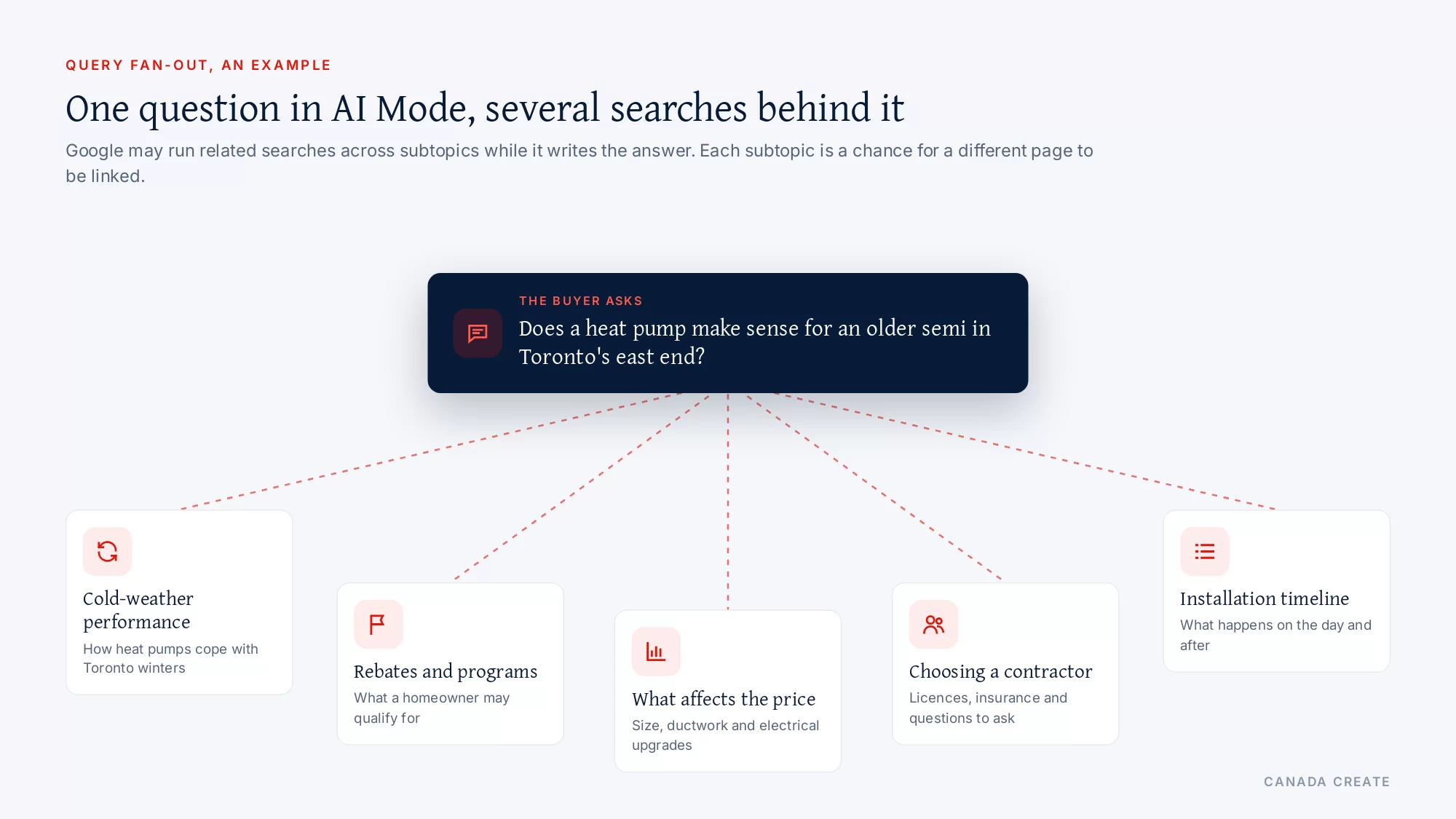
Take a Toronto homeowner who asks AI Mode whether a heat pump makes sense for an older semi in the east end. The answer may draw on separate searches about cold-climate performance, rebates, installation cost factors, how long installation takes and how to choose a licensed contractor. A heating company with one generic “Heat pumps” page gives Google one chance to be linked. A company with a strong service page plus genuinely useful pages on cold-weather performance, the rebate process and what affects the installed price gives Google several reasons to link to it in the same answer.
Google also draws a firm line here. Its guide says creating separate content for every variation of how people might search, including fan-out queries, mainly to manipulate rankings or AI responses, violates its scaled content abuse policy. The goal is a small set of pages that each answer a real question well, not hundreds of thin variants. We build topic clusters from the questions your buyers actually ask, and we merge pages that only repeat each other.
Content Google is more likely to link
Google’s guide is clear that the content most likely to earn a place in AI responses over time is content people find unique, compelling and useful. It contrasts commodity content, such as a generic “7 tips for first-time homebuyers” article anyone could write, with non-commodity content that offers an expert or first-hand view beyond common knowledge. For a Toronto business, non-commodity usually means:
- What you have seen yourself: “What we found behind the drywall in 1920s Leslieville semis” from a renovator, or “Why we stopped recommending a certain filling material” from a dental clinic.
- Local specifics: permits, bylaws, seasonal timing, neighbourhood housing stock, transit and parking, written by people who work here.
- Real numbers from your own records: typical timelines, ranges that affect price, what is included, clearly dated.
- Original photos and video of your work, team and premises, with descriptive file names and alt text. Google notes its AI features can bring in relevant images and video, which means more ways to appear beyond a text link.
- A clear structure with paragraphs, sections and headings that make the page easy to follow.
What does not help with Google, according to its own guide: writing in a special style just for AI, chopping content into tiny chunks, chasing every long-tail variation, buying or faking “mentions”, and adding structured data in the hope it acts as an AI switch. Structured data is still worth keeping for rich results, as long as it matches the page.
Images, Lens and Circle to Search
A growing share of Google searches start with a camera instead of a keyboard. Someone photographs a cracked tile, a plant in their yard, a part from a dishwasher or a storefront, and Google answers with an AI summary and links. Search Console counts these separately as multimodal searches in the Generative AI performance report, which covers Google Lens, Circle to Search on Android, uploaded images and Chrome image search.
For businesses whose products or problems are visual, this is a real opening. Original photos of your products, materials, finished work and premises, with descriptive file names, alt text that says what is shown, and nearby text that explains it, give Google something to match when a person searches with a picture. Stock photos that appear on hundreds of other sites give it nothing to connect to you.
The controls that decide whether you can appear
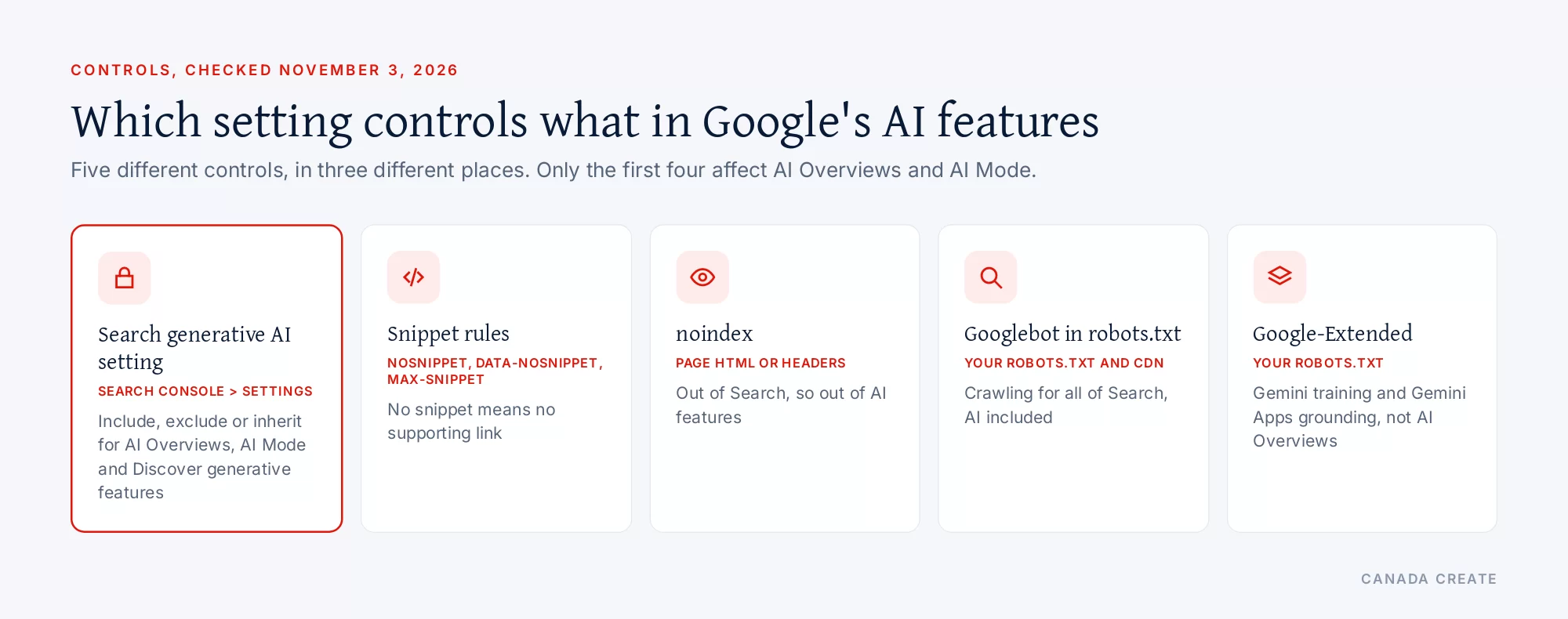
Several settings can quietly remove a site from AI Overviews and AI Mode. Each one belongs to a different system, and they are often confused.
| Control | Where it lives | What it affects |
|---|---|---|
| Search generative AI setting | Search Console > Settings | Whether your links and content can appear in AI Overviews, AI Mode and Discover generative features |
| nosnippet, data-nosnippet, max-snippet | Page HTML or HTTP headers | How much text Google can show; a page with no snippet is not eligible as a supporting link |
| noindex | Page HTML or HTTP headers | Removes the page from Search, and so from AI features |
| robots.txt for Googlebot | Your site’s robots.txt | Crawling for all of Search, AI features included |
| Google-Extended | Your site’s robots.txt | Gemini model training and grounding in Gemini Apps and Vertex AI; not Search or AI Overviews |
The Search generative AI setting in Search Console
As of August 31, 2026, Google has rolled out the Search generative AI control to every website. You find it in Search Console under Settings > Search generative AI. It covers AI Overviews, AI Mode and generative AI features in Google Discover, and Google says the list may grow.
There are three possible states:
- Include my site’s links and content. Your pages can appear as links and can help ground AI answers. This is the default for every property.
- Exclude my site’s links and content. Links to your site and your content will not appear in those features, your content will not be used as an input for their answers, and you will get no impressions or traffic from them. Google says content from other sites will still be available and may look similar to yours.
- Inherit control from parent. A property follows the setting of its parent property, which is the default for properties that have a parent, such as a URL-prefix property under a domain property.
Google states that this control is not used as a ranking or inclusion signal for other parts of Search, and that it does not affect AI training. We check it on every site, at the domain property and at any child properties, because a single exclusion set by a past developer or a cautious IT team undoes all other work.
Snippet controls
AI Overviews and AI Mode use the same preview controls as regular results. The nosnippet rule, the data-nosnippet attribute, max-snippet and noindex all limit what Google can show. Without a snippet, a page drops out of the running for a supporting link. These rules are sometimes added by themes, page builders, cookie or legal plugins, or by a developer who wanted to hide one paragraph and hid the whole page. We scan your templates and live pages for them.
data-nosnippet can be useful in moderation: it lets you keep a specific block, such as a promotional disclaimer, out of previews while the rest of the page stays eligible. Used broadly, it starves Google of the text it needs.
Googlebot, robots.txt and the hosting layer
Google says robots.txt directives for Googlebot are the control for crawling for Search, including its AI features, because AI is built into Search. There is no separate AI crawler to allow. Problems usually come from somewhere else: a CDN rule, a firewall or a security plugin that slows or blocks Googlebot, or important pages left out of internal links and the sitemap.
Google-Extended is a different switch
Many owners assume Google-Extended controls AI Overviews. It does not. Google describes Google-Extended as a robots.txt token that manages whether content it crawls may be used for training future Gemini models and for grounding in Gemini Apps and Vertex AI; it does not affect inclusion in Google Search and is not a ranking signal. Blocking it can matter for Gemini SEO, but it neither removes you from nor adds you to AI Overviews.
Why a Toronto site is missing from AI Overviews
When a business with good rankings never shows up as a supporting link, the cause is usually one of a short list. We check them in this order, because the first ones are the cheapest to fix.
- The site, or a child property, is excluded in the Search generative AI setting.
- Snippets are blocked by a theme, plugin or header rule, often added years ago for a different reason.
- The best answer sits on a page Google does not index, such as a PDF without text, a filtered page or a page that robots.txt blocks.
- Key facts appear only in images or scripts, so Google’s text index has little to quote.
- The page answers a different question than the one the AI Overview addresses. A service page that never explains cost factors will not be linked for “how much does it cost”.
- The content is commodity content: the same tips that appear on every other site, with nothing first-hand or local.
- The Business Profile and the website disagree on hours, services or areas, which weakens local answers.
- Competitors are simply stronger on that topic, with more useful pages and more independent coverage. That one takes the longest to change, and it is where most of the content work goes.
Generative features in Google Discover
The Search generative AI setting also covers generative AI features in Google Discover, the feed of articles many Android and Google app users see without searching. Discover is most relevant to businesses that publish regularly: news, guides, seasonal advice and local stories. The same choice applies there: including your site keeps your content eligible, and excluding it removes you. The Generative AI performance report for Discover is a separate view in Search Console. If your business runs a blog, we check both.
Measuring AI Overviews and AI Mode in Search Console
Google gives site owners its own reporting for these features, and we use all of it.
The Generative AI performance report
Search Console’s Generative AI performance report shows impressions: how many times links to your site were shown to someone in a generative AI feature on Google Search, currently AI Overviews and AI Mode. The report can be broken down by:
- Pages: the final URL Google linked, after redirects, usually the canonical URL.
- Countries: where the search came from, which helps a Toronto business separate Canadian demand from elsewhere.
- Dates: by day, week or month, in Pacific Time.
- Devices: desktop, tablet or mobile.
You can also filter by search type: Web: text-based for typed searches, and Web: multimodal for searches made with images, such as Google Lens, Circle to Search on Android, uploaded images and Chrome image search. Google notes the newest data can be preliminary for a few hours, and that experiments in Search Labs are not included.
The regular Performance report
Clicks and impressions from AI Overviews and AI Mode are also included in the overall Performance report under the “Web” search type. We read the two reports together: the AI report tells us which pages are being shown in AI features, and the Performance report tells us how those pages perform in Search as a whole.
From clicks to calls and forms
Google says clicks from results pages with AI Overviews tend to be higher quality, meaning people are more likely to spend time on the site. That claim is worth testing on your own data. We connect Search Console with your analytics and call tracking so the report shows which pages linked in AI features produced calls, bookings and form enquiries, not only impressions.
Local businesses: Business Profile data in AI answers
Google’s guide says generative AI responses can include information about local businesses, and that Google Business Profiles help your business be visible in AI responses and other Search results. For a Toronto business, that makes the Business Profile part of AI Overviews optimization, not a separate chore.
- Categories and services that match how people describe the work, including the specific services you want to be found for.
- Hours and special hours kept current, especially around statutory holidays.
- Photos of the premises, team and real work, refreshed regularly.
- Reviews that mention the service and the area in the customer’s own words, requested from every satisfied customer within Google’s rules.
- A website link to the most relevant service or location page, not always the home page.
We run this as part of our Google Business Profile management in Toronto and local SEO in Toronto, so the profile and the pages Google links to tell the same story.
Online stores: Merchant Center and product details
For retailers, Google says AI responses can include product listings and product information, and that Merchant Center feeds help products appear in AI responses as well as other results. Product pages need clear titles, full specifications in text, accurate prices and availability, shipping and return details for Canadian buyers, and original product images. The feed and the page must agree. Our ecommerce SEO services cover feeds and product pages together.
Google also mentions Business Agent, a conversational experience on Google Search that lets customers chat with a brand, and newer agentic experiences that can complete tasks such as comparing products or booking. Where these are available and relevant to your business, we assess whether they are worth setting up; pages that are clearly structured, fast and readable by assistive technology are easier for agents to use in any case.
AI Mode and multi-step questions
AI Mode suits buyers who are comparing options or working through a decision, which is exactly when a business can win or lose a customer. Prepare for the follow-up questions as well as the first one:
- Comparison questions: “Invisalign or braces for an adult in Toronto?” Pages that explain the trade-offs fairly, from a practitioner’s point of view, are useful sources.
- Eligibility and requirements: “Do I need a permit to finish my basement in Toronto?” Link to the official rule and explain what it means in practice.
- Cost and timing factors: what changes the price and how long the work takes, without promising a figure you cannot stand behind.
- Choosing a provider: credentials, licences, insurance and what to ask, stated plainly.
Because AI Mode may use different models and techniques from AI Overviews, the links it shows can differ. We track a set of conversational questions in AI Mode separately from the keyword searches we track for AI Overviews.
What our AI Overviews optimization includes
We scope each engagement after a free consultation and set it out in a written custom proposal. It typically covers:
- Eligibility audit: indexing, snippet eligibility, robots.txt, CDN and firewall access, the Search generative AI setting on every property, and structured data checked against visible content.
- AI Overview and AI Mode baseline: the searches where AI Overviews appear in your market, who is linked today, and a set of AI Mode conversations tracked over time.
- Topic clusters: your core service pages strengthened and a limited set of supporting pages for the real follow-up questions, with duplicates merged.
- Non-commodity content: pages built from your team’s experience, local knowledge and records, with original photos and video.
- Business Profile and Merchant Center alignment for local businesses and retailers.
- Search Console reporting: the Generative AI performance report and the Performance report read together, with pages linked in AI features tied to calls, bookings and forms.
How this fits with your other AI search work
AI Overviews and AI Mode are usually the first priority for a Toronto business, simply because they reach everyone already searching on Google. The same groundwork carries over to the assistants outside Google: ChatGPT SEO adds OpenAI’s crawler settings, Microsoft Copilot SEO adds Bing Webmaster Tools and Bing’s AI reports, and Gemini SEO covers Google’s assistant app, which has its own controls. Underneath all of them sit our SEO services in Toronto, and the AI SEO program in Toronto coordinates the lot.
Before you start: three common questions
Will AI Overviews take my traffic?
For some informational searches, people get what they need from the summary and do not click, and that is real. Google says the clicks that do come from pages with AI Overviews are higher quality. The way to know what is happening on your site is to measure it: which of your pages appear in AI features, what their clicks and enquiries look like, and whether the searches that matter to your revenue show AI Overviews at all. High-intent local searches, such as “emergency plumber Scarborough”, can behave very differently from broad research questions, so we look at each group separately.
Should I exclude my site from AI features?
Rarely, for a business that wants customers. Excluding your site removes your links from AI Overviews and AI Mode, while competitors’ content can still appear. Some publishers with subscription models make a different choice; for most local and service businesses, inclusion is the better default. Google says the setting does not affect your rankings elsewhere in Search.
Can anyone promise a link in an AI Overview?
No, and Google says indexing and serving are never assured. Be cautious of anyone claiming special access: Google’s guide states that no third-party tool has access to its internal ranking or AI systems. What we can do is make your site eligible, give Google better material to link, and report what changes.
Call (416) 273-9030, Monday to Friday, 9 am to 6 pm, and Saturday, 10 am to 2 pm. After hours, our 24/7 AI agent answers the toll-free line, +1 (800) 808-9235, and we’ll follow up the next business morning.
Talk to a strategist
Ready when you are?
Request a custom proposal
Tell us your goals, budget and timeline. You get a custom proposal and a named strategist, so your next stage of growth starts now.
How AI Overviews optimization runs
Eligibility first, then the content and profiles Google links.
- Eligibility and baseline Week 1 to 2
Settings, indexing and snippet checks, plus today's AI Overview and AI Mode results.
- Fixes that unblock Week 2 to 4
Remove accidental exclusions, snippet blocks and crawl barriers.
- Topic clusters Month 1 to 3
Strengthen service pages and add the follow-up pages buyers need.
- Profiles and media Ongoing
Business Profile, Merchant Center, photos and video kept current.
- Report and refine Monthly
AI impressions, clicks and enquiries reviewed page by page.
Why Canada Create for AI Overviews
18+ years in search
We have helped businesses get found online since 2008.
BBB Accredited, A+
An A+ rating with the Better Business Bureau.
AI Overviews within your wider SEO
AI Overviews work is run with your Google SEO, Business Profile and the other AI assistants in one scope.
Quoted in writing
Every fee is confirmed in writing before work starts. Request your custom proposal.
Site, search and ads under one roof
Web development, local SEO and Google Ads without vendor hand-offs.
Sales and support hours
Call (416) 273-9030, Monday to Friday, 9 am to 6 pm, and Saturday, 10 am to 2 pm. After hours, our 24/7 AI agent answers the toll-free line, +1 (800) 808-9235, and we'll follow up the next business morning.
Google AI Overviews and AI Mode in Toronto: questions buyers ask
How AI Overviews and AI Mode work
What are AI Overviews?
AI Overviews are AI-written summaries that Google shows above the regular results for some searches, with links to supporting web pages. Google says they appear only when its systems decide a summary adds to classic results, so many searches never show one. They draw on Google's index and ranking systems.
How is AI Mode different from AI Overviews?
AI Mode is a separate, conversational way to search that a person chooses, built for exploration, reasoning and comparisons, with follow-up questions. AI Overviews appear inside normal results. Google says the two may use different models and techniques, so the answers and the links they show can differ for the same topic.
How does AI Mode work?
AI Mode takes a longer question, may run many related searches across subtopics and data sources (Google calls this query fan-out), and writes a response with links to supporting websites. Each follow-up question can pull a new set of links, so it rewards sites that answer the whole decision, not just the first question.
Is Google AI Mode the same as Gemini?
No. AI Mode is part of Google Search and follows Search's controls and reports. Gemini Apps are Google's assistant app at gemini.google.com and on Android, with their own settings, such as the Google-Extended token for grounding. We cover the Gemini app on a separate page.
Why do AI Overviews appear for some searches and not others?
Google says AI Overviews are shown only when its systems determine they are additive to classic Search, and that they often do not trigger. Broad research questions are more likely to show one than a quick navigational or local search. We map which of your important searches show AI Overviews before deciding where to focus.
What should I do if an AI Overview says something wrong about my business?
Find the page or listing that probably supplied the wrong fact, correct it on your website and your Business Profile, and keep the corrected page indexable so Google can recrawl it. Then recheck the same search after the page has been crawled again.
Do AI Overviews only link to pages that rank on page one?
Google does not say that. Its documentation explains that query fan-out helps it find more supporting pages while an answer is written, so AI features can show a wider and more diverse set of links than a classic results page. Strong rankings help, but a clear page on a subtopic can also earn a link.
Does AI Mode show different links from AI Overviews?
Often, yes. Google says the two features may use different models and techniques, so the responses and links vary. That is why we track AI Overview searches and AI Mode conversations separately instead of assuming one result predicts the other.
Eligibility and settings
What does a page need to appear in AI Overviews or AI Mode?
According to Google, the page has to be indexed and able to show a snippet in normal results, with no further technical requirement. Your site must also be included in the Search generative AI setting in Search Console. Beyond that, eligibility alone does not earn a link; usefulness and quality decide.
How do I check my Search generative AI setting?
In Search Console, open Settings, then Search generative AI. You will see whether the property includes or excludes its links and content, or inherits the choice from a parent property. Check the domain property and any URL-prefix properties, since a child can follow or override its parent.
What happens if I exclude my site from Search generative AI features?
Google says links to your site and your content will not appear in AI Overviews, AI Mode or generative features in Discover, your content will not be used to ground their answers, and you will receive no impressions or traffic from them. Content from other sites can still appear and may look similar to yours.
What does inherit control from parent mean in Search Console?
It means a property follows the Search generative AI choice of its parent property, for example a URL-prefix property under a domain property. Any change at the parent applies automatically. You can override it on the child property at any time, which is why we check both levels.
Does the Search generative AI setting affect my normal rankings?
Google says no. The control only affects whether your content can appear in certain generative AI features, and it is not used as a ranking or inclusion signal for other parts of Search. It also does not affect AI training, which Google handles through the Google-Extended token.
Does blocking Google-Extended remove me from AI Overviews?
No. Google describes Google-Extended as a robots.txt token for Gemini model training and for grounding in Gemini Apps and Vertex AI, and says it does not affect inclusion in Google Search. AI Overviews and AI Mode are governed by Googlebot access, snippet rules and the Search generative AI setting.
Can I keep one section of a page out of AI Overviews?
Yes. Google supports the data-nosnippet attribute on specific HTML elements, which keeps that text out of previews while the rest of the page stays eligible. Use it sparingly, for example on a disclaimer, because broad use takes away the text Google needs to link your page.
Is there a separate Google crawler for AI Overviews?
No. Google says AI is built into Search, so robots.txt directives for Googlebot are the crawling control for Search and its AI features. If Googlebot can crawl and index a page and show a snippet, the page is technically eligible for AI Overviews and AI Mode.
Does Google use llms.txt for AI Overviews or AI Mode?
No. Google's guide states that its Search systems ignore llms.txt and similar AI text files, so having one makes no difference to visibility in Search or its AI features. You may still keep one for other services that read it.
Should I keep my structured data now that AI Overviews exist?
Yes. Google says structured data is not required for its AI features and there is no special schema for them, but it still helps pages qualify for rich results. Keep it accurate and matched to the visible page, and do not expect it to act as a switch for AI Overviews.
Content Google links
What is non-commodity content?
Google uses the term for content that offers an expert or first-hand view beyond common knowledge, as opposed to generic articles anyone could write. For a Toronto business, that means your own findings, local specifics such as permits and housing stock, dated figures from your records, and original photos of your work.
Should I create a page for every fan-out query?
No. Google's guide warns that creating separate content for every search variation, including fan-out queries, mainly to manipulate rankings or AI answers violates its scaled content abuse policy. Build a small set of pages that each answer a real buyer question well, and merge pages that repeat each other.
Do AI Overviews show images and videos from websites?
Google says its generative AI features can bring in relevant images and video, which creates more ways to appear beyond a text link. Use original, high-quality photos and video that support the text, with descriptive file names and alt text, following Google's image and video SEO guidance.
How long should a page be to appear in AI Overviews?
There is no ideal length, according to Google, and shorter or longer pages can both work depending on the audience. Write as much as the question needs: a quick answer for a simple question, a full explanation with sections and headings for a complex decision.
Do I need to rewrite my pages in a special style for AI Mode?
No. Google says you do not need to write in a specific way for generative AI search, because its systems understand synonyms and general meaning. Write clearly for people, put the answer early in each section, and use headings that reflect the questions buyers ask.
Do mentions on blogs, videos and forums help with AI Overviews?
Google says its AI features can show what is being said about products and services across the web, including blogs, videos and forums. It also warns that seeking inauthentic mentions is not as helpful as it seems, because its spam systems apply. Earn genuine coverage and reviews instead.
How do I prepare my pages for AI Mode follow-up questions?
List the questions buyers ask after the first one, such as cost factors, timing, requirements, credentials and alternatives, and make sure each has a clear answer on a relevant page. Link those pages to each other so Google can find the whole set when a conversation goes deeper.
Can content drafted with AI help appear in AI Overviews?
It can, if it meets the same standards as any other content. Google says content made with generative AI tools must meet Search Essentials and its spam policies. Content that only repeats what is already online adds little; your own knowledge, records and photos are what make a page worth linking.
Local and ecommerce
How do Toronto businesses show up in AI Mode answers for local questions?
Google says AI responses can include information about local businesses and that Business Profiles help businesses be visible in AI responses. Keep your profile complete and current, link it to the right service or location page, and make sure that page states your services, area and hours in text.
Which Google Business Profile details matter most for AI answers?
Accurate categories, services, hours and special hours, a link to the most relevant page, recent photos and steady reviews that describe the work. Google lists up-to-date Business Profile information among its best practices for AI features, so stale details carry a direct cost.
Do Google reviews affect AI Overviews for local searches?
Reviews are part of the business information Google shows across Search and Maps, and they describe your services in your customers' own words. Ask every satisfied customer for a review within Google's rules, reply with useful detail, and never buy or script reviews.
Does Merchant Center help products appear in AI Mode?
Google says AI responses can include product listings and product information, and that Merchant Center feeds help products be visible in AI responses and other results. Keep the feed and the product page consistent on price, availability, shipping and returns for Canadian buyers.
What is Google's Business Agent?
Google describes Business Agent as a conversational experience on Google Search that helps customers chat with a brand. Whether it suits you depends on your business type and goals. We assess it where it is available and relevant, alongside the Business Profile and Merchant Center work.
What are agentic experiences in Google Search?
Google uses the term for AI agents that complete tasks for people, such as booking a reservation or comparing products. Browser agents may read your pages, screenshots and accessibility tree. Clear structure, readable forms and accurate details make your site easier for them to use.
Should a multi-location business have a page per location for AI answers?
Yes, when each location is real and has its own address, hours, services and staff. Each page should match its own Business Profile. Do not create location pages for places you do not operate; thin, near-identical location pages help no one.
Can a service-area business without a storefront appear in AI answers?
Yes. Set up your Business Profile as a service-area business with the areas you really serve, and describe those areas and services in text on your site. AI answers draw on the same profile and page information that Google uses elsewhere in Search.
Measuring results
How do I see AI Overview impressions in Search Console?
Open the Generative AI performance report. It counts how often links to your site were shown in AI Overviews and AI Mode, broken down by page, country, date and device, with a filter for text-based or multimodal searches.
Does Search Console show clicks from AI Mode?
Yes, within the overall Performance report. Google says sites appearing in AI features are included in overall search traffic under the Web search type. The Generative AI performance report adds the impression view specific to AI Overviews and AI Mode.
What is the multimodal search type in the Generative AI report?
It covers searches made with images rather than typed text, such as Google Lens, Circle to Search on Android, uploaded images and Chrome image search. If your business is often searched by photo, such as products, plants or parts, this view shows how your pages appear there.
Why is my Generative AI performance report empty?
Common reasons are that your site is excluded in the Search generative AI setting, that your pages have not yet been shown in AI features, or that the newest data is still preliminary. Search Labs experiments are also not included. Check the setting first, then indexing and snippet eligibility.
Can I see which searches triggered an AI Overview for my site?
Google lists pages, countries, dates and devices as the dimensions of the Generative AI performance report. To understand the searches behind them, we pair it with the regular Performance report for the same pages and with our own tracked searches where AI Overviews appear.
Are clicks from AI Overviews worth less than normal clicks?
Google says the opposite: clicks from results pages with AI Overviews tend to be higher quality, with people more likely to spend more time on the site. Test it on your own data by comparing enquiries and engagement from those pages with the rest of your search traffic.
Can a third-party tool show how Google ranks AI Overviews?
Google's guide says no third-party tool has access to its internal ranking or AI systems, and advises caution with tools that claim to use internal Google metrics. Tools can record what appears in results, which is useful, but their advice should be checked against Google's own guidance.
How do I connect AI Overview visibility to leads?
Join the Generative AI performance report with your analytics and call tracking by landing page. Pages that gain AI impressions can then be compared on calls, bookings and form enquiries over the same period, which shows whether visibility is turning into business.
What are generative AI features in Google Discover?
Discover is the feed of articles shown in the Google app and on many Android phones without a search. Google's Search generative AI setting also covers its generative AI features, and Search Console has a separate Generative AI performance view for Discover. It matters most for businesses that publish guides or news regularly.
Working with us
What does AI Overviews optimization include at Canada Create?
An eligibility audit (indexing, snippets, robots.txt, CDN and the Search generative AI setting), a baseline of AI Overview searches and AI Mode conversations, topic clusters built from real buyer questions, non-commodity pages, Business Profile and Merchant Center alignment, and Search Console reporting tied to calls and forms.
How much does AI Overviews optimization cost in Toronto?
It depends on the size of your site, how many services and locations you have, and how much needs fixing. Fees are set out in a written custom proposal once we have reviewed your site in a free consultation; third-party costs, if any, appear on their own line.
How long until my pages appear in AI Overviews?
There is no fixed timeline. Technical fixes count once Google recrawls the pages, which Google says can take from days to months. New content and stronger profiles take longer to be picked up. Tracked searches are agreed on day one, and the monthly report shows how they move.
Is AI Overviews optimization separate from SEO?
No. Google says the same SEO best practices apply to its AI features, so the work is SEO with a closer look at eligibility settings, fan-out topics, non-commodity content and AI reporting. Improvements usually help your regular rankings too.
Can you get my business into the AI Overview for a specific keyword?
No one can promise that, and Google says serving is never assured. Some keywords do not show AI Overviews at all. We focus on making your best pages eligible and genuinely useful for the searches that matter, then show you where you appear and where you do not.
Do I need AI Overviews work if most of my leads are local calls?
Often yes, because research questions before a call increasingly show AI answers, and local AI answers draw on your Business Profile. The work overlaps heavily with local SEO, so we run them together rather than as two projects.
What should I fix first for AI Overviews?
Check the Search generative AI setting, make sure key pages are indexed and can show snippets, and remove any accidental nosnippet or noindex rules. Then update your Business Profile and strengthen your most valuable service page. Those steps cost little and unblock everything else.


Is your site even eligible for Google's AI features?
One setting, one snippet rule or one blocked page can keep you out. Check eligibility first, then see which of your searches show AI Overviews and who is linked.