
Shared Hosting vs Dedicated Hosting: Why Canadian Businesses Are Moving On (2026)
Many business owners encounter shared hosting as part of another purchase. It arrives bundled with a domain, a website builder or a special offer that looked like a bargain. The site goes live, and for a while nothing seems wrong. Then the pages get slower, a security warning appears, the renewal invoice doubles, and a support agent in a chat window suggests upgrading to a more expensive plan.
This guide compares shared hosting with a dedicated environment. To compare managed WordPress hosting providers, read our guide to managed WordPress hosting in Canada.
This guide explains, in plain language, what shared hosting really is, why it quietly holds back so many Canadian business websites, what a dedicated environment changes, and why we decided that Canada Create would stop selling the shared model altogether. It is long because the decision matters: your website is often the first place a customer meets your business, and the hosting underneath it decides whether that first meeting is fast and trustworthy or slow and broken.
Disclosure: Canada Create sells website hosting, and this article recommends it. We explain our reasoning openly so you can judge it for yourself.
What Is Shared Hosting?
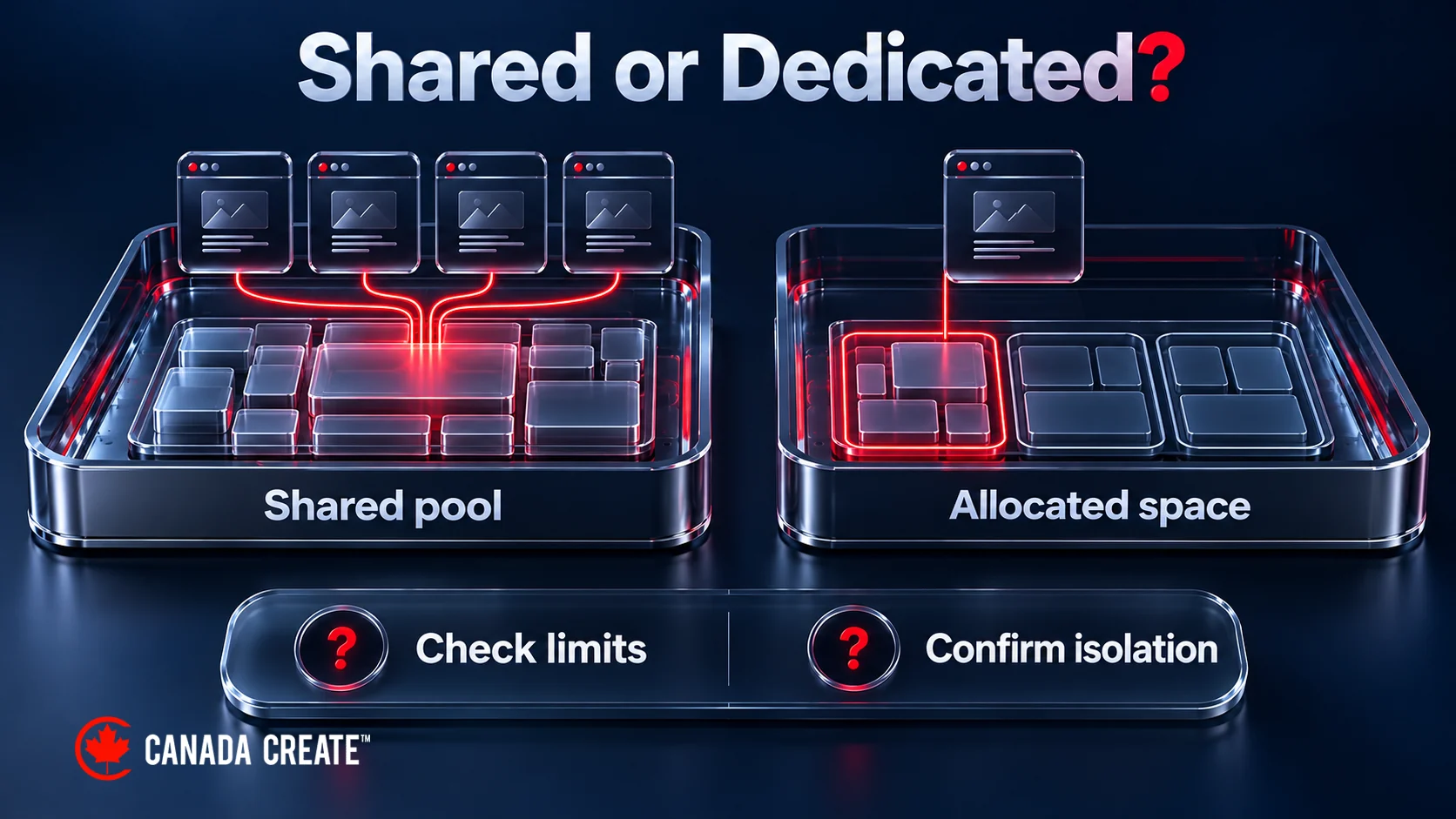
Shared hosting is one inexpensive way to put a website online. The host takes one server and divides it among many customers, often hundreds and sometimes more. Every website on that server draws on the same pool of processing power, memory and storage speed. You rent a small corner of a crowded building and hope the neighbours are quiet.
A simple way to picture it is an apartment building where every unit shares one water heater. When a few people shower at the same time, everyone gets lukewarm water. You did nothing wrong, but you still feel the effect. On a shared server, when another website gets a traffic spike, runs a badly written plugin or is hit by an attack, your website can slow down or go offline with it.
Shared hosting can suit modest business sites, personal blogs and new projects. The question is whether the plan meets your traffic, isolation, recovery and support needs. A business-critical site needs evidence that those needs will be met, rather than a decision based only on the introductory price.
What Is a Dedicated Hosting Environment?
A dedicated environment gives your website a defined space and allocated resources. The exact isolation depends on the architecture: a separate account, container, VPS and physical dedicated server are not the same thing. Resource limits and isolation can reduce interference from neighbours, but shared infrastructure, software vulnerabilities and network outages still matter.
Traditionally, this level of separation was expensive. Businesses that wanted it moved to a virtual private server or rented a whole server, then paid a developer or systems administrator to manage it. That is why so many small businesses stayed on shared plans: the step up looked too costly and too technical.
Canada Create offers a dedicated hosting environment with the included features stated in its hosting plan. Our team manages the hosting environment; ask for the resource allocation and support scope that apply to your site.
Shared Hosting vs Dedicated Environment: Side by Side
| What matters to your business | Typical shared hosting | Canada Create dedicated environment |
|---|---|---|
| Who else is on your space | Multiple accounts share underlying resources; density and limits vary | Your website in its own dedicated environment |
| Speed at busy times | May slow under contention; isolation and capacity matter | Confirm allocated resources and shared infrastructure limits |
| Security | Isolation and security features vary by provider and plan | Malware cleanup included; confirm wider security scope |
| SSL certificate | Free basic SSL on many hosts; premium certificates upsold | SSL included; confirm domain coverage and renewal |
| Backups | Retention, storage location and restore fees vary | Off-site backups included; confirm retention and restore process |
| WordPress updates | Depends on the maintenance included | Core updates included; plugin/theme maintenance separately scoped |
| Support | Channels and application support vary by plan | Call (416) 273-9030, Monday to Friday, 9 am to 6 pm, and Saturday, 10 am to 2 pm. After hours, our 24/7 AI agent answers the toll-free line, +1 (800) 808-9235, and we’ll follow up the next business morning. Human response targets apply. |
| Price | Low promo rate that renews higher, plus add-ons | Custom-scoped engagements; proposal after discovery. Paid annually, plus applicable tax; confirm included and separately scoped work |
We host, monitor and back up business websites, with a sales and support line open Monday to Saturday.
The Hidden Cost of Cheap Shared Hosting
Shared hosting is advertised with a very low monthly number, but that number rarely matches what a business ends up paying. Here is how the real cost builds up.
1. The introductory price disappears at renewal
Many large shared hosts sell the first term at a steep discount, often requiring you to prepay one to three years to get it. When the term ends, the plan renews at the regular rate, which can be substantially higher. Business owners who budgeted for a few dollars a month are surprised by an invoice several times larger.
2. Security is sold as an extra
Shared plans commonly offer malware scanning, website firewalls and “site lock” style security badges as paid add-ons during checkout or after a scare. Check whether the advertised protection includes cleanup after an incident or only monitoring and prevention controls.
3. Backups are limited or cost more
Shared plans differ in backup location, retention and restore access; some include geographically separate backups. Automated off-site backup with one-click restore is a common paid upgrade. A backup kept on the same machine as your site fails when that machine fails.
4. SSL and email are upsold
Basic SSL certificates are free on many hosts today, but premium certificates, extra domains, professional email mailboxes and domain privacy are frequently sold separately. Each one is small; together they add up.
5. Your time is not free
On a plan without application maintenance, updating WordPress, fixing plugin conflicts and restoring a broken page remain your responsibility. If you do it yourself, it costs your evenings. If you hire a developer each time, it costs an hourly rate. Either way, it is a real expense that never appears on the hosting invoice.
6. Include possible lost business in the cost comparison
When a site is slow or offline, visitors leave and rarely return. A contact form that silently stops sending emails can lose weeks of enquiries before anyone notices. For a business that wins even one or two customers a month from its website, a single bad week on cheap hosting can cost more than a full year of proper hosting.
The “Bad Neighbour” Problem Explained
The biggest weakness of shared hosting is not the price. It is the neighbours. On a crowded server you have no idea who you are sharing with, and their problems can become yours.
Traffic spikes next door
If another website on the same server goes viral, runs a big sale or gets hit by bots, it can consume a large share of the server’s processing power. Your pages then take longer to load, even though nothing changed on your site. Hosts try to limit this with resource caps, but on a heavily sold server there is only so much to go around.
Badly built websites
Some websites on a shared server run outdated software or poorly written plugins that make heavy database requests. They slow the whole server. You cannot see them, you cannot fix them, and the host may take a long time to act.
Hacked neighbours
Shared servers are attractive to attackers because breaking into one weak site can give them a foothold. Good hosts isolate accounts from each other, but weaker setups have historically allowed infections to spread or have caused whole servers to be blocked. Even when your site is untouched, the server can slow to a crawl while the host deals with an attack on another account.
Email reputation
Shared hosting may send email through a shared sending IP. If another customer sends spam, that IP can end up on block lists, and your quotes, invoices and form notifications may start landing in spam folders. This is one of the most common hidden problems we find when businesses move to us.
Isolation and reserved resources can reduce neighbour-related problems. They do not remove shared-network outages, application faults or email-reputation risks. Ask which components are isolated, which remain shared and who is responsible when an incident affects your site.
Why Hosting Matters for SEO
Search engines want to send people to pages that load quickly, stay online and are safe to visit. Your hosting affects all three. It does not replace good content or strong backlinks, but it decides whether your SEO work is built on solid ground or on sand.
Page speed and Core Web Vitals
Google measures real-world loading experience through Core Web Vitals, including how quickly the main content appears (Largest Contentful Paint), how quickly the page responds to a tap or click (Interaction to Next Paint) and how stable the layout is as it loads (Cumulative Layout Shift). These are part of Google’s page experience signals. Server response time is one early part of a navigation, alongside DNS, connection setup and other work. A slow, crowded shared server adds delay before a single image or line of text can load, which makes good Core Web Vitals scores much harder to reach.
Uptime and crawling
If Googlebot tries to crawl your site while it is down or extremely slow, it cannot read your pages. Google has explained that when a server responds slowly or with errors, its crawlers reduce how much they crawl. Frequent outages can delay new pages from being indexed and, if they persist, can cause pages to drop from results. A stable environment keeps your site available whenever Google visits.
Security and trust signals
Hacked websites can be flagged by Google’s Safe Browsing systems, which show warnings in search results and browsers. Spam links injected by attackers can damage rankings and trust for months. HTTPS is a confirmed lightweight ranking signal, and browsers label sites without it as “Not Secure”. Malware monitoring, cleanup and correctly renewed TLS certificates reduce risk; none makes a site immune to compromise.
User behaviour and conversions
Even when rankings hold, a slow site loses visitors. People leave pages that take too long to load, especially on mobile data. Faster pages keep visitors reading, clicking and contacting you, which is the whole point of ranking in the first place.
Why Canada Create Hosting Gives Your SEO an Edge
Hosting and SEO are easier to coordinate when the same team understands the website and its environment. The same Toronto team that has spent more than 18 years ranking websites on Google also builds and runs the environment those websites live on. WordPress-tuned settings, caching and current PHP can improve server response; off-site backups and core updates support recovery and maintenance. Plugin and theme testing, monitoring and application repairs need a clear written scope.
Ten Hosting Responsibilities to Compare
Compare these ten responsibilities in writing. Other maintenance and project work is scoped separately; shared hosts may include some of the same features.
1. A dedicated environment instead of a crowded server
Your website runs in its own dedicated environment with its own allocated resources. On shared hosting, accounts share underlying resources; capacity limits and isolation determine how much this affects your site.
2. SSL coverage and renewal
An SSL certificate is included. Confirm coverage and renewal monitoring for every domain and subdomain you use. On many shared plans, extra domains or premium certificates cost more, and expired certificates are your problem.
3. Malware scanning and cleanup
Malware cleanup is included in our hosting plan; confirm ongoing scanning and incident-response responsibilities in writing. On shared hosting, security scanning and cleanup are commonly sold as monthly add-ons or one-time emergency fees.
4. Off-site backups with restores done for you
Off-site backups are included. Compare the same retention, storage and restore details on any shared plan.
5. WordPress updates checked before they go live
Core software updates are included. Agree plugin and theme updates, staging tests and rollback responsibilities in a separate maintenance scope; testing reduces risk but cannot eliminate breakage.
6. WordPress-tuned speed
Server-level caching, current PHP and settings tuned for WordPress keep pages quick on phones and desktops. Some shared plans also provide WordPress-specific caching and tuning, so compare the actual configuration.
7. Uptime monitoring with a team on the fix
Agree monitoring, alert recipients and escalation in the maintenance scope. Check whether monitoring detects a full outage only or also failed forms, checkout errors and slow responses.
8. Domain, DNS and email authentication kept in order
DNS and SPF, DKIM and DMARC work can be included in an agreed scope. These records help authenticate email; they do not guarantee inbox placement. Confirm whether your host or email provider manages them.
9. A toll-free phone line
Call (416) 273-9030, Monday to Friday, 9 am to 6 pm, and Saturday, 10 am to 2 pm. After hours, our 24/7 AI agent answers the toll-free line, +1 (800) 808-9235, and we’ll follow up the next business morning. The standard human response target is 24 to 48 hours during business days, not a guarantee of immediate repair.
10. SEO and web experts on the same team
Your host is also an agency with 18+ years of SEO, web design and Google Ads experience. When you need a page redesigned, a speed problem diagnosed or a ranking drop investigated, you are already talking to the right people. SEO, design and advertising engagements are separately scoped after discovery.
Price Comparison: What Businesses Really Pay
Let us compare what a typical small business pays in a year. Shared hosting prices vary widely and change often, so treat the shared column as an illustration of how costs typically build up, and check any provider’s current price list before comparing.
| Cost item | Typical shared hosting | Canada Create hosting |
|---|---|---|
| Hosting plan | Low first-term price, higher at renewal | Custom-scoped engagements; proposal after discovery. Paid annually, plus applicable tax. |
| Malware protection and cleanup | Scope and fees vary | Cleanup included; confirm monitoring scope |
| Off-site backups and restores | Retention and restore fees vary | Off-site backups included; confirm restore arrangements |
| SSL for extra domains or premium certificates | Sometimes extra | An SSL certificate included; confirm domain coverage |
| WordPress updates and fixes | Check included maintenance or allow for developer time | Core updates included; other maintenance and fixes separately scoped |
| Phone support | Often limited to certain plans | Sales line Mon to Fri 9 to 6, Sat 10 to 2; customer support as described above |
| Dedicated environment | Not included; requires a VPS or server upgrade | Included |
Compare the annual renewal price, included features, optional maintenance and the value of your team’s time. A managed arrangement may offer better value for your business, but the cost difference depends on the plans and responsibilities actually being compared.
Canada Create hosting: Custom-scoped engagements; proposal after discovery. Hosting is paid annually, plus applicable tax.
Why We Stopped Selling Shared Hosting
For years, the hosting industry has pushed small businesses toward the cheapest shared plans and then tried to sell them upgrades when things went wrong. We saw the results every week: clients arriving with slow sites, hacked plugins, lost backups and emails in spam folders, all caused by hosting that was never built for a business.
So we made a decision. Canada Create does not sell the shared model. Every website we host gets a dedicated environment, with the hosting inclusions and any additional maintenance recorded in writing. We would rather host fewer websites properly than many websites badly. When our clients succeed online, they stay with us, refer their friends and trust us with their SEO, web design and advertising. That is a better business for everyone than selling cheap plans and hoping nobody calls.
No more shared environments. A dedicated environment for a successful future is simply the standard every business deserves.
Signs Your Website Has Outgrown Shared Hosting
If any of these sound familiar, investigate the cause, business impact and cost of the available remedies:
- Pages take more than two or three seconds to load on a phone.
- The site slows down at certain times of day for no clear reason.
- You have received a “resource limit reached” or similar message from your host.
- Your site has been hacked, or your host has warned you about malware.
- Customers say your emails ended up in their spam folder.
- Your hosting renewal invoice was much higher than you expected.
- Support answered with a ticket number and a suggestion to upgrade.
- You are not sure when your last working backup was taken.
- Google Search Console shows server errors or slow response times.
- Your Core Web Vitals report shows pages as “Poor” or “Needs improvement”.
Who Benefits Most From a Dedicated Environment
Clinics and health practices
Dental, medical, physiotherapy and wellness clinics depend on booking pages and phone links working on Monday morning. Downtime means missed appointments and patients booking elsewhere.
Law, accounting and professional firms
Professional firms handle confidential enquiries and need forms and email that arrive reliably. A hacked website or a spam-listed email address damages trust quickly.
Online stores
WooCommerce stores need fast product pages and a checkout with enough capacity for expected sale traffic. Checkout delay can increase abandonment; measure its effect on your store.
Contractors and home services
Roofers, plumbers, HVAC and renovation companies win jobs from mobile searches. Fast pages and working quote forms turn those searches into calls.
Businesses investing in SEO or Google Ads
If you pay for SEO or advertising, account for the cost of attracting visitors. Sending them to a slow, unreliable site wastes that investment. Our SEO services and Google Ads management work best on hosting that keeps pages fast.
How Switching to Canada Create Works
- Free hosting review. We look at your current host, site size, software, email and DNS, and confirm the plan in writing.
- Copy and test. Your files and database are copied into your new dedicated environment and tested on a temporary address before anything changes.
- Switch over. We move DNS at a quiet hour, issue SSL and check email, so visitors and messages keep arriving.
- Watch and hand over. Uptime, forms and backups are checked, and you receive a short summary of your new setup.
Keep the old host running until the new setup is confirmed, with a rollback plan and a final data sync for changing content or orders. Timing depends on the site, email and DNS scope and is agreed before the move. If you are planning a new website, our web design team builds it directly in your hosting environment, so launch day is a simple switch.
What About VPS and Dedicated Servers Elsewhere?
Other hosts do offer virtual private servers and full dedicated servers. They can be excellent, but they come with two catches for most small businesses. First, compare their full hosting and management charges with shared plans that meet the same requirements. Second, many are unmanaged or only partly managed, which means someone still needs to secure the server, apply updates, configure caching and fix problems. Unless you have a systems administrator on staff, you end up paying for server power and for a technician to run it.
Canada Create manages its hosting environment for you. Compare the current hosting plan and any separately scoped maintenance with managed VPS or dedicated-server offers on the same basis.
Hosting Types in Plain Language
Hosting companies use a lot of jargon. Here is what the main terms actually mean for a business owner.
- Shared hosting: many websites on one server, all drawing from the same resources. Often inexpensive; predictability depends on resource limits and capacity.
- Cloud hosting: a marketing term used for many different setups. Some cloud plans are still shared underneath; always ask how many accounts share your resources.
- VPS (virtual private server): a virtual server with a specified resource allocation. CPU may still be shared; performance and management depend on the plan.
- Dedicated server: an entire physical server for one customer. Powerful, expensive and requires a systems administrator.
- Managed hosting: a service where the provider handles security, updates, backups and support for you. Managed can apply to any of the types above.
- Canada Create dedicated environment: your website in its own dedicated environment with allocated resources, managed by our team within the agreed hosting and maintenance scope.
Five Myths About Shared Hosting
Myth 1: “Hosting is hosting. They are all the same.”
Two plans with the same storage and bandwidth numbers can perform completely differently. What matters is how many websites share the resources, how the server is tuned, how security is handled and who helps when something breaks. None of that appears in a headline price.
Myth 2: “Unlimited bandwidth means my site can handle anything.”
“Unlimited” plans are still bound by fair-use policies and processing limits. When your site uses more than its share of processing power or memory, the host can slow it down or suspend it, whatever the bandwidth promise says.
Myth 3: “My site is small, so shared hosting is fine.”
A small site can still lose customers when its neighbours slow the server, and a small site is just as attractive to automated hacking tools as a large one. Size does not protect you from bad neighbours.
Myth 4: “I can upgrade later if I need to.”
Some businesses only consider upgrading after something goes wrong: a hack, an outage during a promotion or a sudden drop in rankings. By then the damage is done. Choosing suitable capacity and tested recovery arrangements reduces the chance and impact of an emergency.
Myth 5: “Better hosting is too expensive for a small business.”
Custom-scoped engagements; proposal after discovery. Hosting includes SSL, malware cleanup, off-site backups and core software updates and is paid annually, plus applicable tax. Compare the complete scope and annual cost with your current plan, including add-ons and emergency support.
Three Everyday Scenarios
These are illustrative examples of situations we commonly see, not specific client stories.
The clinic on a Monday morning
A dental clinic’s booking page is on a shared plan. Another site on the server is attacked over the weekend, and the whole server slows down. On Monday morning, patients trying to book see a spinning wheel and call a competitor instead. Account isolation can reduce spillover, while shared network capacity and monitoring coverage still determine how quickly a slowdown is detected and resolved.
The store during a sale
A WooCommerce store launches a weekend promotion. Traffic doubles, the shared plan hits its resource limits and checkout pages start timing out. The owner only discovers the problem from angry customer emails. With allocated resources, WordPress-tuned caching and a team watching uptime, the store is prepared before the sale begins.
The firm whose emails disappear
A law firm notices that clients are not replying to quotes. The shared server’s email address has been listed as a spam source because of another customer. Months of enquiries have been going to spam folders. With proper email authentication records and a clean setup managed by our team, delivery may improve, although recipient filtering and sender reputation still affect inbox placement.
How to Test Your Current Hosting Yourself
You do not need technical skills to check whether your hosting is holding you back. Try these free tools:
- Google PageSpeed Insights: enter your homepage and a service page. Look at the real-user data at the top, and note the time to first byte and Largest Contentful Paint.
- Google Search Console: open the Core Web Vitals report and the Crawl Stats report (under Settings) to see slow responses or server errors.
- An uptime monitor: monitoring services can alert you when their checks detect an outage; choose suitable check frequency, locations and alert delivery.
- Your renewal invoice: compare what you paid in year one with what you will pay next year, including every add-on.
Send us the results and we will explain what they mean in plain language as part of your free hosting review.
Hosting, Privacy and Canadian Businesses
Canadian businesses collecting personal information must determine which federal, provincial and sector-specific privacy rules apply. PIPEDA does not impose a blanket Canada-only hosting requirement. Ask who can access data, where production data and backups are processed, how long copies are retained and what safeguards the contract provides. Hosting isolation alone does not establish compliance. If your organization has a specific residency or health-information requirement, raise it before migration and obtain appropriate privacy advice.
Checklist: Questions to Ask Any Hosting Provider
- Is my website on a shared server, and how many other accounts are on it?
- Does my website get its own dedicated environment and resources?
- Are malware scanning and cleanup included, or extra?
- Where are backups stored, how long are they kept and who restores them?
- Is SSL included for every domain and subdomain I use?
- Who updates WordPress, themes and plugins, and are updates tested?
- Can I call a person at any hour, and will they fix website problems or only server problems?
- What will I pay after the first term, including all add-ons?
- Does your team understand SEO and how hosting affects rankings?
Ask Canada Create these questions and confirm the answers, inclusions and limitations in writing.
The Bottom Line
Your website may be your storefront, booking system and main source of enquiries. Choose hosting against that role: measure performance, check isolation and recovery, and compare the complete annual scope. Shared hosting can be suitable for some business sites; a dedicated environment can be appropriate when resource or operational requirements justify it.
If your business depends on its website, staying on cheap shared hosting is a risk you do not need to take.
Prices are current as of September 2026, billed annually upfront, subject to change without notice, and exclude applicable taxes. Related reading: Best WordPress Hosting in Canada (2026) and 7 Best Affordable WordPress Hosting Options in Canada.
Frequently asked questions
What is the difference between shared hosting and dedicated hosting?
Shared hosting divides underlying resources among accounts. A dedicated environment has a defined resource allocation and isolation boundary, which may be an account, container or VPS rather than an entire physical server. Ask what remains shared.
Is shared hosting bad for SEO?
Shared hosting does not cause a ranking penalty by itself. Slow responses, outages and security problems can affect visitors and crawling on any architecture; suitable resources and maintenance reduce those risks.
How does Canada Create hosting help my SEO?
WordPress-tuned hosting, core updates, SSL, malware cleanup and off-site backups support the technical foundation of your site. SEO results also depend on content, competition and other factors. See Canada Create hosting.
How much does Canada Create hosting cost?
Custom-scoped engagements; proposal after discovery. Hosting is paid annually, plus applicable tax.
What is included in Canada Create hosting?
The hosting plan includes SSL, malware cleanup, off-site backups and core software updates. Plugin and theme maintenance, monitoring, migration and other work need a written scope.
Do shared hosts charge extra for security and backups?
Many large shared hosts sell malware protection, off-site backups, premium SSL and domain privacy as add-ons, and their introductory prices renew higher. Always compare the full yearly cost.
Is a dedicated environment the same as a dedicated server?
No. A dedicated server is a whole physical machine whose management responsibilities and full cost depend on the plan. A Canada Create dedicated environment gives your website its own protected space and resources, fully managed by our team. Custom-scoped engagements; proposal after discovery.
Can you move my website from my current host?
Yes. We copy your site and database, test everything on a temporary address and switch DNS at a quiet hour, so your old host keeps running until the new setup is confirmed.
Who should move off shared hosting?
Consider moving when measured capacity, isolation, recovery or support no longer meets your needs. Calls, bookings or sales alone do not prove that every shared plan is unsuitable.
How do I get started?
Request a free hosting review or call +1 (800) 808-9235. We reply within one business day to discuss your setup. A custom proposal follows discovery. Start here.