
SaaS SEO guide: comparison, alternatives and integration pages that bring pipeline

SaaS SEO connects a software product with people researching a problem, evaluating a solution or trying to use it successfully. The useful question is not simply which keywords could bring visitors. It is which searches reveal a need the product actually serves, what evidence those people need, and what happens after they arrive.
A company can publish hundreds of articles and still leave a buyer unable to confirm an integration, compare plans or understand implementation. Equally, a library of sales pages can miss people who do not yet know which category of software they need. A workable strategy connects education, evaluation and product adoption, then measures the quality of those journeys.
This guide explains how to choose page types, brief useful content, investigate technical obstacles and evaluate qualified demand. The examples are hypothetical teaching examples, not client results or industry benchmarks.
Map content to the buying journey
Start with the customer and the product rather than a keyword export. Record the role experiencing the problem, the person approving the purchase, the workflow being replaced, the trigger for change and the constraints that could disqualify your software. A small business buying a self-serve tool and an enterprise procurement team may use similar words while needing very different evidence.
Build a short evidence file from authorized customer interviews, sales questions, support themes and product documentation. Keep private customer details out of published content. Separate what buyers actually asked from your team’s assumptions. A frequently raised integration objection may justify a page before a broad, higher-volume topic that has little connection to your product.
| Stage | Typical searches | Page type |
|---|---|---|
| Problem aware | How to automate invoice approvals | A practical problem guide covering manual and software options |
| Solution aware | Invoice approval software for multi-entity teams | A product category or use-case page with relevant workflows |
| Comparing | A named tool’s alternatives; one tool versus another | A comparison answering specific purchasing criteria |
| Validating | Your product’s integration, pricing or security information | Integration, pricing, implementation and security pages |
| Customer | How to configure an approval workflow in your product | Accurate help-centre documentation |
We plan and run saaS SEO for B2B and software companies in Toronto and across Canada, scoped in writing after a free review.
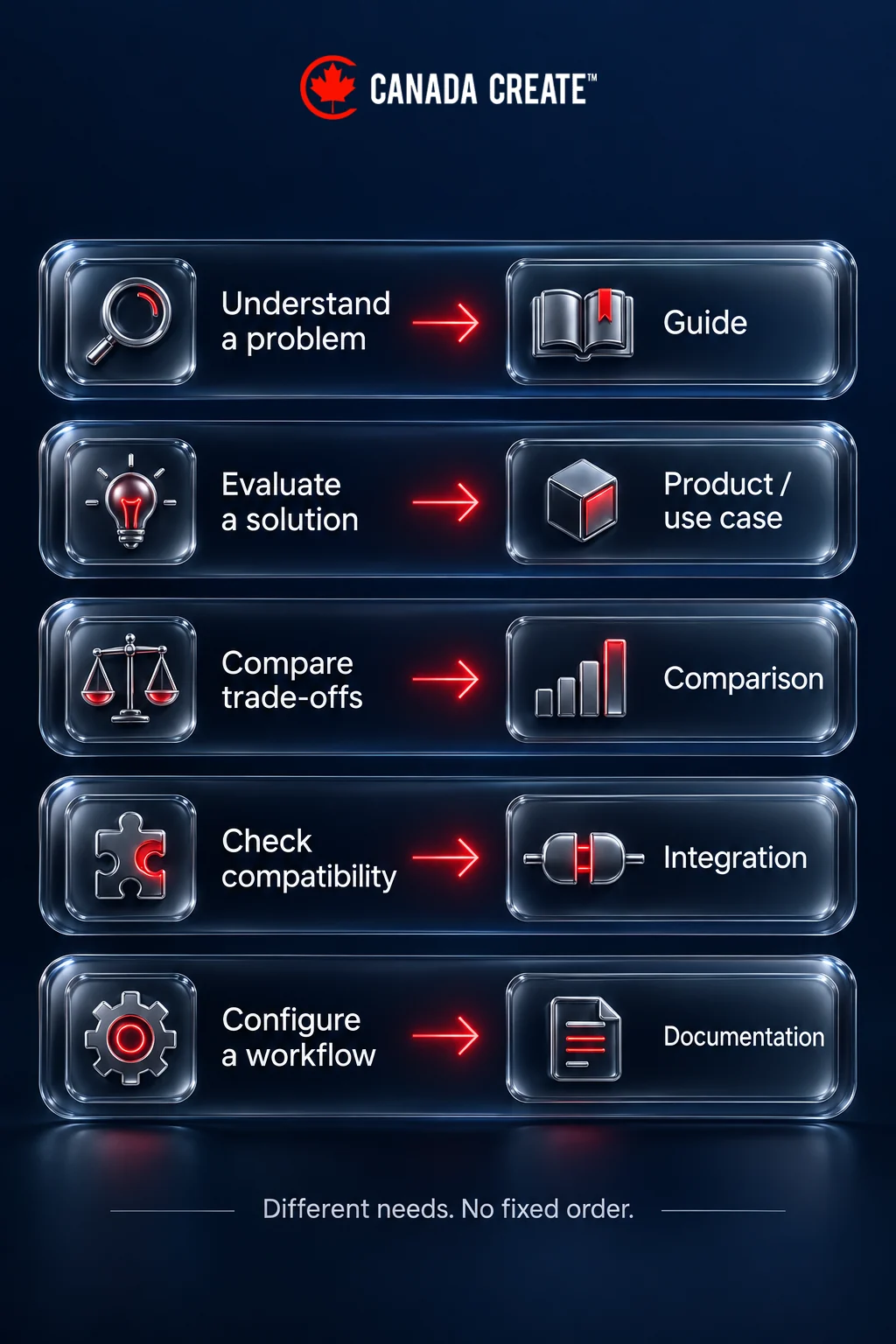
The rows describe possible needs, not a compulsory sequence. Someone can read documentation before booking a demo, or return to an introductory guide after a sales call. Map pages to the decision they support rather than forcing every visit into a linear funnel.
Choose between a product page, a service page and a blog article
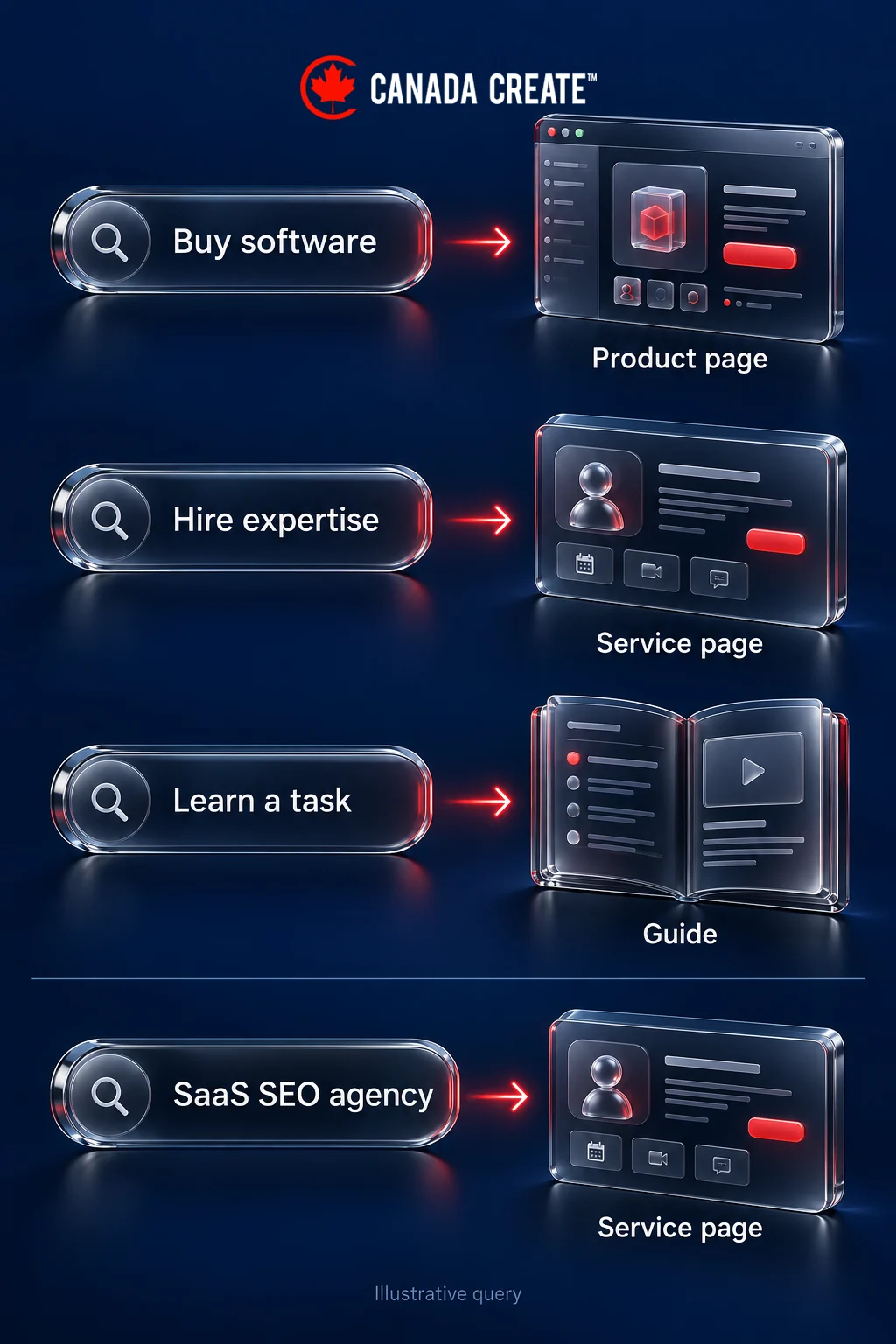
A product page should help someone evaluate or buy the software. It needs the workflow, capabilities, limitations, proof and next step. A service page answers a different question: what help an agency or consultant provides, how scope is agreed and how to enquire. A blog guide teaches a task or explains a decision in enough detail to be useful without a sales conversation.
For example, “SaaS SEO agency” describes demand for a marketing provider. It is not evidence that buyers want your invoice-approval software. Advertising prices for agency keywords are therefore not a forecast of your product’s acquisition costs. Keep those markets separate when choosing topics and assessing their value.
Before approving a new URL, write a one-sentence brief: “This page helps this audience make this decision, using this evidence.” Then identify its closest existing page. If both would satisfy the same need, improve the existing page or define a genuinely different purpose. Separate URLs are justified by different needs and useful content, not just slightly different keyword wording.
Prioritize with constraints visible
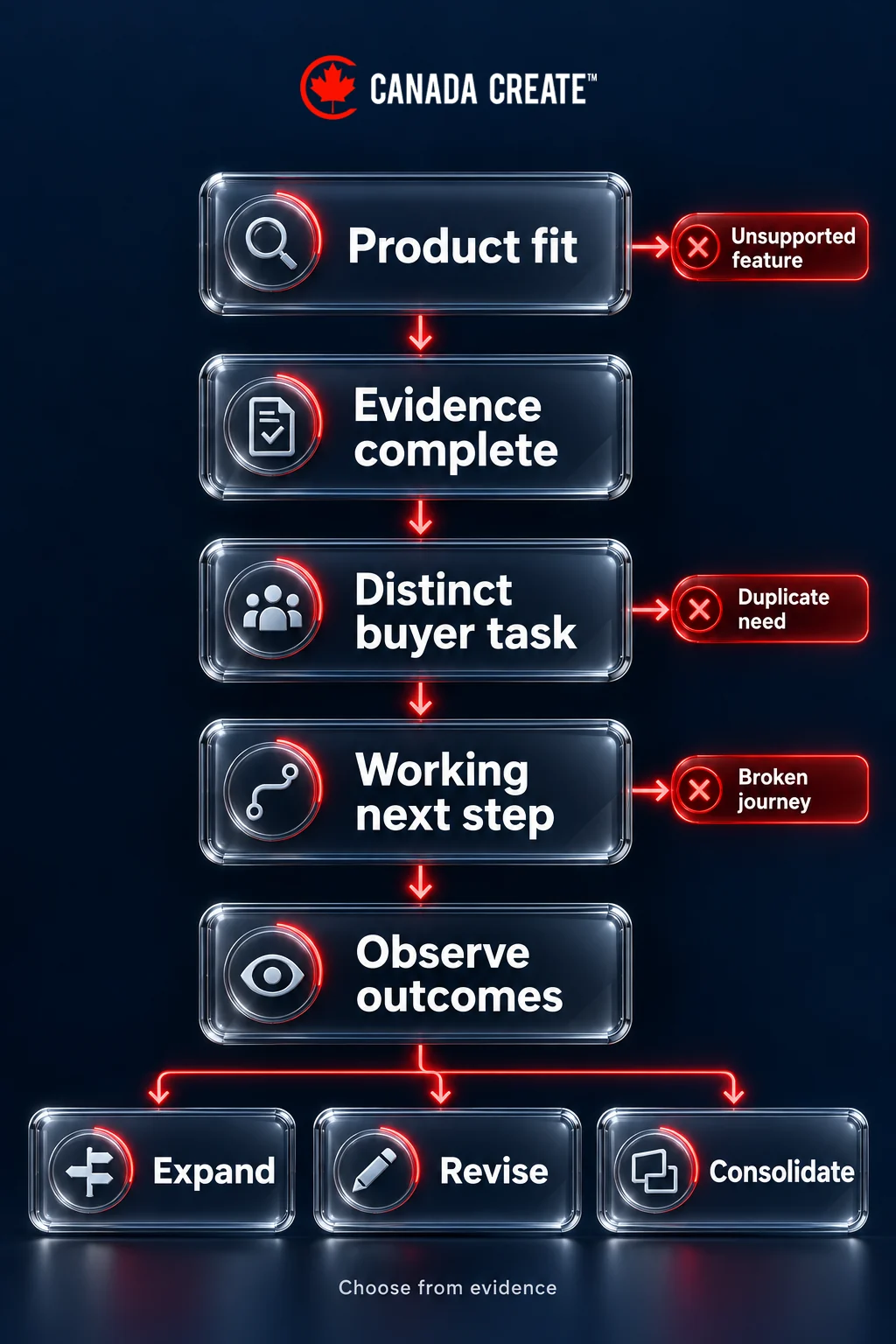
For each candidate, record buyer relevance, product fit, evidence available, current coverage, production effort and the next measurable action. Use clear high, medium and low assessments with a reason. Do not hide an unsupported guess behind a precise score. A page that needs a nonexistent integration fails the product-fit test, however attractive its search demand appears.
Start with a small connected set: a relevant use-case page, a guide answering its main problem, and the integration or comparison page that removes a common objection. Check current search results in the intended market to understand the kinds of answers shown, while remembering that results are observations rather than a fixed specification for your own page.
Comparison and alternatives pages
Comparison content is useful when it helps a buyer make a trade-off. A page that marks every feature in your favour without explaining plan limits or use cases provides little decision support. Begin with the actual reasons someone might switch: implementation effort, missing workflows, seat costs, reporting, support or an integration requirement.
Distinguish a direct comparison from an alternatives guide. A direct comparison examines a defined pair of options against the same criteria. An alternatives guide explains several routes, which might include keeping the current product, changing a process or choosing another category. Do not assume every reader should switch.
Build a comparison people can check
- Define the scenario. State the organization type, workflow and requirements being compared. A result for a five-person team may not apply to a multi-entity deployment.
- Use comparable plans. Record the plan, billing interval, currency, included seats, relevant limits and optional charges. “Starts at” prices do not establish equivalent total cost.
- Separate facts from judgements. A documented feature is a fact to verify. “Easier to use” needs a stated evaluation method and should not be presented as universal.
- Explain limitations. Show where your product is unsuitable, requires an add-on or cannot support the requested workflow.
- Retain evidence. Keep dated source records for published statements, with an owner responsible for checking changed pricing, features and availability.
- Give the reader a next step. Link to relevant implementation documentation, a plan explanation or a scenario-specific demo rather than an unrelated generic form.
In a hypothetical comparison of approval tools, “supports approvals” is too broad. The buyer may need approval thresholds by entity, delegated approvers during leave and an exportable activity history. Explain those requirements individually. A screenshot with synthetic data can show how your own workflow behaves; it does not prove an unsupported claim about another product.
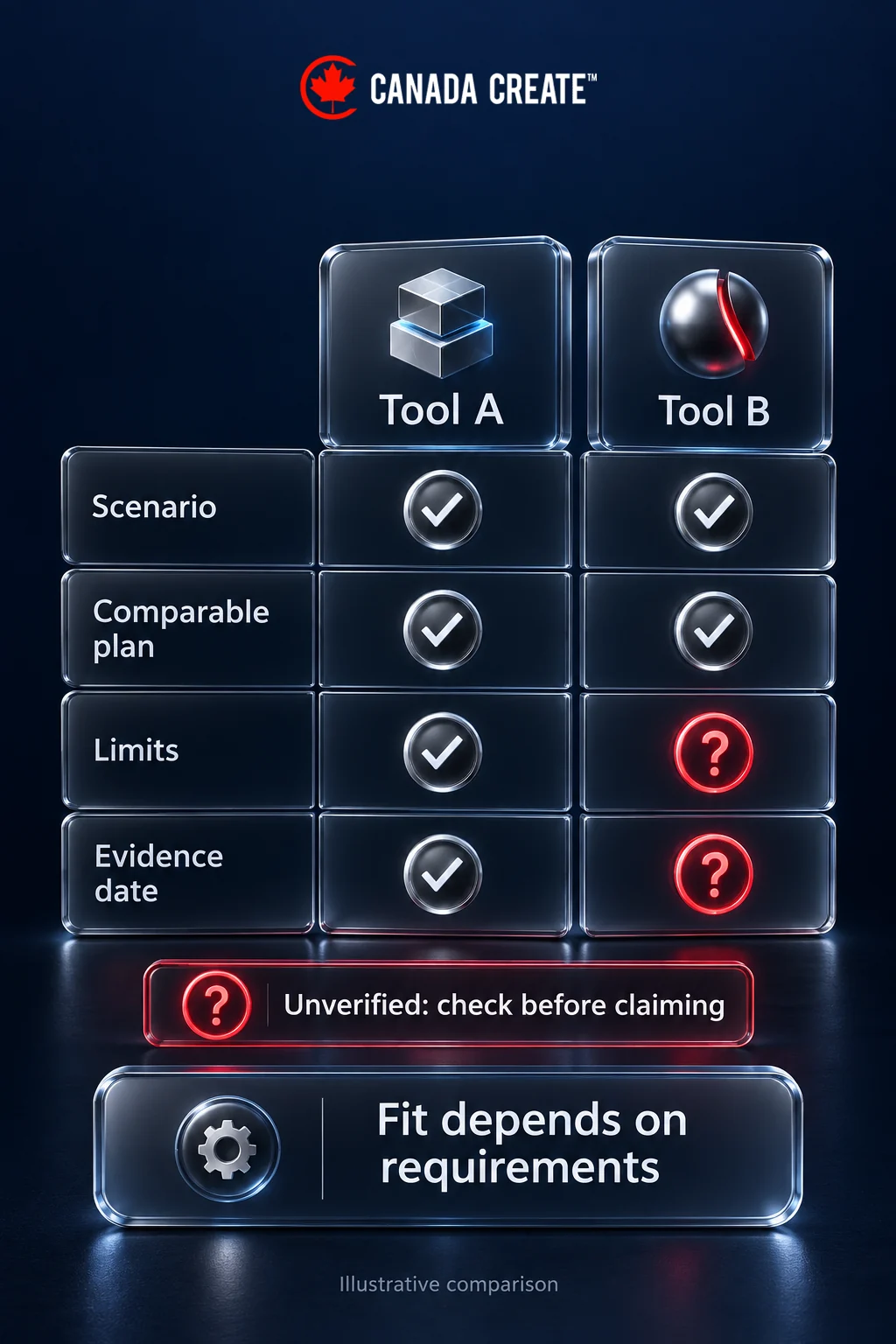
Do not invent missing competitor information or imply an affiliation. If a material detail cannot be confirmed, mark it as unverified or omit the claim until it can be checked. Escalate disputed claims and rights questions to a qualified adviser before publication. An editorial checklist is not legal clearance.
Set maintenance triggers as well as a review date. A product release, pricing change, integration retirement or credible correction should prompt a review. When a comparison becomes outdated, correct the affected conclusion and related FAQ, not just the “last updated” label.
Integration pages
An integration page should answer whether two systems can perform a useful job together. Naming both products is not enough. Before writing, confirm that the connection exists and identify whether it is native, supplied by an intermediary, custom-built or merely a documented export-and-import process.
A strong page answers these questions:
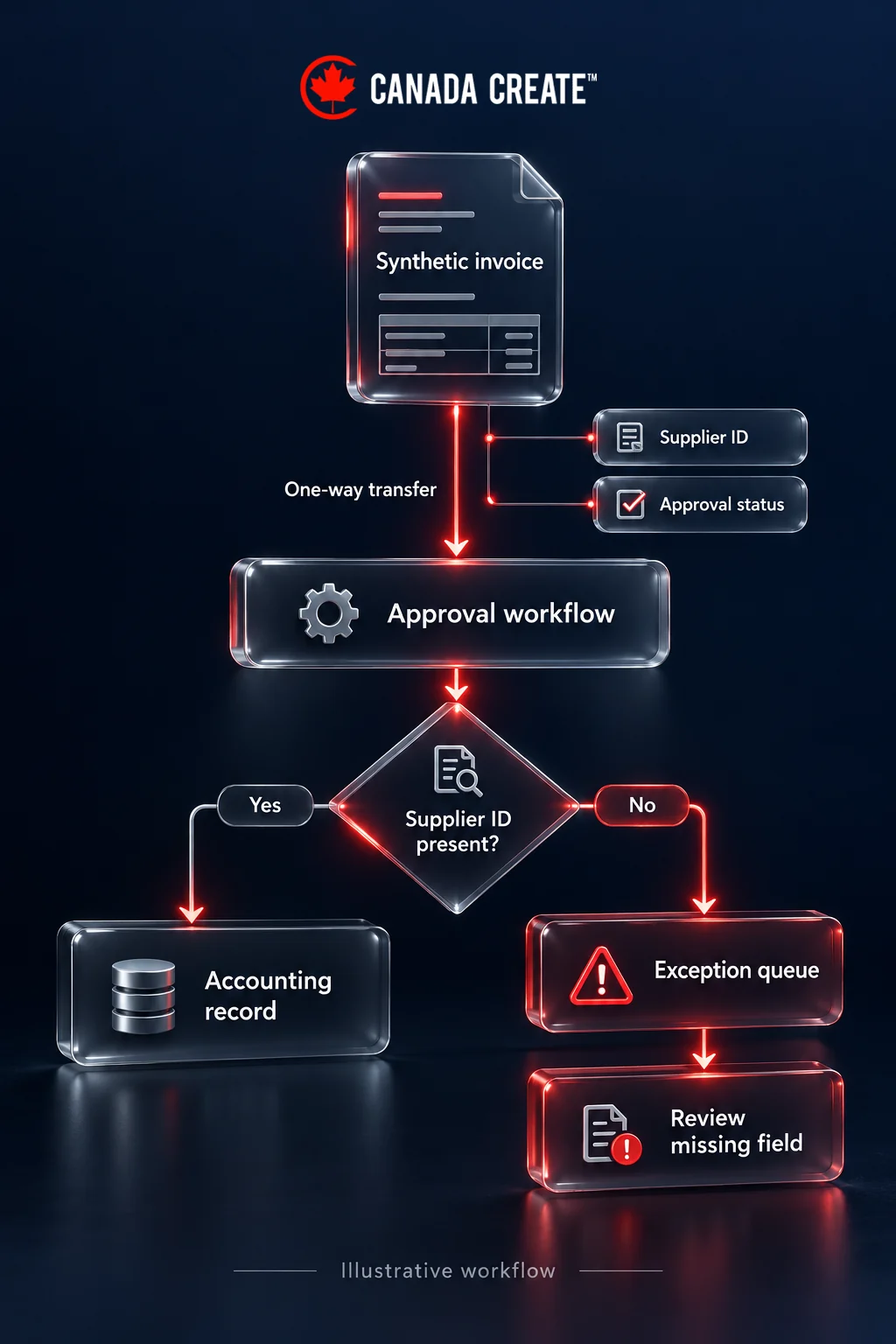
- What moves? Identify the records and fields involved, such as approved invoices, supplier identifiers and approval status. Avoid “syncs everything”.
- In which direction and when? Explain one-way or two-way movement, triggers, scheduling and any material delay.
- What is required? State eligible plans, account roles, prerequisites and additional service costs where applicable.
- What can go wrong? Explain duplicate handling, missing fields, failed transfers and where the user can see errors.
- Who supports it? Distinguish your responsibilities from those of the other provider or implementation partner.
- How does someone begin? Link to current setup instructions and a relevant next action.
For a hypothetical invoice-approval product, a useful integration example follows one synthetic invoice from receipt to approval and then into the accounting system. Show the fields that transfer and the exception when a supplier identifier is missing. That teaches more than a row of software logos or a claim of seamless connectivity.
Keep the marketing page focused on suitability and workflow. Put detailed authentication steps and troubleshooting in maintained documentation, linked from the relevant passage. If the feature is planned rather than available, label its status accurately; do not create a page that invites an unsupported purchase decision.
Where another platform offers an eligible marketplace listing, review its current requirements separately. Publishing a page on your own site neither creates that listing nor secures search visibility. Choose integration pages because they answer real questions and describe supported functionality, not because every possible pair of product names can become a URL.
Use case and industry pages
A use-case page explains a job the software can help perform. An industry page explains why a particular operating context changes that job. Build an industry page only when those differences are substantial enough to deserve their own explanation.
For example, a hypothetical multi-entity finance team may need separate approval policies, shared suppliers and consolidated reporting. A generic small-business page may need a simpler workflow and clearer setup guidance. Changing only the industry name in the headline would not address those differences.
A practical use-case page brief
- Starting situation: Describe the workflow and the failure that prompts change.
- Product path: Show the sequence of actions in the product using approved screenshots or synthetic examples.
- Requirements: Explain the inputs, plan, permissions and integrations needed.
- Exceptions: Identify what happens when the normal process cannot complete.
- Evidence: Include a verifiable demonstration or an approved customer example, with its context.
- Fit boundaries: State when the product is unsuitable or requires additional implementation work.
- Next step: Offer a relevant template, setup guide, trial path or demo.
Product-led content means the product appears where it genuinely helps the reader complete a task. It does not mean inserting a signup button after every paragraph. A guide to approval policies might first explain the policy choices, provide a worked example and then show how the product implements them. Readers should still learn something if they do not buy.
Do not label an illustration as a customer result. Where real customer evidence is available and authorized, explain the starting conditions, what changed and how the outcome was measured. Avoid implying that a product feature establishes an organization’s legal, privacy, accessibility or security compliance.
Connect the pages around the decision
Link the problem guide to the relevant use-case explanation when the reader reaches the implementation question. Link the use-case page to supporting integrations, plan details and documentation. Link documentation back to an explanatory overview where a new reader would otherwise lack context.
Use descriptive link text that tells readers what they will find. Avoid sending every article to the homepage or adding a long block of unrelated links. Google’s link guidance recommends crawlable links and meaningful anchor text. Maintain the connections when products or documentation move, so a useful page does not become an isolated endpoint.
Technical SEO for SaaS sites
Investigate technical issues against the pages that matter. A SaaS business may have a public marketing site, a logged-in application, public documentation and customer-generated pages. Give each group an explicit purpose and access policy before changing indexing controls.
Public product and help pages can serve searchers. Private workspaces and customer records require proper access controls. Search exclusion is not data protection. A public login page may also serve people navigating to the app; assess its purpose rather than assuming every login URL needs the same treatment.
Check rendering only where the implementation requires it
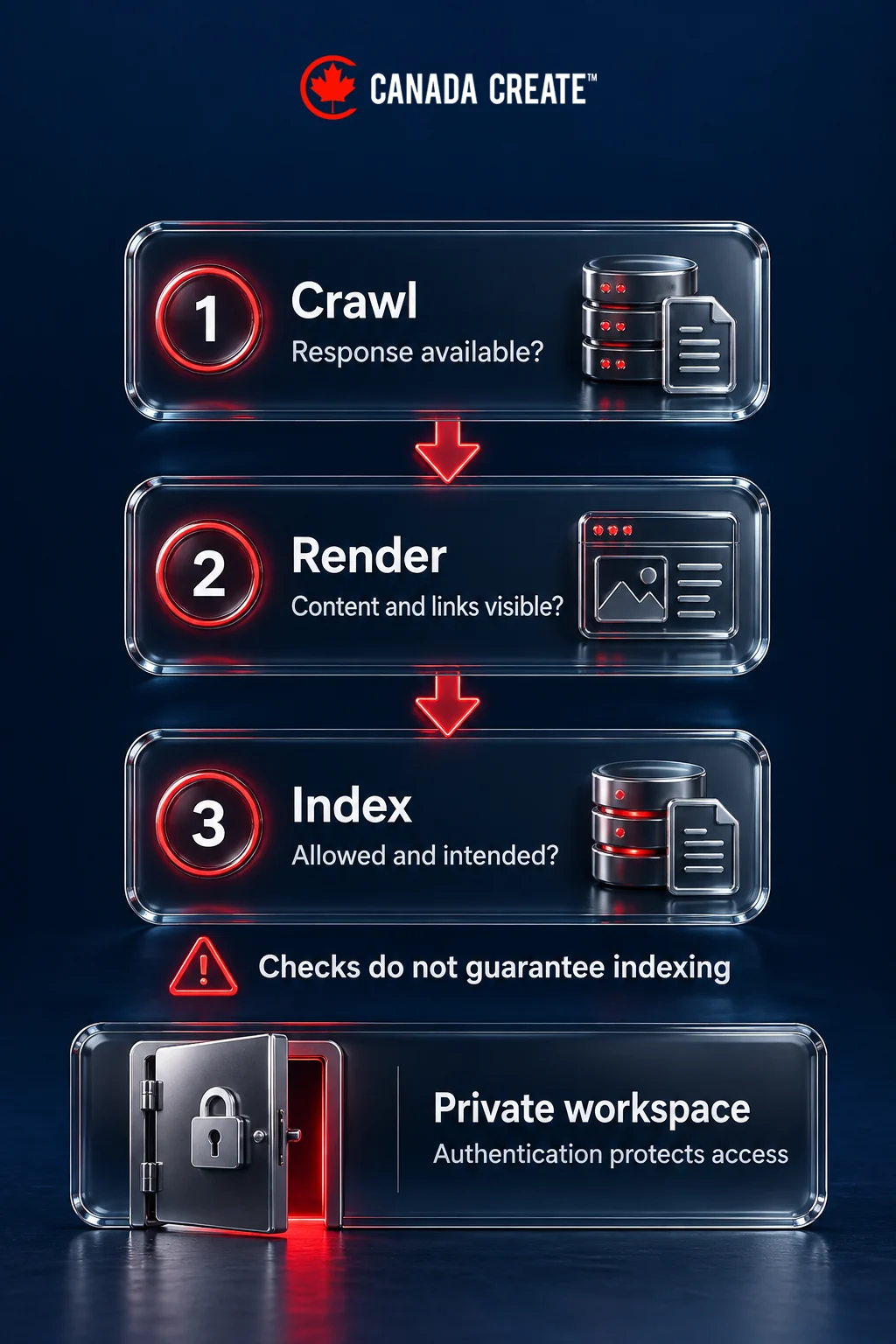
If important copy or links are generated by JavaScript, compare the initial response with the rendered page and inspect a representative URL in Search Console. Check whether the principal product explanation, navigation links and metadata are available without a user interaction. Google’s JavaScript SEO documentation explains crawling, rendering and indexing as distinct stages.
If key content is absent, investigate blocked resources, failed requests, routing and rendering rather than simply rewriting the copy. Server-side rendering or pre-rendering may be appropriate, but a working site does not need a framework migration just because it uses JavaScript. Also check that missing product routes return meaningful error responses rather than an empty page that looks successful to a crawler.
Resolve duplicate and excluded URLs deliberately
Campaign parameters, print versions and repeated product routes can create multiple URLs for similar content. Choose the preferred version, link to it consistently and keep sitemap entries aligned. Use Google’s canonicalization guidance when consolidating duplicates. A canonical is a signal, not a way to make genuinely different pages interchangeable.
For a public page intentionally excluded from search, Google’s noindex guidance explains that the crawler must be able to access the instruction. Blocking crawling can prevent it from seeing that instruction. Keep this distinct from authentication for private information.
Check language and country targeting when you genuinely publish localized versions. English and French pages need maintained translations and appropriate navigation, not a Canadian city name inserted into otherwise identical copy. Structured data should describe visible, accurate content and use currently supported types where applicable; it cannot compensate for a missing product explanation.
Prioritize issues that prevent discovery, indexing or successful use of important pages. Record the affected URL, evidence, intended state, owner and verification step. Our technical SEO audit stack post provides a related starting point for the investigation.
Programmatic SEO, carefully
Templates can make a genuine information library easier to maintain. They do not create useful information by themselves. An integration library is a reasonable candidate when each record contains a supported connection, distinct setup requirements, limitations and troubleshooting guidance. A grid of interchangeable pages for every industry and city is a different proposition.
Before scaling, define required data fields and publication gates. A page should not go live if the integration is unsupported, the explanation is incomplete, the evidence is missing or its purpose duplicates another page. Decide who updates the underlying records when the product changes.
Google’s spam policies address scaled content created primarily to manipulate rankings rather than help users. The practical safeguard is to judge each page by the task it lets a reader complete, not by whether its wording is technically unique.
Test a small, representative set before widening the template. Include a straightforward record and a complicated one with limits or exceptions. Review the result with someone who understands the product and someone who can follow the instructions as a reader. Confirm links, indexing intent and the next action.
Expand when the underlying data is reliable, maintenance has an owner and the pages answer distinct needs. Revise the template when readers repeatedly need information it omits. Consolidate overlapping pages when one stronger resource would serve the same purpose. Low traffic alone is not a sufficient reason to remove a page that provides essential implementation help.
Authority and AI search
Make the product understandable and verifiable wherever a buyer encounters it. Keep capabilities, plan names and integration status consistent between the website, documentation and authorized listings. Publish explanations that resolve difficult buying questions rather than repeatedly claiming to be the leading platform.
Google states that its AI features do not require a separate set of special optimizations; established SEO practices remain relevant. This guidance applies to Google’s features and should not be stretched into a guarantee about every assistant or answer engine.
Useful evidence can include public documentation, accurately described demonstrations and authorized customer stories. If you publish original analysis, explain the sample, method and limitations. If you have not done research, do not turn an opinion into a statistic or label an illustration a study.
Relevant mentions and reviews can help a buyer investigate a product, but their presence does not ensure a citation, ranking or sale. Treat AI visibility observations as dated snapshots: record the question, system and answer, and check whether the cited page accurately represents the product. See AI search optimization and AI SEO versus traditional SEO for related context.
Measure SEO in pipeline
Choose the business outcome before building the dashboard. A self-serve product may need qualified signups, activation and paid conversion. A sales-led product may need accepted enquiries, qualified opportunities and closed business. The same visit count means little without that context.
Define what counts
A signup is an account created. Activation should represent a meaningful experience of product value, defined with the product team. In the hypothetical approval tool, that might be a workspace completing its first valid approval workflow. A login or a page view would not automatically qualify. Use an event that can be measured consistently and distinguish test accounts from real prospective customers.
For a sales-led product, agree what makes a lead qualified: the relevant organization type, a suitable use case and a credible buying process, for example. Keep a demo request separate from an attended demo and an accepted opportunity. Otherwise a campaign can appear successful by attracting enquiries the sales team cannot serve.
Connect landing-page and acquisition information to account or opportunity records where your measurement setup and privacy requirements allow. Keep first acquisition, later interactions and the reporting attribution model distinct. Do not put personal information into URLs or treat incomplete cross-device tracking as a complete account history.
Read a hypothetical cohort correctly
Suppose one page produces 40 signups and eight activated accounts, while another produces 15 signups and six activated accounts during the same observation window. Their activation rates are 20% and 40%. The first page still produces more activated accounts in absolute terms. Neither result alone establishes which page is more profitable: acquisition costs, customer fit, paid conversion and retention remain unknown.
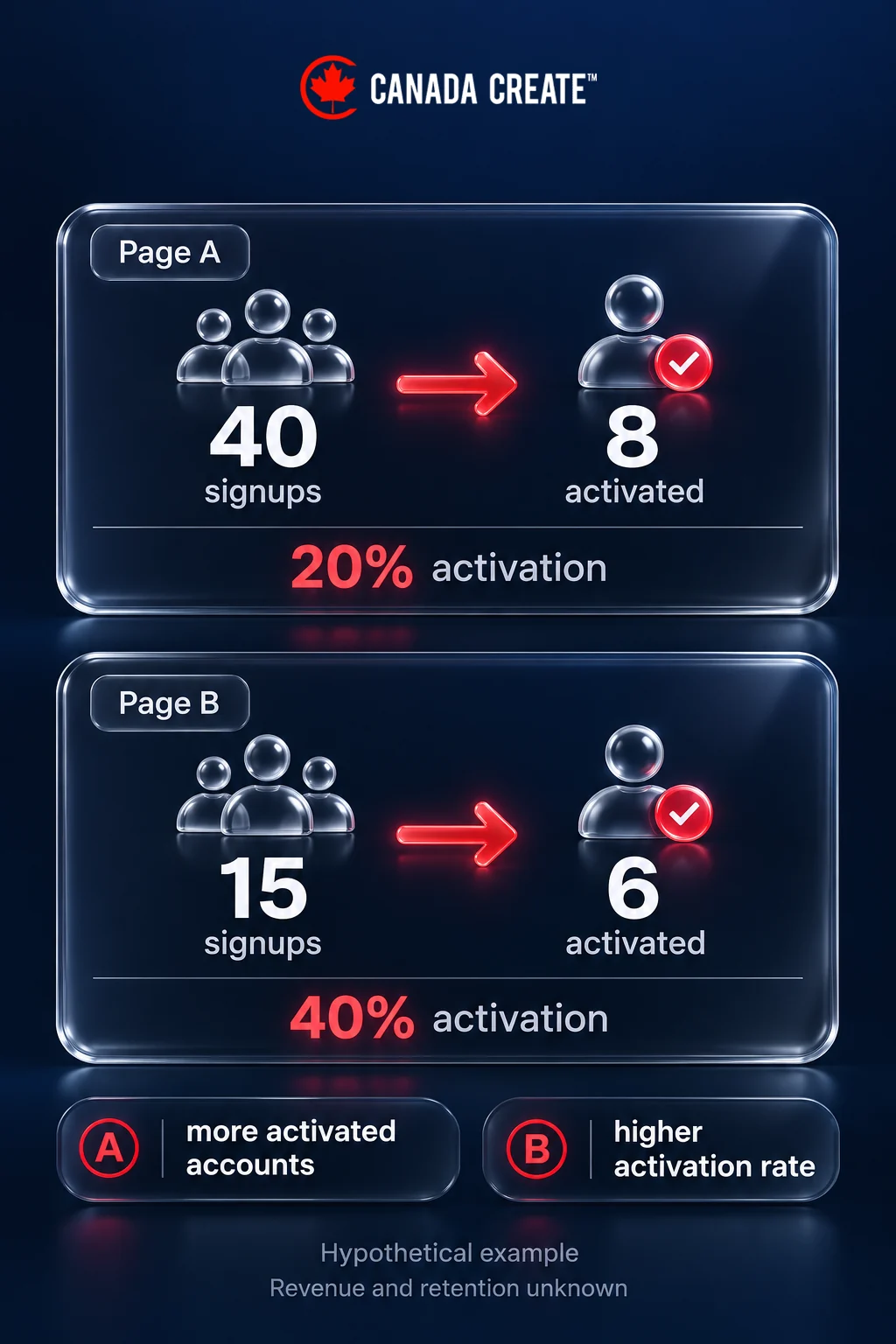
Compare cohorts with enough time to reach the outcome. Recent enterprise leads should not be judged against older leads that have completed a long sales cycle. Show counts alongside rates, make small samples obvious, and keep branded and non-branded acquisition separate where the available data supports it.
Report sourced pipeline separately from influenced pipeline. A page can support an existing opportunity without originating it. Avoid adding both totals as if they were independent revenue. Where attribution is incomplete, record the gap and combine the available quantitative evidence with sales feedback rather than assigning certainty to an unknown source.
Turn findings into a decision
- Relevant impressions, few visits: Check whether the title and page proposition match the observed queries before changing the topic.
- Visits, few suitable signups: Review intent, product fit, the offer and whether essential limitations are clear.
- Signups, weak activation: Investigate onboarding, integration friction and mismatch between the page’s promise and the product experience.
- Qualified opportunities, few wins: Ask sales about pricing, implementation, procurement and competitive objections. More articles may not address the obstacle.
- Useful customer traffic: Evaluate the documentation’s support purpose separately from new-customer acquisition.
Build an execution queue the team can finish
First, inventory the current product, comparison, integration, help and blog pages. Assign a purpose, product owner and next action to each. Fix broken high-value paths and unsupported statements before commissioning a large batch of new content.
Next, choose one buyer problem and complete its connected page set. Have the product owner verify capabilities, an editor check clarity and evidence, and the measurement owner test the intended event. Publish only after the page and its next step work together.
Finally, review the page set after there is enough observation time for its intended outcome. Continue when it attracts suitable users and resolves their questions. Change the approach when the evidence points to the wrong audience or an incomplete product path. Keep a record of the decision so the next review can test what changed.
For help planning that work, see our SaaS SEO agency service. For the wider acquisition plan, read the SaaS marketing playbook and how B2B SEO works for long sales cycles.
Frequently asked questions
What is SaaS SEO?
SaaS SEO connects software buyers and users with relevant product pages, practical guides, comparisons, integrations and documentation. Its value should be assessed against qualified demand and product use.
Which SaaS pages generate the most pipeline?
There is no universal winning page type. Compare use-case, comparison, integration and other page cohorts using qualified opportunities or activated accounts, with enough time for the buying cycle.
How should a comparison page be prepared?
Define the buying scenario, compare equivalent plans, retain dated evidence, explain limitations and review changes. Escalate disputed claims or rights questions to a qualified adviser.
Should SaaS companies build integration pages?
Build them for supported connections when you can explain the workflow, prerequisites, data movement, limits, support and setup. Do not present a planned connection as available.
Is programmatic SEO a good idea for SaaS?
It can suit a maintained library of distinct useful records. Test a small set, require complete product evidence and stop expansion when pages duplicate existing answers.
How does AI search affect SaaS SEO?
Clear, verifiable product information remains useful. Google says its AI features do not require special additional optimizations, but that does not guarantee visibility in Google or other assistants.
How should SaaS SEO be measured?
Track suitable signups and activation for self-serve products, or qualified leads and opportunities for sales-led products. Separate sourced from influenced pipeline and report attribution gaps.
Do SaaS SEO agency keyword prices predict software acquisition costs?
No. Searches for an agency describe a different market from searches for your software. Assess your own audience, product intent and observed acquisition economics.
Should the help centre be indexed?
Public documentation can help prospects and customers. Assess its purpose and accuracy; protect private workspaces with access controls rather than relying on search exclusion.
How often should comparison pages be updated?
Assign an owner and review date, and also review when pricing, capabilities, integrations or credible corrections change the comparison.