
App store optimization guide for Canadian apps

App store optimization (ASO) helps the right people discover an app and decide whether to install it. For a Canadian app, that means more than adding “Canada” to a title. The listing needs to match the languages people use, the places the product actually serves and the experience they will get after downloading.
A Toronto parking app, a bilingual scheduling tool and a Canada-wide grocery app need different keyword choices, screenshots and success measures. Start with the customer’s task and your actual coverage. Then improve discovery, store-page conversion and activation together. More installs are useful only when the app delivers what the listing promises.
What each store reads
Build separate metadata plans for Apple and Google. Their fields differ, and neither publishes a simple formula that guarantees a ranking. Apple describes text relevance and customer behaviour among its App Store search factors. Treat strong-ranking claims with caution when they imply a known weighting or predictable result.
| Element | Apple App Store | Google Play |
|---|---|---|
| App name | Up to 30 characters; make the brand and purpose understandable | Up to 30 characters; one localized name per language |
| Subtitle or short description | Subtitle: up to 30 characters to explain the app’s value | Short description: up to 80 characters to communicate the main benefit |
| Keyword field | Up to 100 characters; comma-separated terms without unnecessary repetition | No separate equivalent keyword field; write relevant, natural listing text |
| Long description | Explain features, use cases and purchase requirements clearly | Up to 4,000 characters; describe the product accurately without keyword stuffing |
| Screenshots and preview video | Show the real experience and the reason to try it | Use accurate screenshots and supported promotional assets |
| Ratings and reviews | Public feedback supports trust; investigate recurring product problems | Public feedback supports trust; avoid manipulated or incentivized reviews |
We plan, design and build web and mobile apps for Canadian businesses.
Check the current Apple product-page guidance and Google Play listing requirements before submission. Character limits are ceilings, not targets. A shorter, specific explanation is better than filling every field with near-identical phrases.
Canadian storefronts and language are different decisions
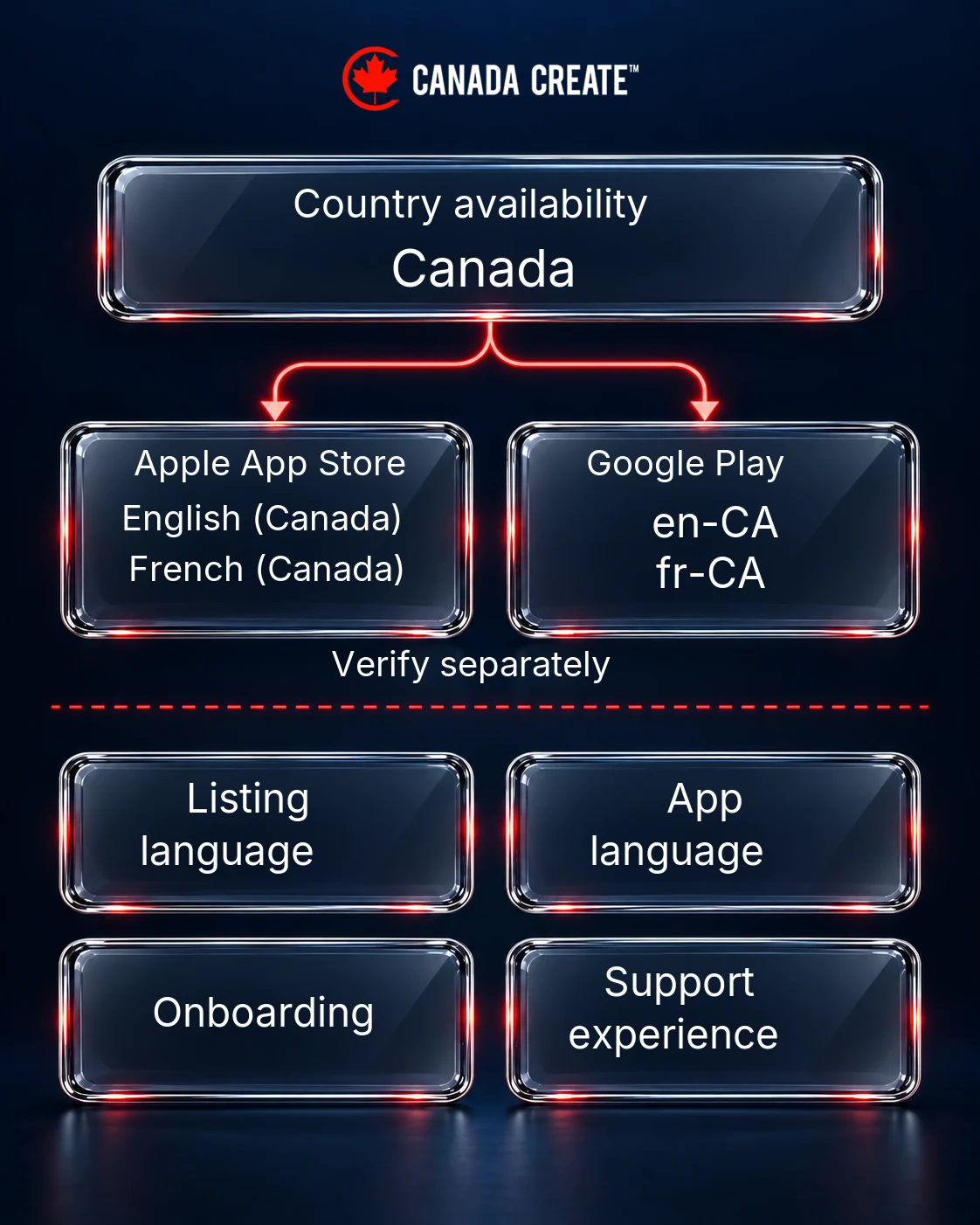
Apple lists English (Canada) and French (Canada) for the Canadian storefront. What a person sees also depends on their device settings, available localizations and the app’s primary language. Use the supported storefront localizations rather than assuming every Canadian customer sees the same page.
Google Play supports English (Canada), en-CA, and French (Canada), fr-CA, in its listing translations. Country availability and language preference are separate. A Canada-targeted custom store listing can carry relevant local messaging, but its translations still need to be supplied; choosing Canada does not automatically create bilingual copy.
Do not equate French with Quebec alone. Canadian Heritage’s 2021 Census-based language tables show French-speaking communities across provinces, including New Brunswick and Ontario. Use this as audience context, not as a forecast of demand for your app. Your own customer interviews, support requests and acquisition data should determine localization priorities.
Translate the journey, not just the headline. Check the description, screenshot captions, onboarding, important error messages, purchase explanations and support route. Apple distinguishes store metadata localization from app-binary localization. A French listing does not make an English-only product French. If support or features differ by language or region, explain the limits accurately before download.
Keyword research for apps
Start with what a person is trying to do: find parking, plan meals, track mileage or book a class. Build separate English and French candidate lists rather than translating a finished English keyword set word for word. Have a Canadian French speaker review meaning, terminology and natural phrasing in context.
- Define the available product. List supported cities or provinces, languages, device types and essential features. Exclude phrases that imply unavailable coverage or functions.
- Collect customer language. Review support questions, onboarding interviews and existing reviews. Record the problem people describe and the outcome they want.
- Inspect the right store. Review relevant search suggestions and competing listings using the intended Canadian storefront and language settings. Record the date and context; an observed result is not a search-volume estimate.
- Group by intent. Separate brand searches, category terms, specific tasks and genuinely relevant geographic terms. Compare the apps returned for each phrase with the job your product actually performs.
- Choose and measure. Prioritize relevance and a credible product fit. Save the old metadata, record the release date and compare like-for-like reporting periods after the change.
Illustrative Canadian keyword starting points
The examples below are research prompts, not measured keywords, volume estimates or ranking recommendations. Validate the wording and actual product fit before using them.
- A parking app serving Montréal: explore “Montréal parking” and “stationnement Montréal”. Check whether people need parking discovery, payment or reservation; those are different promises.
- A grocery-planning app with Canadian coverage: explore “grocery list” and “liste d’épicerie”. Add “Canada” only if Canadian features or coverage matter to the searcher; do not force it into every field.
- A Canadian mileage-tracking app: explore “mileage tracker” and “suivi du kilométrage”. Show kilometres in relevant screenshots. Do not imply tax-authority approval or guaranteed deductibility because the app can export a driving log.
- A local activity-booking app: investigate the relevant activity and city together. A Vancouver-only service should not present itself as available throughout Canada.
Keep a keyword worksheet with language, task, geography, supporting customer evidence, observed competing results and the proposed field. Leave demand marked “unverified” where you have no store-specific evidence. Google web-search volumes and advertising cost-per-click figures are not App Store or Google Play search demand, install costs or proof of a Canadian ASO opportunity.
Screenshots that convert
Think of the screenshot sequence as a short product demonstration. The first image should make the core task obvious; subsequent images should answer practical questions that could prevent someone from installing. Use real screens from the current release, not features that are still on the roadmap.
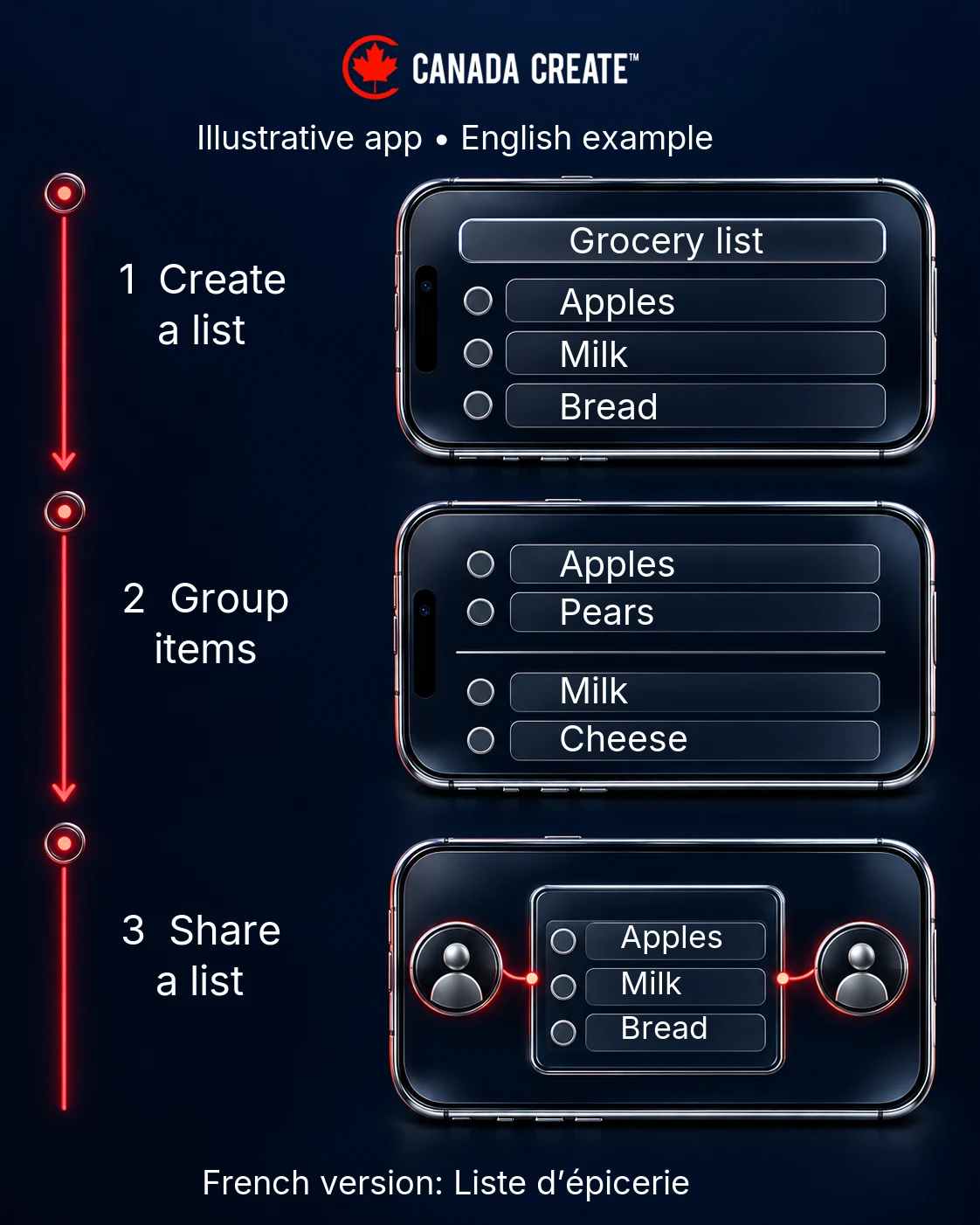
For an illustrative Canadian grocery app, the sequence could show building a weekly list, grouping items and sharing the list with a household. Show Canadian prices or retailer coverage only if the product genuinely supplies them. A maple leaf does less work than an accurate screen showing how the app solves the customer’s problem.
- Localize the whole image. Match captions and visible interface text. Check accented characters, line wrapping and whether the French caption still reads comfortably on a small screen.
- Use realistic Canadian details. Where applicable, use CAD, kilometres, Celsius and supported place names. Check date formats for ambiguity. These details must match the actual app settings.
- Explain limits early. If an important feature requires a subscription, account or supported service area, do not let the screenshot sequence imply unrestricted access.
- Make the benefit readable. Prefer one clear idea per screenshot, adequate contrast and short captions. Inspect at the size customers actually see rather than only on a designer’s monitor.
- Use video when motion helps. A concise demonstration can clarify an unfamiliar workflow, but test whether it improves the listing rather than assuming video always wins.
Before release, walk through the English and French versions on relevant devices with a reviewer who understands the audience. Check the first-launch language, permission explanations, empty states, purchase screens and support links. A persuasive localized listing followed by broken onboarding is an acquisition problem, not a copywriting success.
Ratings and reviews
Use the stores’ official in-app review mechanisms at an appropriate moment after a meaningful task, without interrupting it. Apple’s ratings and review guidance recommends considerate timing and accessible support. Never buy reviews, offer rewards for ratings or pressure people to leave positive feedback. Google explicitly prohibits manipulated and incentivized ratings.
For Canada, read feedback by language and relevant service area where the data supports it. A complaint about missing Montréal coverage needs a different response from a French checkout error or an Android crash. Assign each recurring issue an owner, reproduce it and record whether a release resolves it. Reply in the customer’s language when your team can do so accurately, and move account-specific troubleshooting to a private support channel.
Reviews can also reveal misleading listing copy. If users repeatedly expect offline access, a free feature or a province you do not support, correct the promise as well as reviewing the product opportunity. Do not conceal a limitation with a more polished screenshot.
Testing and iteration
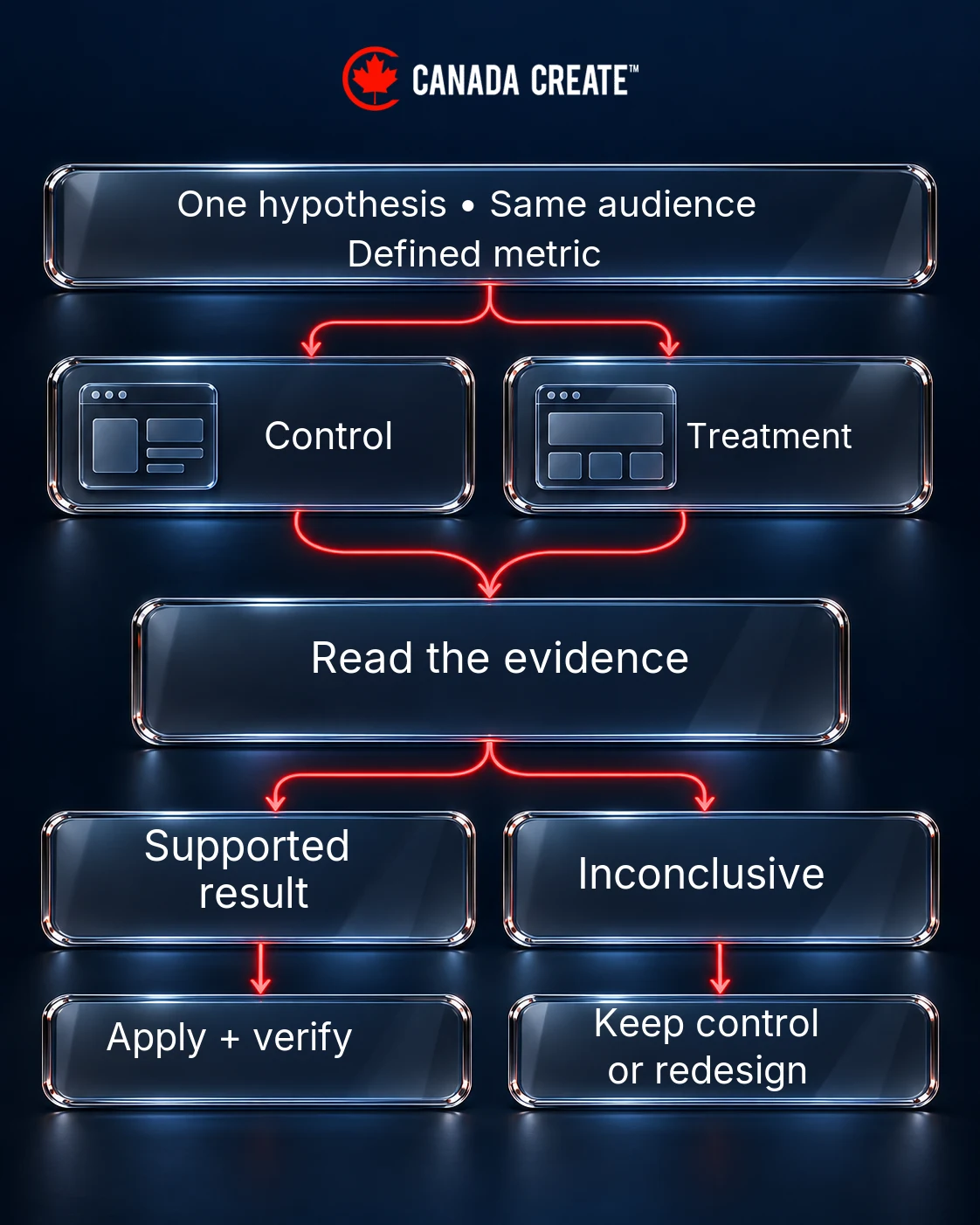
Test a specific decision. For example: “For French-language visitors, showing the shared-list workflow first will communicate the main benefit more clearly than showing the settings screen.” That is a usable creative hypothesis. “Make the listing more Canadian” is too vague to evaluate.
Apple’s product page optimization setup guidance covers icon, screenshot and preview treatments, including localized assets. Google’s store listing experiments support graphics and, for localized experiments, descriptions. Confirm the available fields and eligibility in the live console before planning a test; a metadata edit is not automatically a randomized experiment.
- Save a baseline. Archive the listing, assets, release version, dates and relevant acquisition figures before changing anything.
- Choose the audience. Record storefront or country targeting, language, devices and traffic allocation. A language test can include people outside Canada; do not label its result Canada-only without supporting targeting or reporting.
- Change one important idea. Test a lead screenshot or benefit message without simultaneously replacing the icon, pricing and onboarding. Otherwise, identifying the cause becomes difficult.
- Define the decision in advance. Choose the store’s supported primary metric and a practical success criterion. Record activation or retention as separate downstream checks when they can be measured responsibly.
- Read uncertainty. Use the platform’s confidence and result reporting. Small differences in a small audience are not proof. If the result remains inconclusive, retain the control or redesign the test rather than announcing a winner.
- Verify the applied treatment. Check the live listing in each intended language and monitor whether the product experience still matches the promise.
A reusable test record
Copy this record into your team’s working document before launching each experiment. Filling the gaps is part of deciding whether the test is ready.
| Decision | Your record |
|---|---|
| Audience and scope | Store: ___; country targeting: ___; language: ___; device scope: ___ |
| Hypothesis and evidence | Changing ___ should improve ___ because customers currently ___ |
| Control and treatment | Baseline asset/version: ___; exact change: ___; other releases or campaigns: ___ |
| Measurement | Primary metric and denominator: ___; downstream check: ___; observation window: ___ |
| Decision and accountability | Platform result: ___; limitations: ___; apply, retain or redesign: ___; owner and date: ___ |
A Canadian measurement scorecard
Keep the question, population and denominator visible in every report. For each store, record the reporting period, Canada filter where available, listing language or treatment where available, traffic source and app version. Do not invent a country-by-language breakdown that the console does not provide.
- Discovery: relevant store impressions, search traffic or listing visitors, using that store’s definitions.
- Conversion: the store’s reported install or download conversion measure. Document whether its denominator is impressions, visitors or another defined population.
- Activation: new users who complete the core task, such as creating and sharing a first list. Define the event and observation window before comparing cohorts.
- Retention: whether the same acquisition cohort returns after a defined period. Keep cohorts mature enough for a fair comparison.
- Economics: acquisition spend and downstream value, with currency and attribution assumptions stated explicitly.
Google documents country, traffic-source and acquisition fields in its store-performance exports. Use the actual report definitions rather than treating iOS and Android conversion rates as interchangeable. Low discovery suggests a different investigation from strong traffic with weak conversion or healthy installs followed by poor activation.
ASO with paid acquisition
Apple Ads and Google App campaigns can support paid acquisition, while ASO improves the relevance and clarity of the listing people encounter. Keep paid and organic objectives separate. A campaign can bring additional visitors without proving that your unpaid search position improved.
One important reporting trap: Apple’s discovery report definition says “App Store search” includes Search Ads results. Do not relabel the entire search bucket organic. Reconcile store reporting with campaign reports, their attribution windows and privacy-related limitations; simple subtraction may not produce a reliable organic total.
For a Canadian campaign, record the spend currency and Canadian audience settings before comparing costs. As an illustrative calculation, CAD 1,000 spent to acquire 200 attributed installs is CAD 5 per install. If 40 of that same cohort meet a predefined retention condition, the cost is CAD 25 per retained user. Those are example calculations, not Canada Create results or market benchmarks.
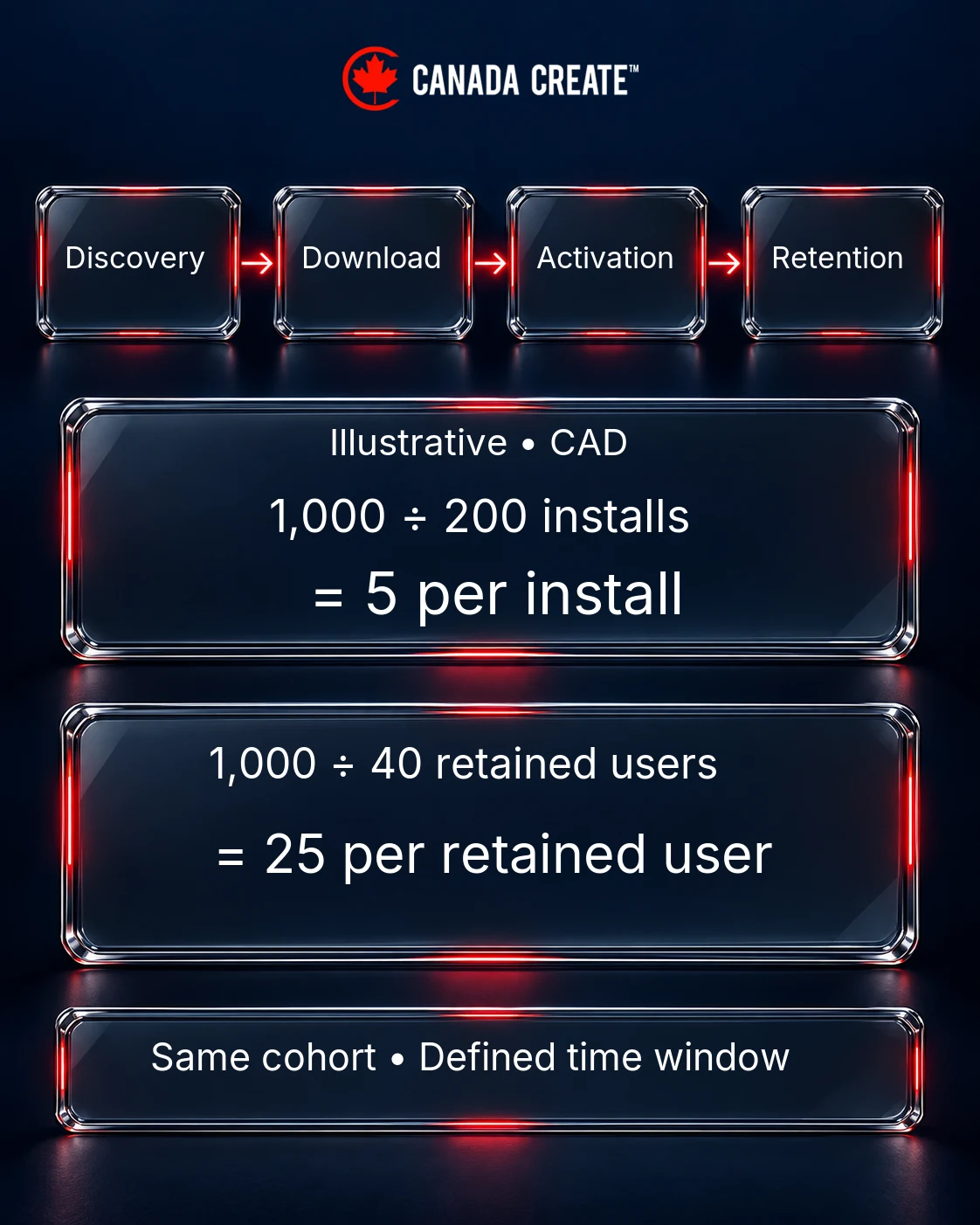
Compare cohorts on the same basis. A lower cost per install is not necessarily better if fewer people activate, stay or purchase. When English and French audiences differ in scale, avoid shifting all budget to the larger group before checking whether the localized product experience and measurement are comparable. Respect platform privacy frameworks and avoid promising perfect user-level attribution.
Beyond the store
Give the app a useful website with accurate feature explanations, current coverage, support information and direct store links. If you publish English and French pages, keep them aligned with the corresponding product experience. Press coverage, relevant community partnerships and helpful web content can introduce the app to people who are not searching in a store yet. See the SaaS SEO guide.
A practical first-month plan
- Week 1: audit both listings and the actual app; confirm Canadian coverage, language support, baseline reporting and the most important customer task.
- Week 2: prepare evidence-led English and French metadata, have a qualified reviewer check the French, and build accurate screenshot sequences.
- Week 3: complete device and language QA, submit the necessary updates and start one eligible experiment once the listing is ready.
- Week 4: review available evidence and support feedback. Apply a supported winner or keep collecting data. A calendar deadline does not make an underpowered test conclusive.
The useful output is a repeatable process: a clear Canadian audience, truthful bilingual product communication where supported, a documented test and a measurement trail connecting discovery to real use.
Building or growing an app? See our app store optimization, mobile app development, mobile app design and MVP development services.
Frequently asked questions
What is app store optimization?
Improving an app's store listing so it ranks for relevant searches and converts more visitors into installs.
What matters most for App Store rankings?
Apple describes text relevance and customer behaviour among its search factors. It does not publish a simple weighting formula or guarantee rankings.
Does Google Play have a keyword field?
No separate keyword field is provided. Use accurate, relevant language in the app name and descriptions without keyword stuffing.
How important are screenshots?
Very. Lead with the clearest benefit and test screenshot variants against your own conversion results.
Can I offer rewards for app reviews?
No. Both stores prohibit incentivized ratings and reviews.
Should Canadian apps localize into French?
Plan Canadian French localization around the audience you serve, including French-speaking users outside Quebec. Match the listing to the actual app, onboarding and support experience.
Can I A/B test my store listing?
Yes, for eligible listings and supported assets. Confirm the live console’s options, use a clear hypothesis and respect confidence reporting before declaring a winner.
Do paid installs help organic ranking?
Paid campaigns buy advertising exposure, not an organic ranking guarantee. Measure paid and organic acquisition separately and compare cost per retained user.
How much does ASO cost?
It depends on scope, markets and languages. We define the work through discovery and provide a custom written proposal.
How often should I update my listing?
Review it with every major release and test changes regularly.